
AI powered enhanced search arrives in the Affiliate.com API

AI powered enhanced search is now an operator choice for the Any field in the Affiliate.com API. Teams that have long used Any with the like operator can switch to enhanced to add an AI understanding and ranking layer that interprets intent and surfaces the most likely product first. All core controls remain, normalization across more than thirty networks, brand and barcode indexes, price and availability fields, deduplication, merchant and network filters, and layered filters.
Use enhanced when a query reflects consumer language, contains misspellings, or is intentionally broad. The AI layer expands synonyms, resolves brand intent, and orders results so canonical matches lead, followed by near matches and accessories. Keep like for strict substring matching when that is the goal.
What changed
- A new operator named enhanced is available for the Any field. Selecting enhanced routes the query through AI understanding and ranking.
- Results favor canonical product matches, then near matches, then accessories.
- All existing controls still work, currency, brand, barcode or GTIN or UPC or MPN, discount, availability, merchant and network, deduplication, limit, sort, and export.
Why it matters for operators
Teams waste cycles triaging cases and bundles when they really meant a specific model. Enhanced reduces that cleanup so you can move straight to building Comparison Sets, applying cross currency checks, or validating stock and discount logic. In practice, this shifts work from fix the query to shape the set.
Mini workflows
Example 1, Airpod intent to the right products
Before: Any like airpod can flood results with cases and decorative accessories from mass merchants.
Now: Switch the operator to enhanced. The same query prioritizes Apple AirPods and AirPods Max across merchants and color variants, then trails into accessories.
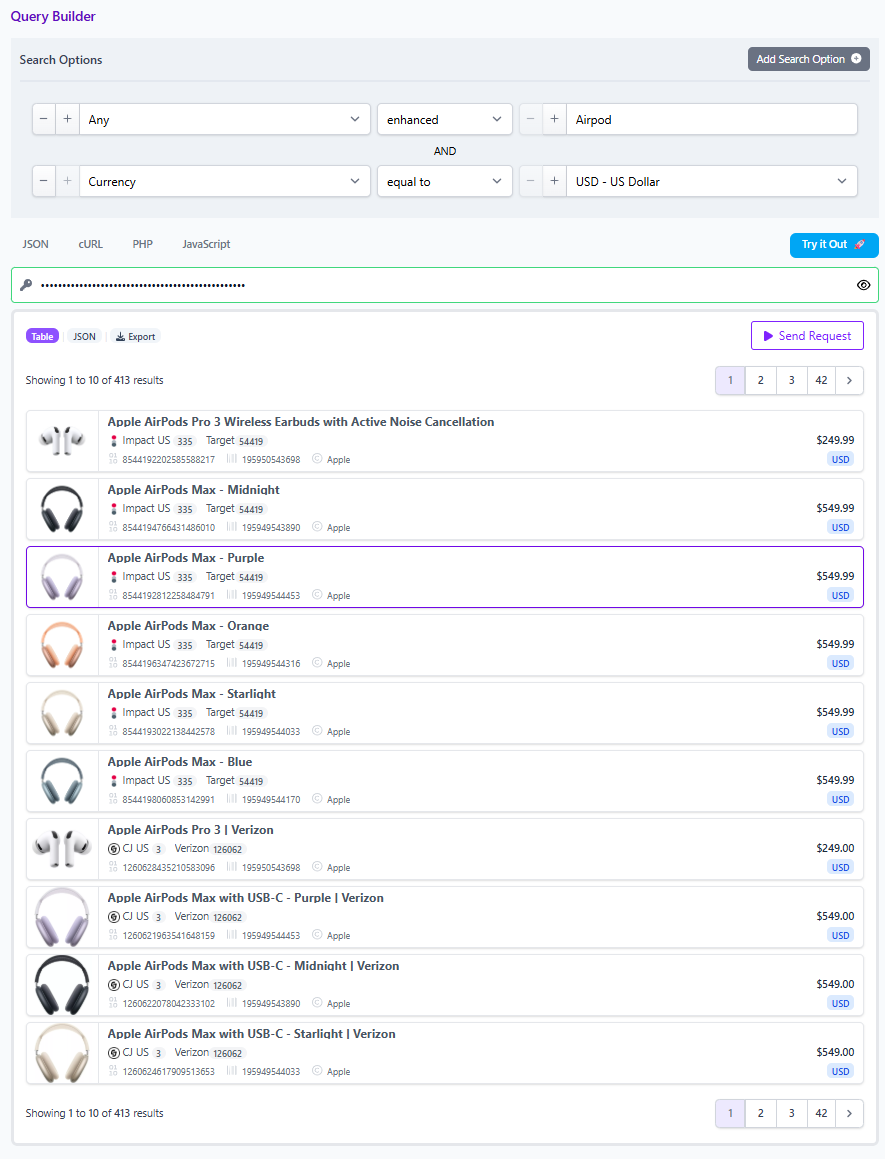
You can lock precision with layered filters:
{
  "search": [
    { "field": "Any", "operator": "enhanced", "value": "airpod" },
    { "field": "Currency", "operator": "equal", "value": "USD" },
    { "field": "Brand", "operator": "equal", "value": "Apple" }
  ],
  "deduplication": "on",
  "sort": { "field": "Final Price", "direction": "asc" },
  "limit": 50
}
What to expect, colorways such as Midnight, Starlight, Blue, Purple, and more from multiple programs including large retailers, with normalized Regular Price and Final Price and a clear currency tag. Accessories still appear, but after core models.
Example 2, Apple as a broad query
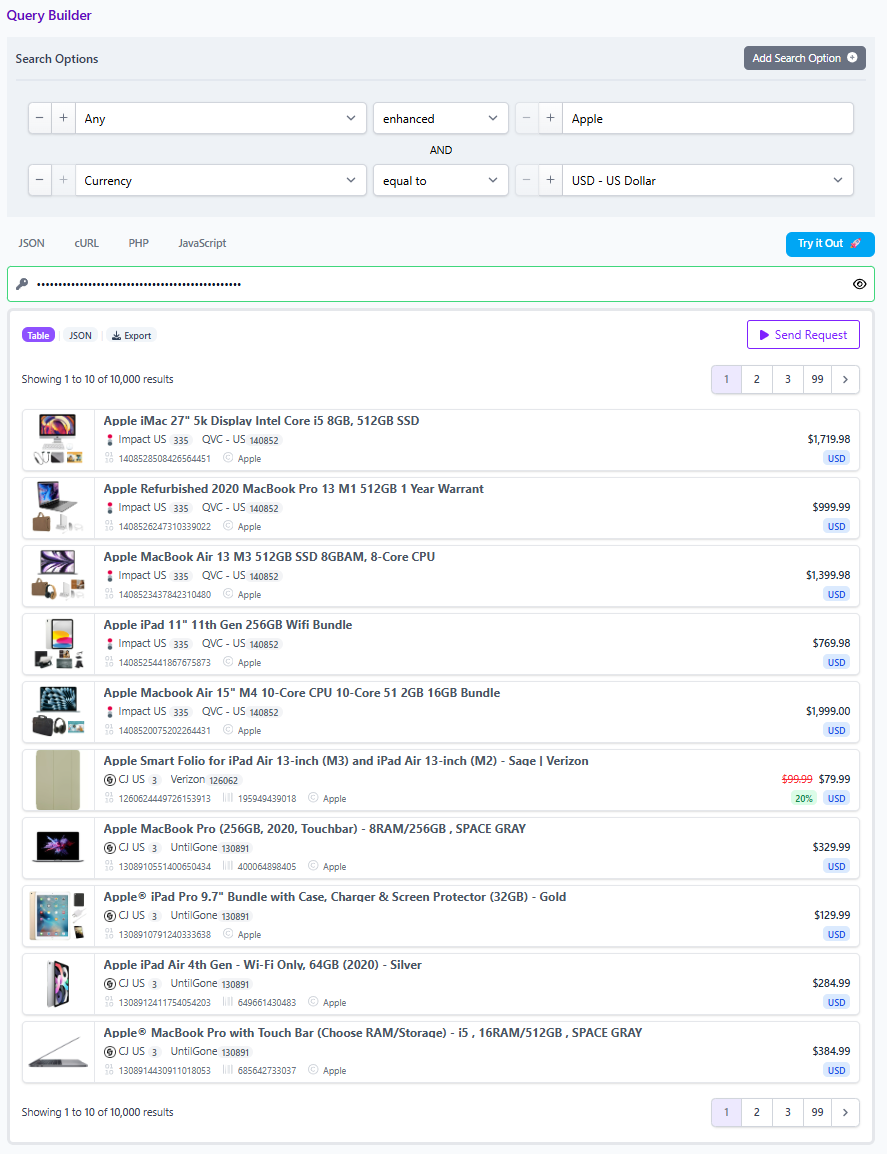
Before: Any like apple could bury you in every item with the word apple in a title or description.
Now: Any enhanced apple treats Apple as a brand concept and prioritizes canonical Apple products. Shape the intent in one pass:
{
  "search": [
    { "field": "Any", "operator": "enhanced", "value": "apple" },
    { "field": "Brand", "operator": "equal", "value": "Apple" },
    { "field": "Availability", "operator": "equal", "value": "In Stock" }
  ],
  "network_filter": ["Partnerize", "Impact"],
  "limit": 100
}
Add Category or Model if your taxonomy is in play, then export the JSON or save as a Comparison Set for your merchandiser.
Example 3, Misspell and still land on target
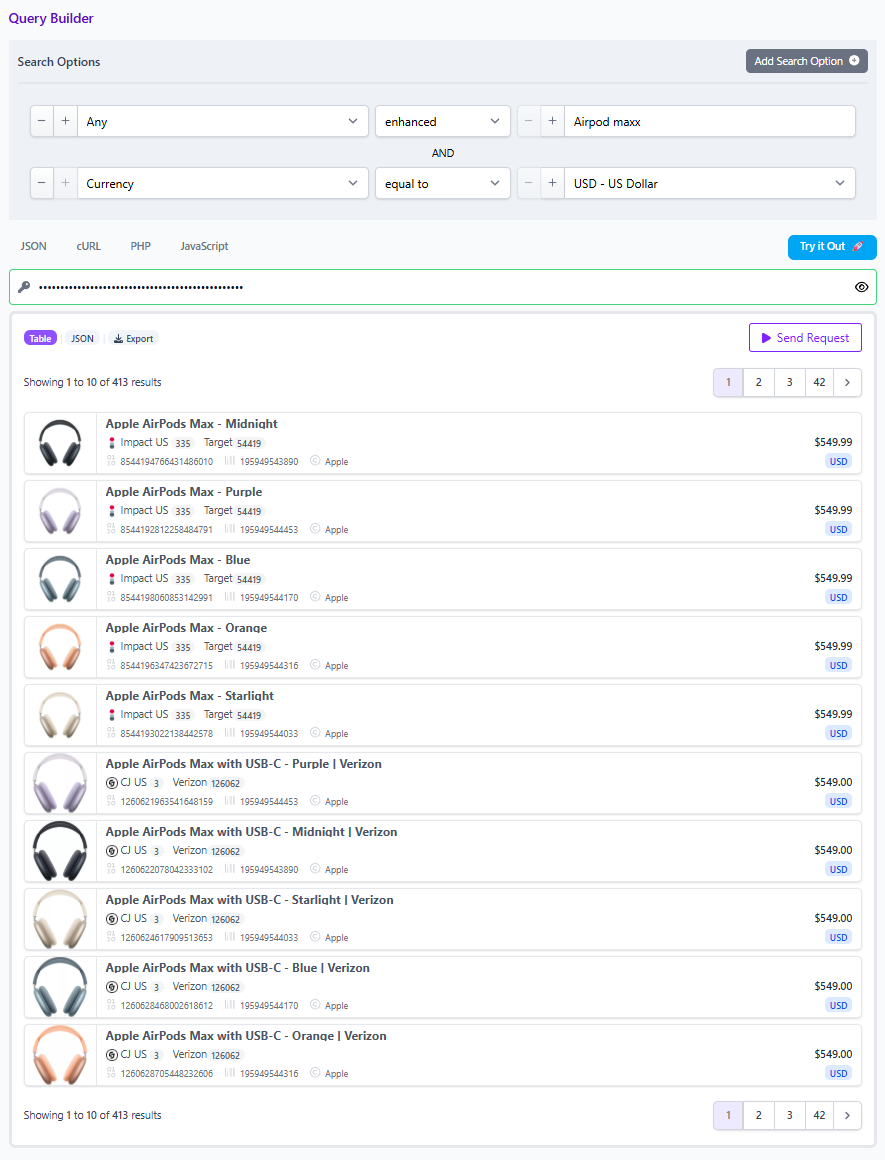
Before: Any like airpods pro maxx often missed the exact model or ranked it below noise.
Now: Any enhanced airpods pro maxx normalizes common spelling drift and returns the likely target first. Precision is still in your hands:
{
  "search": [
    { "field": "Any", "operator": "enhanced", "value": "airpods pro maxx" },
    { "field": "Barcode", "operator": "equal", "value": "195949544033" }
  ],
  "deduplication": "off",
  "limit": 10
}
Use barcode or MPN when you want zero ambiguity. Keep deduplication off if you want to compare pricing across merchants for the same item.
Field coverage that makes AI useful
The search layer is only as good as the fields it can act on. Affiliate.com indexes brand, barcode or GTIN or UPC or MPN, currency, on sale flags and discount percent, regular and final price, availability and stock, merchant and network identifiers, URLs and images, and more. That lets AI understanding hand off to deterministic filters, so your team can mix intent and control without rewriting the query three times.
Practical guidance
- Start broad with Any using the enhanced operator. Then layer brand, currency, and availability to shape the set.
- Use barcode or MPN to confirm model identity before you publish.
- Keep a currency filter on when you plan cross currency comparisons later.
- Toggle deduplication on for one representative offer per product, off to analyze price dispersion across merchants.
What stays the same
This update does not change governance or export flows. You can still filter by merchant or network, share a link to a saved query or to a Comparison Set, and drive the same downstream workflows in content or pricing operations.
Try it in the Query Builder
Open the Query Builder. Choose Any, then in the operator menu select enhanced. Add Currency equal USD and optionally Brand equal Apple. Click Try it Out, review the ranked set, then export JSON or save the Comparison Set for your team.