
Barcode Search (SKU, MPN, ID, and Barcode): Verify Product Identity Before You Compare Prices Across Merchants

In affiliate content, the fastest way to lose trust is to recommend the right product category but the wrong exact item. A reader clicks expecting the 40 oz tumbler in matte black, lands on a 30 oz gloss version, then bounces. That mismatch usually starts upstream, when teams rely on titles and keywords instead of identifiers.
Barcode search is the simplest antidote. A product barcode, such as UPC, EAN, GTIN, or ISBN, is a universal identifier that can confirm two listings from different sources are the same product, even when titles differ. Affiliate.com is designed for this kind of work, normalizing product data across more than 30 networks, thousands of merchants, and a catalog that reaches into the billions of products, so you can match, filter, and compare with structured fields instead of guesswork.
Why identifiers beat titles in real affiliate workflows
Product titles are marketing copy. One merchant writes the brand official name, another stuffs keywords, a third truncates the model. The result is search noise and accidental lookalikes. Inconsistent titles and missing attributes make it hard to tell when two listings are actually the same product.
Identifiers are different. They are meant to be stable.
What each identifier is good for
Barcode (UPC, EAN, GTIN, ISBN): the cross merchant truth signal. It can verify that two listings from different networks refer to the same product, and it is the cleanest starting point for matching across sellers.
SKU and MPN: precision within a merchant context. They are useful when you know the exact model in a specific store, or you need to differentiate close variants. SKUs and MPNs act as a precise way to identify a specific product from a specific merchant.
ASIN: Amazon specific. It is powerful when your starting point is Amazon, but it is not guaranteed to carry a barcode. Affiliate.com supports using ASIN or barcode style identifiers to find the same product at other merchants.
The practical method: start with identity, then compare offers
A good barcode workflow has three moves: anchor identity, expand across merchants, then rank offers with pricing and availability fields.
Step 1: Anchor on the strongest identifier you have
If you already know the exact product you want to promote, start with that single item and plug in the most specific identifier, ideally a barcode. A cleaner starting point yields better matches, and barcode style identifiers cut through naming differences so you see true matches rather than close enough results.
If you do not have the barcode yet:
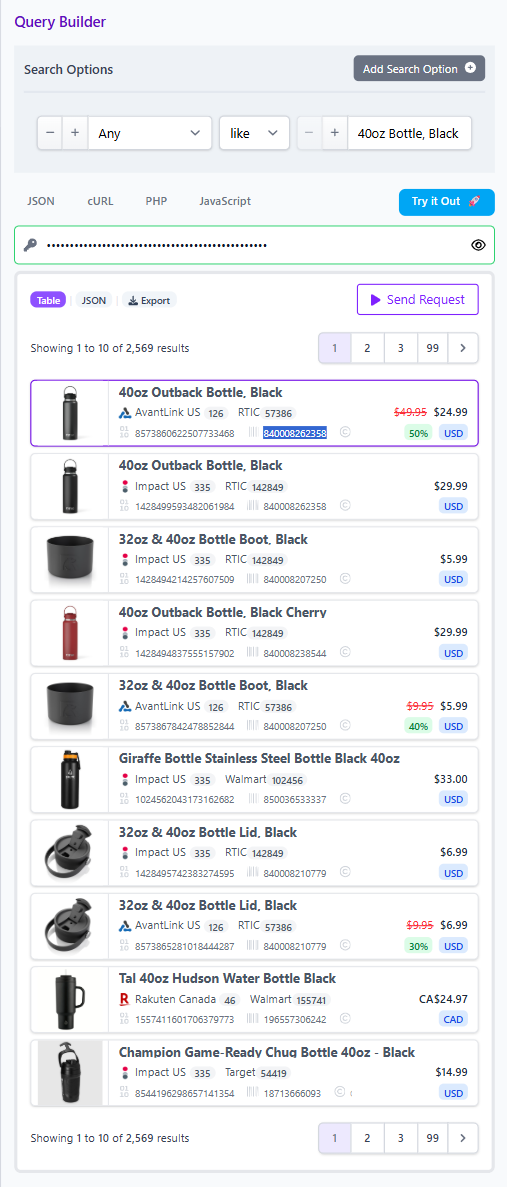
• Start with Any or Name to locate the product record
• Use Brand plus SKU or MPN to narrow quickly
• Capture the barcode once you see it, then use barcode for cross merchant matching
Step 2: Expand across networks and merchants, on purpose
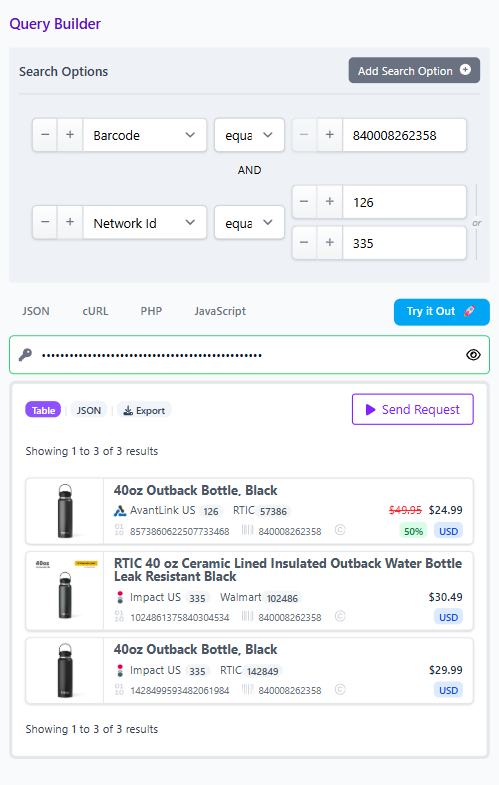
Once you have the barcode, search across the dataset to pull every merchant listing for that product, regardless of how it is titled. That is the point of normalized data: one product identity, many offers.
Then apply partner governance with filters:
• Network Name or Network ID if you only want specific affiliate networks
• Merchant Name or Merchant ID if you only want merchants you already work with, or want to stay inside an approval list
This is where product and ops teams can protect the business without slowing down editorial.
Step 3: Compare offers using the fields readers actually feel
Identity gets you the right product. Offer quality gets you the click and the conversion.
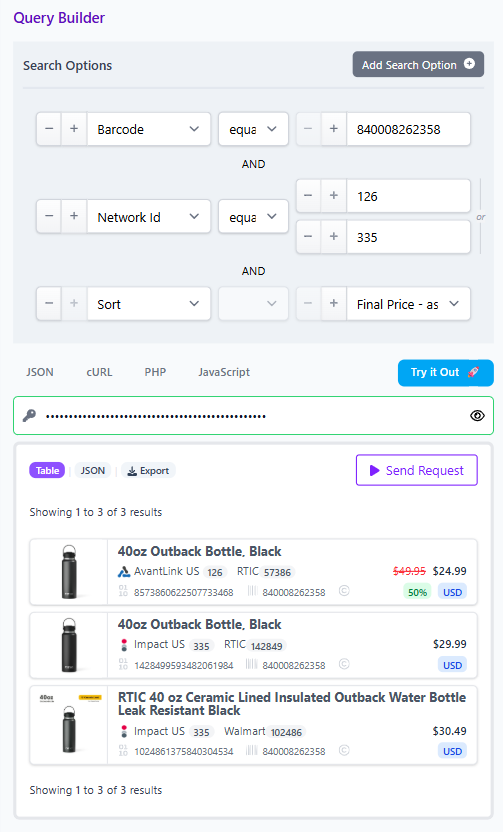
Affiliate.com distinguishes regular price, final price, and discount, and explains why final price is what the customer pays after discounts. That is the safest basis for ranking and highlighting deals.
A simple, defensible offer ranking rubric:
• Filter In Stock true, or Availability when you need a broader signal
• Sort by Final Price ascending
• Use Discount to set a minimum threshold when you are building a deals page
• Use Currency to keep comparisons apples to apples, or to support cross currency comparisons when you intentionally allow multiple currencies
Reminder for trust: pricing and availability can change after publishing. Use the Query Builder to verify before you ship, and encourage readers to confirm on the merchant page at click time.
When to deduplicate, and when not to
Deduplication is a display control that changes how your pages feel.
With deduplication on, identical offers are clustered and one representative record is shown, which is ideal for clean lists and top picks. With deduplication off, you see all matching variants and offers, which is better for comparison experiences where multiple sellers matter.
A quick decision rule:
• Building a best of list: deduplicate on
• Building a price comparison box: deduplicate off
• Building a product set tied to one barcode: deduplicate off until you pick the offer you want to feature, then optionally deduplicate for the final display
A worked example you can copy into your process
Scenario: you are updating a roundup and want the exact same water bottle across multiple merchants, then pick the best in stock offer.
- Find the barcode
• Search Any or Name for the product
• Confirm Brand, then capture the Barcode field - Run a barcode search
• Barcode equals the captured value
• Optionally filter to your approved Merchant IDs - Filter and rank
• In Stock true
• Currency set to your target
• Sort by Final Price
• Optional discount filter if the page is deal focused - Choose presentation
• Deduplication off if you want to show multiple offers
• Deduplication on if you want one clean pick per product
CTA: build it once in Query Builder, then reuse it
If you want this to scale across a team, stop treating product selection as a one off spreadsheet exercise. Affiliate.com’s Query Builder lets you narrow results across 30+ search fields, then share the query so the same product set opens for another teammate, populated with the same filters.
Use it as your operating system:
• Build a barcode based query for your top products
• Save and share it as a repeatable artifact
• Reopen it before seasonal updates to refresh selections, then publish with confidence
That is how barcode search turns from a neat trick into a durable editorial advantage.