
Build assistant ready product search with identifiers first queries and affiliate network controls

AI shopping assistants live or die on the quality of their product data. A Product Data API gives teams a consistent way to search, normalize, and compare items across many merchants and networks without guesswork. The result is faster product search, cleaner identifiers, and displays that users trust.
In practice that means working from ground truth fields first, then layering filters that serve the intent of the page or conversation. This piece shows how to use identifiers, normalization, and deduplication to power reliable AI shopping results at scale.
Why clean identifiers change AI assistant quality
Identifiers are the connective tissue of retail search. A barcode or ASIN is an objective anchor that lets your assistant match identical products across merchants, even when titles differ.
Without them, the assistant drifts into fuzzy search that inflates results and erodes trust. With them, you can collapse duplicates into a single canonical item and present a clear set of offers for that one product.
The essential fields for a network integrated product data API
Connect affiliate networks and map IDs so your assistant only searches approved, commissionable programs. In Affiliate.com you authenticate each partner network, pick the programs you have joined, and map them to Network Name and Network ID so they appear as filterable fields beside Merchant Name and Merchant ID. Enable Commissionable Status and link fields like Commission URL and Direct URL, set a presentation currency for cross currency comparison, and keep a simple allow list of Network IDs and Merchant IDs.
- IDs: ID, Barcode, SKU, MPN, ASIN
- Merchant and network: Merchant ID, Merchant Name, Network Name, Network ID
- Pricing and sale state: Currency, Regular Price, Final Price, Sale Price, Sale Discount, Ship Price
- Inventory visibility: In Stock, Stock Quantity, Availability, Commissionable Status
- Descriptive attributes: Brand, Category, Color, Material, Model, Size, Tags, Last Updated
- Links: Commission URL, Direct URL, Image URL
These fields let you normalize, filter, and render decisions that are auditable.
Mini workflow, exact item then best offer
Goal: find the exact Nike Pegasus 41 in men size 10, surface the best in stock price from approved merchants, and avoid duplicate variants.
- Anchor on identifiers
Query Any for “Pegasus 41” and Brand equals Nike. If you have a barcode, prefer Barcode equals 197593762955 for example. If not, layer Model when present. - Normalize and deduplicate
Turn Deduplication on to collapse near duplicates and variants that share the same identifier set. Keep the most complete record by Sort, for example by lowest Final Price or by recent Last Updated. - Constrain to approved sources
Apply Merchant ID or Network ID filters to respect your merchant mix and program rules. - Price integrity
Select Final Price, Regular Price, Sale Price, and Sale Discount fields. Compare in a single currency using Currency equals USD or your target. For currency codes. - Stock reality
Require In Stock equals true and Availability signals that indicate purchasable status. - Output for the assistant
Limit to five results, return Image URL, Name, Brand, Final Price, Currency, Commission URL or Direct URL, and Merchant Name.
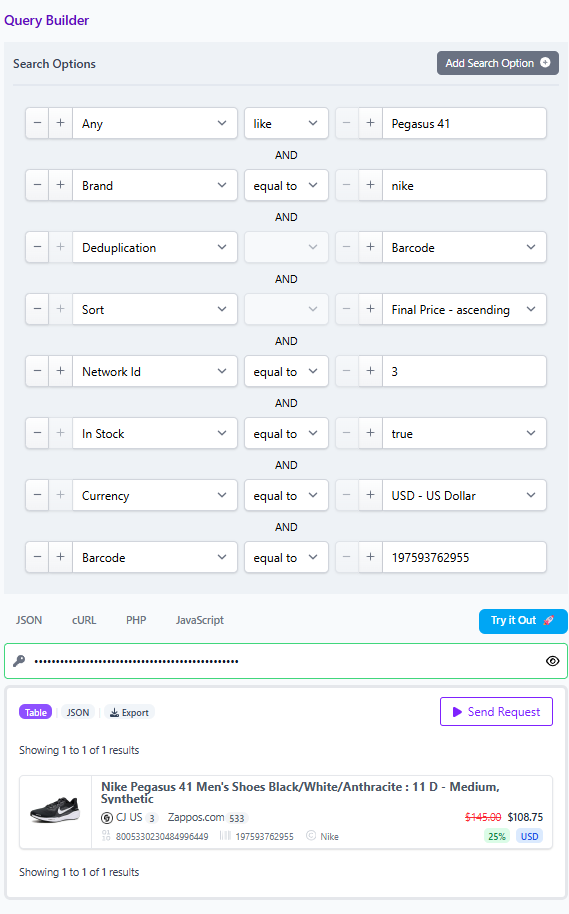
Result: one clean card per merchant, consistent currency, deduplicated variants, and no dead clicks.
Implementation checklist
- Define the default Any query scopes you will allow the assistant to use.
- Require identifiers in prompts and retrieval where available, then fall back to attributes.
- Turn on deduplication by default for consumer answers.
- Enforce network and merchant allow lists, plus Commissionable Status equals true.
- Standardize Currency and enable cross currency comparison with a single presentation currency.
- Cache shareable query links for your top five categories as Comparison Sets.
What to do next
Start with the API or the Query Builder to prototype your first Comparison Set. Build a single category experience with identifiers, deduplication on, and merchant filters applied, then expand once the pattern proves itself. Your assistant will answer faster, with cleaner matches, and your team will trust the output because the path from question to product is visible and repeatable.