
Catalog Governance for Multi Team Commerce: One Query Standard for Pages, Tools, and Internal QA

Catalog governance for multi team commerce starts with a simple question: when content, product, and ops teams search the same catalog, are they actually looking at the same product universe? In most affiliate programs, the answer is no. One editor searches by title, an analyst filters by merchant, and an ops lead reviews availability by feed source. The result is drift: duplicated products, missed offers, and inconsistent pages.
A query standard fixes that drift. Here, query standard means a shared way to define how teams search, filter, deduplicate, and verify products before those products appear on pages, in tools, or in internal review queues. That matters because product identifiers such as GTIN and MPN are foundational to consistent product recognition, and major commerce surfaces explicitly rely on them to classify products correctly.
Why governance matters in affiliate catalogs
Governance is not bureaucracy. It is the operating layer that decides whether a buying guide, a comparison module, and an internal QA check all refer to the same item in the same way.
That sounds abstract until you see the failure mode. An editor assembles a page for wireless headphones. The content looks clean, but one result is a bundle, two are the same product listed by different merchants under different titles, and one is out of stock. Nothing is technically broken, but the page is commercially weaker than it appears.
This is where normalized product data changes the job. Affiliate.com aggregates product data across more than 30 networks, tens of thousands of merchant programs, and over a billion products, then makes that catalog searchable by fields such as brand, barcode, MPN, merchant, currency, discount, availability, and more. That gives teams a shared base layer instead of a patchwork of merchant specific naming conventions.
The three layer query standard
1. Identity layer: define what counts as the same product
Start with the most stable identifier available. Barcode is usually the cleanest cross merchant key for the same physical item. MPN is useful when barcode is missing. Brand helps disambiguate MPNs and titles, which is also how large shopping systems think about unique product identification.
For Affiliate.com teams, the practical rule is simple:
- Use barcode first for exact product matching across merchants
- Use brand plus MPN when barcode is absent
- Use name or the any field only as a starting point, not as final proof of sameness
That distinction prevents a common catalog mistake: treating text similarity as product identity.
2. Selection layer: define which offers are eligible
Once identity is clear, decide which offers belong in the result set. This is where governance becomes operational.
A good eligibility rule usually layers:
- Merchant or network filters
- Currency
- In stock or availability
- Commissionable status
- Final price, regular price, or sale discount
- Deduplication on or off, depending on the page type
For a category page, you may want deduplication on so users see product variety, not five copies of the same item. For a comparison module, you may want deduplication off so multiple merchant offers remain visible. Affiliate.com supports both modes, which makes the governance choice explicit instead of accidental.
3. Publishing layer: define how the query is reused
A query standard only matters if teams can reuse it. That is why shareable query links and Comparison Sets are so useful. They turn a good search into a repeatable asset.
An editor can hand the same query to product ops for review. A data lead can open it to verify barcode coverage. A merchandising lead can adjust a merchant filter without rebuilding the logic from scratch. In practice, this is how multi team commerce stops arguing about screenshots and starts working from the same object.
A concrete workflow
Imagine a team building a page for espresso machines under a premium price band.
Start broad with the any field for “espresso machine.” Then layer brand filters for a controlled manufacturer set. Add currency to keep the page regionally coherent. Add final price above a premium threshold. Filter to in stock products only. Then switch deduplication on to review product variety, and off to inspect merchant level offer spread for the final shortlist.
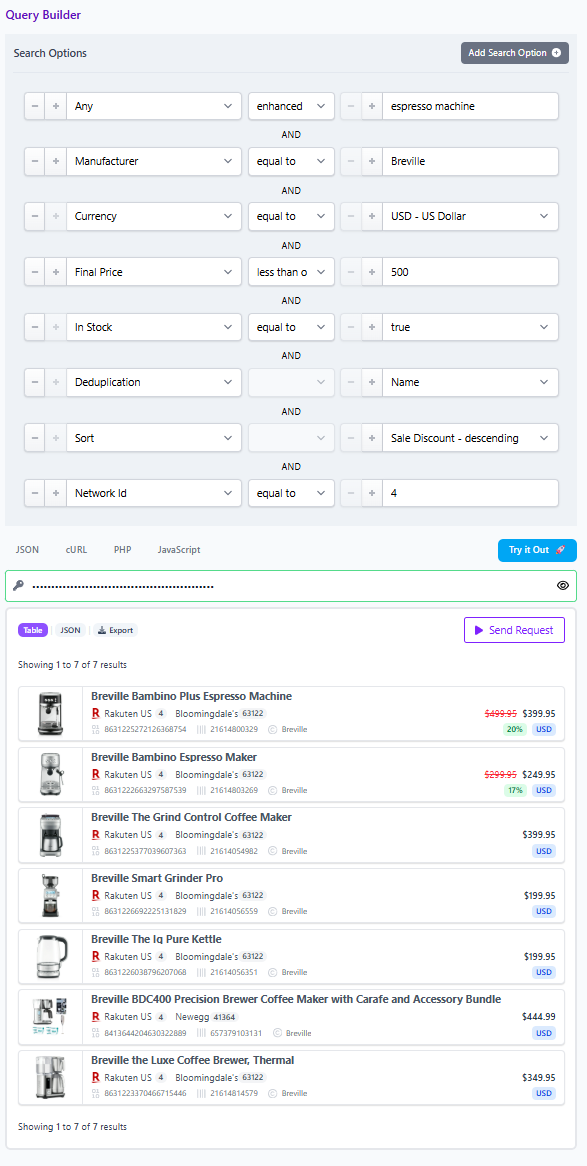
Now QA the shortlist with identifiers. For any result that looks suspiciously similar, barcode match it across merchants. If barcode is absent, check brand plus MPN. If the team also wants an Amazon benchmark, use ASIN to barcode matching to locate the same item elsewhere in the catalog without relying on title text alone.
That workflow is not flashy. It is better than flashy. It is repeatable.
What internal QA should actually check
Internal QA is strongest when it verifies query logic, not just page appearance.
Use this checklist:
- Identity: Is the item confirmed by barcode, or by brand plus MPN when barcode is missing?
- Scope: Are merchant and network filters aligned with the intended partner set?
- Availability: Are out of stock products excluded where they should be?
- Pricing integrity: Are regular price, final price, and discount fields being used consistently?
- Display logic: Is deduplication set correctly for discovery versus comparison use cases?
- Reusability: Has the approved query been saved or shared so other teams can inspect the same logic?
The strategic payoff
Governance often sounds slow until you compare it with the alternative. Gartner has reported that poor data quality costs organizations at least $12.9 million annually on average, and has also warned that many governance efforts fail because they never become operational. In commerce, operational governance means the rules live inside the query itself.
That is the real value of a query standard. It gives content teams cleaner pages, gives ops teams faster QA, and gives product teams a shared language for how the catalog should behave.
If you want to put this into practice, start in Affiliate.com’s Query Builder or API with one page template, define the identity and eligibility rules, save the query, and make that saved query the standard every team reviews first. Verify the current results in the live UI before publishing, especially when pricing or availability matters.