
Commissionable product links: when to use tracked URLs versus direct landers on deal pages

Commissionable product links are the difference between a pretty deal page and a measurable affiliate outcome. In plain terms, a commissionable link is a click destination that preserves affiliate attribution, while a direct lander is the merchant page URL that prioritizes speed and clarity for the shopper.
Most teams get tripped up because they treat link choice as a publishing detail. It is actually a product decision that affects conversion flow, tracking integrity, and how confidently you can scale content across merchants and networks.
What Affiliate.com gives you for link routing decisions
Affiliate.com aggregates normalized product data across more than 30 networks, thousands of merchants, and over a billion products, which matters because link behavior varies by source.
In the dataset, URL fields include a commissionable product URL, a direct URL, and an image URL. That trio is enough to support most marketing use cases without inventing extra machinery.
Definitions marketers can align on
Commissionable link
A commissionable link is the click destination you use when attribution must be preserved. It is the safe default for affiliate content because it aligns the shopper click with the tracking path. Affiliate.com notes that product results can generate trackable, commissionable affiliate links using your affiliate IDs.
Direct lander
A direct lander is the merchant page URL. Use it when the primary goal is friction reduction or when you are routing inside an owned experience where tracking is handled elsewhere, but treat it as a deliberate exception, not the default.
Why normalization and identifiers matter here
If you cannot reliably tell whether two listings are the same product, you cannot route consistently. Affiliate.com uses normalization plus identifiers like barcode to match identical products across merchants even when naming differs.
When to choose a commissionable link on a deal page
Use it when you need clean attribution across many merchants
If your deal page mixes merchants, the commissionable link is how you keep routing consistent while you test offers. Affiliate.com supports filtering by merchant and network so you can define the partner set, then route clicks in a standard way.
Use it when you are comparing offers for the same product
Offer comparisons are only credible when the product is identical, the pricing fields are comparable, and the click path is consistent. Barcode matching is built for this: one product, multiple merchants, then compare final price, discount, and availability.
Use it when your team needs repeatable governance
Marketing teams change, contractors rotate, and deal pages get copied. The easiest way to reduce mistakes is to standardize on the commissionable link wherever possible, then make direct landers an explicitly documented exception.
When direct landers are the right call
Use direct landers for speed in tightly controlled flows
If you are running a single merchant campaign and the destination must land on a specific product detail page fast, direct landers can reduce hops. This is most defensible when the merchant, product, and campaign are fixed, and you have a separate measurement plan.
Use direct landers when the story is the merchant experience
Sometimes the content promise is about the retailer, like exclusive bundles or a curated storefront. In those cases, the direct page can be the narrative, but you should still validate availability and pricing fields before you send traffic.
A practical workflow for deal pages that mix pricing, stock, and routing
Step 1, anchor product identity
Start with a strong identifier, ideally a barcode, so you are comparing true matches rather than lookalikes. Affiliate.com calls out barcodes as the cleanest way to cut through naming differences across merchants.
If you are working within one merchant, SKU or MPN can be more precise for that merchant’s catalog.
Step 2, pull offers across merchants, then decide how to display duplicates
If your deal page should show one unified product with multiple buying options, use deduplication on Direct URL to consolidate repeated listings. If your page is explicitly an offer comparison, keep deduplication off so each offer stays visible.
Step 3, layer pricing and inventory filters before you publish
Use pricing fields that Affiliate.com defines clearly: regular price is the typical price reference, final price is what the customer pays today after discounts, and discount is calculated from those two fields.
Then layer inventory fields so you do not recommend dead inventory. Affiliate.com highlights that availability and stock info help you confirm whether a product is in stock before promoting it.
A deal page filter stack that works in practice usually includes
- Currency to keep comparisons consistent across markets
- Final price ceiling to match shopper budgets
- Discount threshold to surface meaningful deals
- In stock true to avoid churn
Step 4, choose the click destination rule
Now you decide routing, and it should be boring
- Default to the commissionable product link for anything you want attributed
- Use the direct lander only when the campaign demands a specific merchant page experience
You can also keep the product image URL separate so creative teams can build consistent cards without touching the click destination logic.
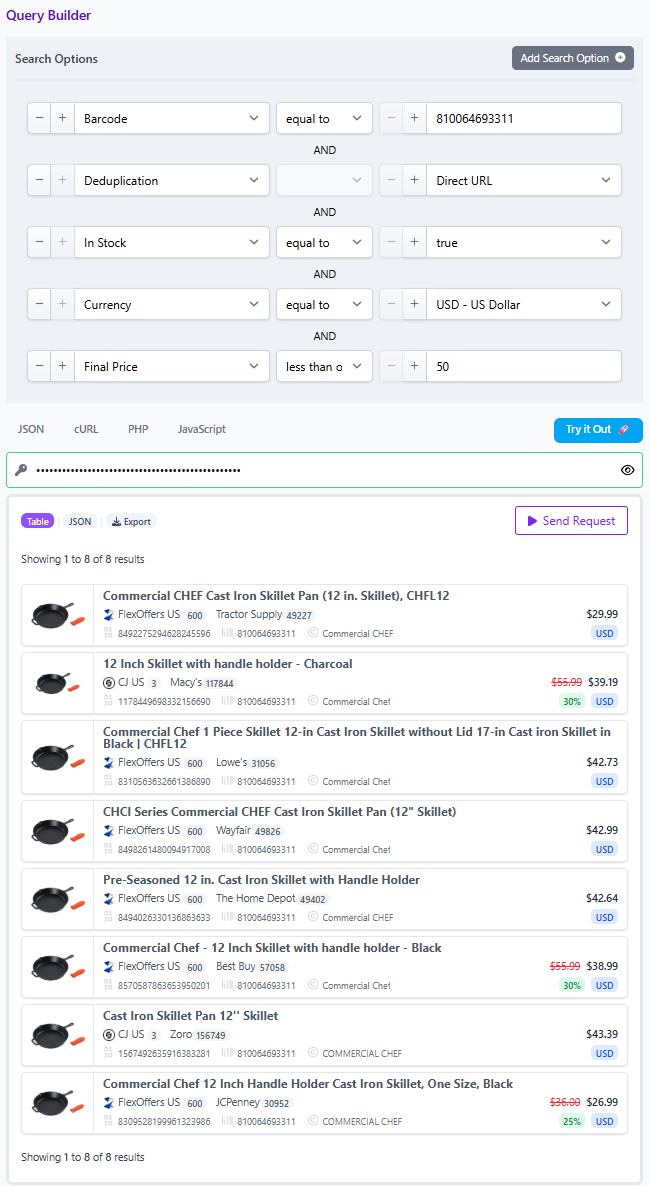
Applied example: a campaign safe deal card that routes correctly
Scenario: You are promoting a branded hero product across multiple merchants, but only want offers that are discounted and available.
- Search by barcode to match the identical product across merchants.
- Layer Brand to keep results anchored to the right manufacturer. Affiliate.com notes brand data is normalized, so you avoid name variation issues.
- Filter to In stock true, then set Currency and a minimum Discount.
- Add Merchant Name or Merchant ID filters to stay inside your approved set.
- Route clicks using the commissionable product link as the default destination, and reserve direct landers for the few cases where your landing page must be fixed.
Build the rule once, then share it
The fastest way to align marketing, ops, and product on routing is to build the query in Affiliate.com’s visual Query Builder, then share the query so everyone reviews the same constraints. Affiliate.com explicitly supports sharing a query link that opens and populates with the specified products, which makes link governance a repeatable process instead of a Slack argument.
As always, avoid price guarantees and encourage teams to verify key offers in the live destination experience, since pricing and availability refresh over time.