
Compare Regular Price vs Final Price via API: A Simple Way to Surface True Deals Across Merchants


Comparing regular price and final price via API is the cleanest way to separate promotional fluff from actual savings. In normalized affiliate data, regular price is the reference price, and final price is what the shopper would pay today after discounts or coupons. Get this comparison right and you highlight real deals across merchants without guesswork, even when titles or descriptions diverge.
At Affiliate.com, where product data spans more than thirty networks, tens of thousands of merchants, and over a billion products, consistent identifiers and fields are the difference between noisy lists and decisive comparisons. When those fields are normalized, you can deduplicate, barcode match, and layer filters to turn a jumble of feeds into ranked offers for the exact same product.
Definitions that matter
Regular price: The merchant stated reference price, often MSRP or the crossed out base.
Final price: The price a shopper would pay now after applied promotions or discounts.
Discount: The computed difference between regular price and final price, expressed as currency or percent. These three pricing fields are indexed and searchable alongside merchant, network, currency, inventory, and identifiers such as barcode, SKU, MPN, and ASIN.
Why normalization and identifiers are non negotiable
Merchants name the same item differently, and bundles can look like single units at a glance. Barcode level matching connects identical listings, which lets you compare final price to regular price on the same physical product across multiple merchants with confidence. Then you can choose to keep deduplication off to show all offers, or turn it on to present one unified product record.
A quick anecdote from last quarter: a team flagged a thirty percent off headline on a popular coffee maker. Final price looked compelling at first glance. Barcode matching revealed that Merchant A included grinder filters in a bundle, while Merchant B sold the base model. Regular price to final price comparisons only made sense after we grouped identical barcodes, then evaluated discount within each exact SKU.
A simple workflow in the Query Builder
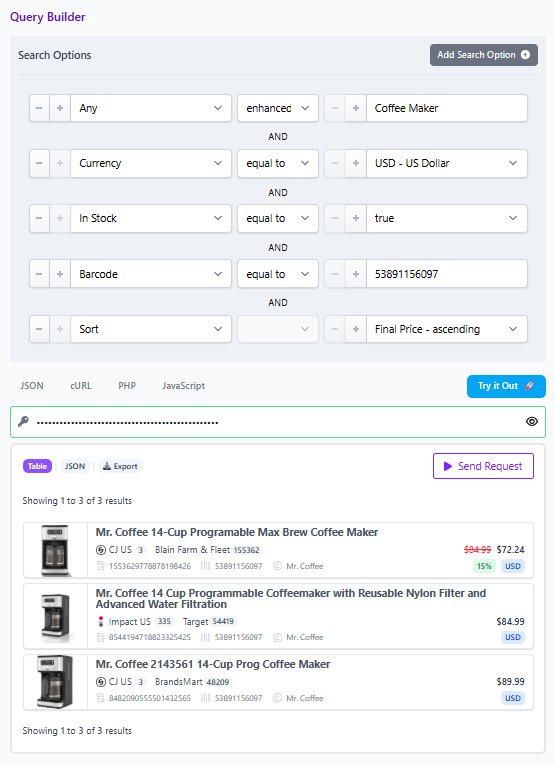
- Start broad with the any field, then layer filters. Search Any Enhanced for our best results then search Coffee Maker, set currency to USD, and set in stock to true.
- Tighten the set with a brand filter if relevant, or jump straight to a barcode if you have it for product level precision.
- Turn deduplication off to surface every merchant offer for the same product. Keep it on only if you want a clean list per product.
- Add price filters. On sale equals true, then sort by highest discount or lowest final price. This isolates true deals based on the delta between regular price and final price.
- Use merchant or network filters to restrict results to programs you approve or want to feature.
- Share a Comparison Set link for collaboration, so editorial and partnerships can review the exact query and results.
API concept, language agnostic
{"page":1,
"per_page":10,
"sort_by":"final_price","sort_order":"asc",
"networks":{},
"search":[{"field":"any","value":"Coffee Maker","operator":"enhanced"},{"field":"currency","value":"USD","operator":"="},{"field":"in_stock","value":true,"operator":"="},{"field":"barcode","value":"53891156097",
"operator":"="}]}
This pattern uses only indexed fields, keeps deduplication off to expose multiple offers, and returns the pricing trio required for true deal logic.
Decision checklist before you publish
- Are you comparing identical products: Confirm barcode or MPN equality, not title similarity.
- Is the discount meaningful: Use a minimum percent off filter to avoid noise, for example twenty percent.
- Is the offer shoppable for your audience: Filter by network or merchant based on approval and audience trust.
- Is inventory viable: Require in stock equals true to prevent dead clicks.
- Is currency consistent: When comparing across regions, normalize by currency and keep final price comparisons within the same currency set to avoid false deltas.
Practical variations you can ship this week
- Deal led collection: On sale equals true, discount percent at least thirty, sort by discount descending, group by brand to avoid clustering from a single label.
- Single product, many merchants: Start from a barcode or an Amazon ASIN that maps to a barcode, pull all merchant offers, then sort by final price to spotlight the best live offer today.
- Price integrity guardrail: For any product set, exclude results where regular price equals final price if the page is a sale page. That keeps the story honest.
What to communicate to readers
Disclose that prices and stock change, and advise verifying in the live interface. If you link to merchants, add a short note near the first link, We may earn a commission when you buy through links in this article. Keep claims factual, focus on regular price versus final price logic, and avoid promises about live or guaranteed pricing.
Try it
Open the Query Builder, select pricing and inventory fields, and run the workflow above. Then copy a share link to circulate the Comparison Set with your team. When you are ready, promote the best offer and keep deduplication off on the comparison module so shoppers can choose their preferred merchant.