
Cross Currency Offer Strategy: How to Compare the Same Product Across Regions Without Breaking Trust


Global affiliate teams eventually hit the same wall: the product is identical, but the offers are not directly comparable because they arrive in different currencies. One listing is USD, another is GBP, another is EUR, and the temptation is to “just convert” and call it solved.
The operational reality is tougher. What you need is identity consistency first, then currency aware offer selection second. Affiliate.com’s normalized dataset, spanning more than 30 networks, 20,000 merchant programs, and over a billion products, is designed for this exact workflow, connect identical listings across regions, then present the best local options without juggling separate regional feeds.
Why cross currency comparisons fail in practice
Exchange rate conversion is not the hard part
Exchange rates are easy. The hard part is knowing you are comparing the same physical item, not a lookalike, bundle, or prior generation with a nearly identical title.
Affiliate.com’s guidance is explicit: the most reliable way to confirm two listings refer to the same physical product is a barcode, and barcode searches can surface every matching listing across multiple merchants even when titles differ.
Titles and promotions drift across regions
Even when identity is correct, pricing context varies. Promotions, “regular price” conventions, and what counts as a sale can differ by merchant. That is why you should base deal logic on normalized fields like regular price, final price, and discount, not on merchant copy. Affiliate.com describes regular price as the typical or base price, final price as what the customer pays after discounts, and discount as the calculated percentage off, which lets you filter and rank real deals with consistency.
The identity first workflow
Step 1: Anchor the product with an identifier that survives regions
Use barcode when you are comparing across merchants, networks, and regions. Barcodes are unique identifiers that can verify that two listings from different networks refer to the same product, which is exactly what you need for global offer selection.
Use SKU or MPN when you are doing merchant scoped QA, for example validating a specific listing inside a retailer catalog, or debugging why a single merchant is not returning expected results.
Step 2: Choose deduplication based on how you will present offers
Deduplication is not a cleanup toggle, it is an interface decision. Affiliate.com explains that when deduplication is enabled, matching offers are clustered and a single representative record is selected, and when it is off, all variants and offers are returned.
A reliable pattern for cross currency work:
- Deduplication on for discovery, so you see one product concept without repetition while exploring a category or brand.
- Deduplication off for offer selection, so you can see every merchant offer for the exact same product and choose the best per region.
The currency aware offer selection pattern
Step 3: Split offer selection by currency, do not blend currencies in a single ranked list
The moment you sort by final price across multiple currencies in one list, you create nonsense rankings. Instead, treat currency as a segmentation key:
- Filter to a currency, then sort within that currency.
- Repeat per currency you support.
Affiliate.com explicitly highlights that products can appear under different currencies and that normalization makes it possible to connect those listings as one product while still reflecting accurate local pricing, which is the principle your templates should enforce.
Step 4: Rank offers using normalized price and inventory fields
Within each currency segment, rank with the fields that reflect what the shopper actually pays and whether the offer is live:
- final price for cheapest offer selection
- discount for deal intensity
- in stock and availability signals to avoid dead clickouts
- commissionable status to avoid featuring offers that are not promotable
Affiliate.com’s pricing fields are designed for exactly this, filter and prioritize with regular price, final price, and discount, then use discount thresholds like 20 percent or more to highlight true deals.
Applied example: one product, best offer per region
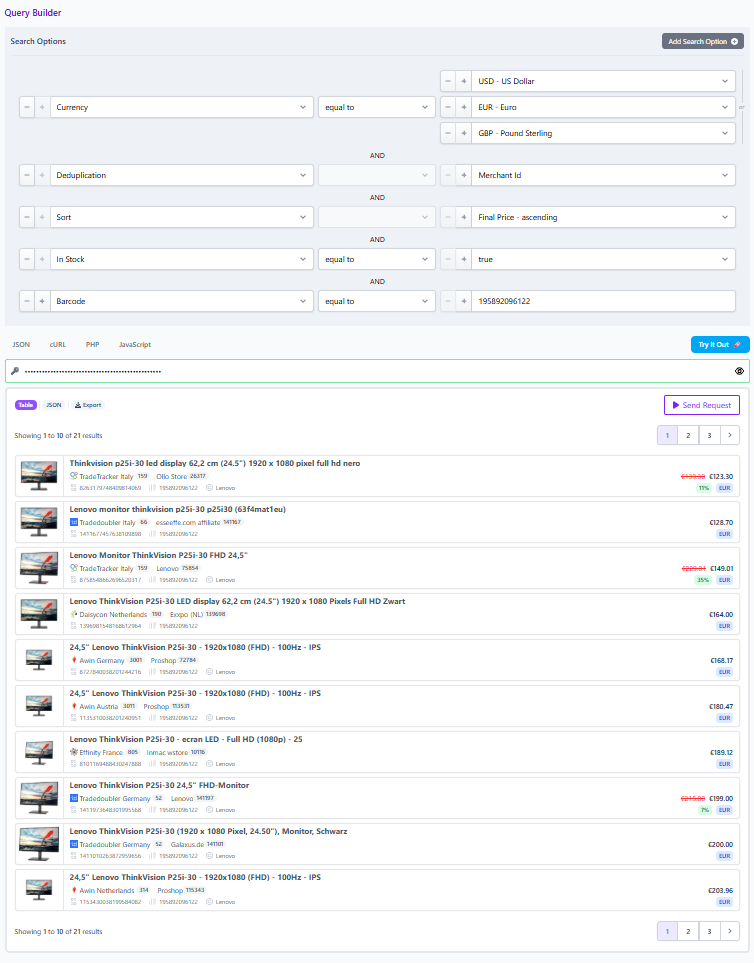
Imagine you have a single identified product, anchored by barcode, and you want to show “Best price in US, UK, EU” without confusing readers.
Build the offer set
- Query by barcode to retrieve the same product across merchants. Affiliate.com gives a concrete example of barcode search returning the exact same water bottle across multiple merchants, which is the shape you want before you segment by region or currency.
- Keep deduplication off so you see all offers and variants for that barcode, rather than one representative record.
Segment and rank
For each target currency:
- apply currency filter
- apply in stock and commissionable status filters
- sort by final price ascending, with discount as a secondary sort when the page is “deals first”
Then render a localized module that shows the best offer plus two alternates, instead of forcing a global “winner.”
Operational checklist for existing customers
- Identity: barcode for cross merchant matching, SKU or MPN for merchant scoped QA.
- Query shape: deduplication on for discovery, off for offer tables and comparisons.
- Deal math: validate “on sale” claims using regular price, final price, and discount, and apply discount thresholds to avoid weak promotions.
- Currency integrity: never sort by price across currencies in one list, segment by currency first.
- Reproducibility: save the query logic as a shared artifact your team can reopen and audit
Turn your best global query into a shared spec
Affiliate.com’s Query Builder lets you narrow results using 30 plus search fields, then share a link that reopens to the same query and populates the specified products, which is ideal for collaborating on global templates and debugging coverage gaps.
Build one reference flow for a barcode anchored product, with deduplication off, then add currency segmented offer selection. Once you can reproduce that flow in Query Builder, you have a stable blueprint to implement in your integration and a support friendly link your team can use to diagnose missing offers or unexpected merchants fast.