
Discount filters that check stock, build better deal pages shoppers trust


Discount filters are rules that show products only when the price meets your target markdown. When paired with stock checks, they keep sold out clutter off the page. This piece explains how to design discount filters that check inventory so your deal pages stay clean and credible.
Affiliate teams work across more than 30 networks and over a billion products. Without normalization, identifiers, and deduplication, the same item can appear multiple times with different titles, currencies, or prices. The result is broken trust. We will use concrete workflows based on the fields Affiliate.com makes searchable, then close with a checklist and a simple governance model.
What discount filters are, and why stock matters
A discount filter selects products where Sale Discount or the delta from Regular Price to Final Price is above a threshold. Stock checks verify In Stock or Availability is true before the product can render. Pairing both gives editors two protections: do not show weak markdowns and do not show items that are unavailable.
Three reasons this matters:
- Price integrity. You list only offers that meet your rule, for example at least 20 percent off.
- Clean UX. Sold out products never surface, so click waste drops.
- Publisher reputation. Readers learn that your deal pages mean what they say.
The fields you will actually use
Affiliate.com aggregates normalized data across networks and merchants. The key fields for this workflow include:
- Pricing: Regular Price. Final Price. Sale Price. Sale Discount. Currency.
- Inventory: In Stock. Availability.
- Identity: Barcode. ASIN. SKU. MPN. Brand.
- Merchants and networks: Merchant Name and ID. Network Name and ID.
- Basics: Name. Description. Image URL. Direct URL.
- Search controls: Limit. Sort. Deduplication. Any.
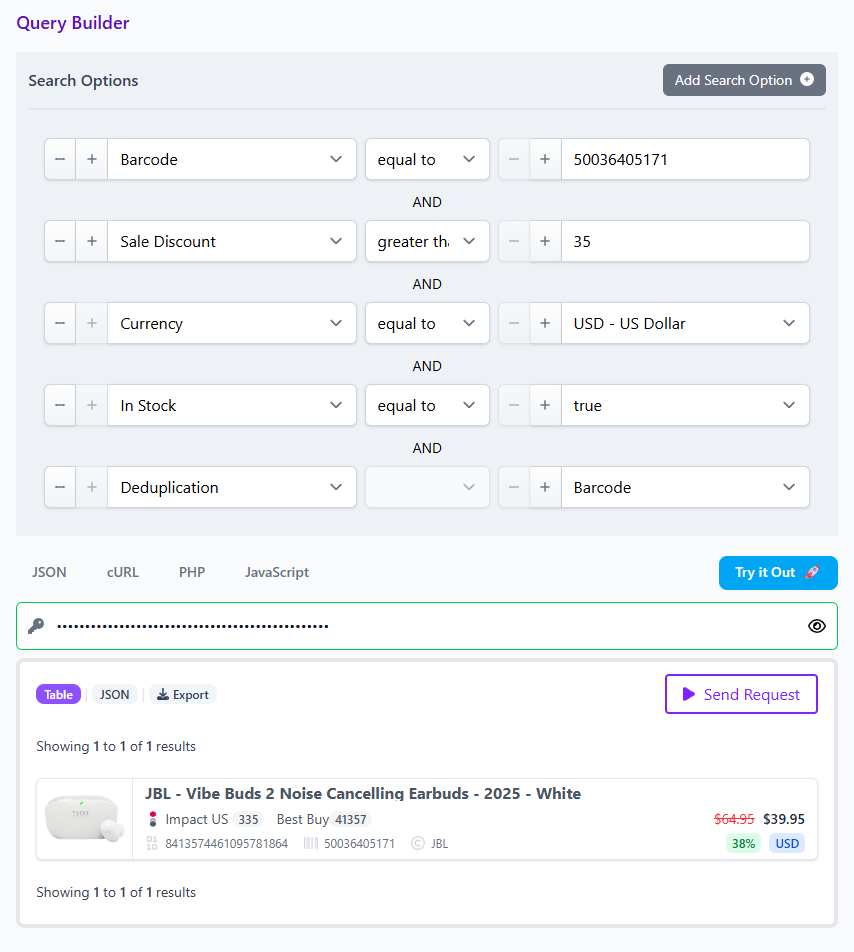
Normalization ensures cross currency math is consistent. Identifier matching across barcode, ASIN, and brand lets you deduplicate the same item across merchants even when titles differ.
A concrete workflow in the Query Builder or API
Picture an editor building a Back to School roundup. They want backpacks that are at least 25 percent off, in stock, and available from a short list of trusted merchants.
- Start broad with Any enhanced backpack and set Deduplication to on to avoid repeats of the same product.
- Layer filters:
- Any Enhanced search for the keyword "Backpacks"
- Sale Discount greater than or equal to 25.
- Deduplication by name
- In Stock equals true or Availability equals in stock.
- Sort by Sale Discount - ascending.
- Currency set to USD
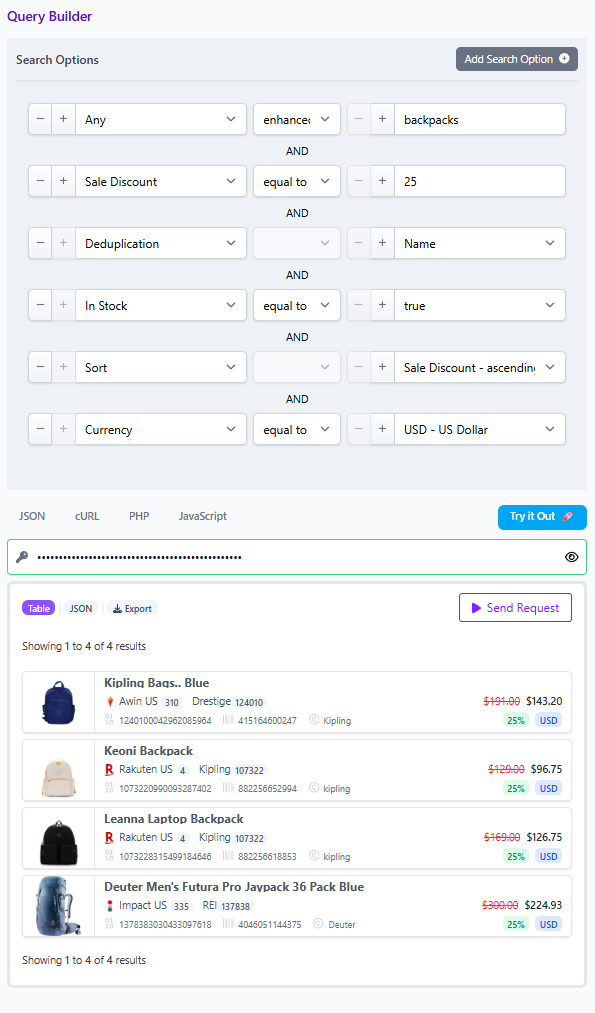
Result: your page shows only backpack SKUs that meet the markdown rule and are confirmed in stock, deduped across merchants. If a merchant goes out of stock, the item falls out automatically on refresh based on the Availability field.
Handling edge cases without engineering pain
- Mixed titles and variants: Use Barcode or ASIN with Brand to match identical products and deduplicate, even when names differ.
- Currency drift: Always filter and sort on normalized Sale Discount and Final Price, not on scraped strings.
- Fast sell through: Keep a freshness window. For example, only surface items Last Updated within the past day for campaigns with heavy traffic.
Governance you can explain to editors
Create a simple scorecard so the team knows the rules.
- Eligibility: Discount at or above X percent, Commissionable Status true, Last Updated within Y hours.
- Availability: In Stock true or Availability is in stock.
- Identity: Deduplication on, match on Barcode or ASIN with Brand to avoid duplicates.
- Mix: Merchant allow list, Network allow list, optional category or brand guardrails.
- Review: Editors spot check five items per set before publishing. If an item fails a rule, rollback by tightening the filter or removing the merchant from the set.
This governance model is easy to teach, and it travels from seasonal events to evergreen deal hubs.
Measuring quality, not just clicks
Track three signals that map to trust:
- Click to product page success rate, the share of clicks that land on an in stock product page.
- Discount validity rate, the share of items where Final Price matches the claim within your tolerance.
- Repeat click rate per cohort, a proxy for reader confidence in your deal pages.
Improvement on these three metrics often precedes revenue lift because they are closer to the user promise.
Implementation notes for data and ops teams
Keep identifiers tight. When possible, enrich products with Barcode or ASIN so deduplication works across merchants. Document your currency policy. Decide the display currency and stick with normalized math. Store Comparison Sets for marquee campaigns so merchandising and editorial stay aligned. Use the Any field to seed broad discovery, then narrow with layered filters on price, discount, stock, and attributes like Brand or Category.
Call to action
Open the Query Builder and set up your first discount plus stock filter using the fields above. Save it as a Comparison Set and share the link with your editorial lead for a quick review. If you prefer the API, mirror the same fields and rules, then validate a sample of results in the live UI before publishing.