
eCommerce MCP Is Only as Good as the Data Behind It. A Look Inside Affiliate.com's Normalized Index

Ecommerce MCP, or ecommerce use cases built around Model Context Protocol, depends on one unglamorous constraint: the agent can only reason as well as the commerce data it can retrieve. If the index behind the agent is fragmented, duplicated, or weakly identified, the output may sound confident while comparing the wrong products.
Affiliate.com’s normalized index is built for that data problem. It brings together product data across more than 30 networks, tens of thousands of merchant programs, and over a billion products, then makes that data searchable through structured fields for identity, price, inventory, merchant context, network context, URLs, and attributes.
Why Ecommerce MCP Needs a Normalized Index
Most merchant feeds are not written for machine reasoning. They are written by different merchants, across different networks, with different naming habits, price fields, attribute depth, and product identifiers.
That creates a familiar failure mode. An AI shopping assistant may see “Nike running shoe,” “Nike men’s road trainer,” and “Nike Pegasus size 11” as similar enough to compare, even when one is a different model, color, or size. Normalization gives the system a cleaner basis for deciding whether products are identical, related, or merely adjacent.
Affiliate.com’s index helps turn inconsistent merchant feed data into a searchable commerce layer, so publishers and product teams can search by brand, merchant, attributes, price, availability, discount, and identifiers rather than relying on titles alone.
The Core Question: Is This the Same Product?
For Ecommerce MCP, product identity comes before recommendation logic. Price comparison, merchant routing, substitution, and saved collections all break down if the system cannot tell whether two listings refer to the same item.
Identifiers are the strongest signal. Barcode, GTIN, UPC, ISBN, MPN, SKU, and ASIN fields help distinguish exact matches from lookalikes. Affiliate.com’s documentation and prior product examples consistently show why a barcode or similar identifier is better than a title when matching the same product across merchants.
A useful operating rule:
- Use barcode or GTIN when exact product sameness matters.
- Use MPN when model specificity matters.
- Use SKU when working inside a merchant specific context.
- Use ASIN when starting from Amazon and searching for alternate merchant listings.
- Use name or any when discovery comes before exact matching.
This order keeps the agent from mistaking similarity for sameness.
Searchable Fields Give the Agent Commercial Judgment
A strong Ecommerce MCP does not simply retrieve products. It applies commercial constraints.
Affiliate.com’s searchable fields support that work across several practical groups: product basics such as any, name, and description; identity fields such as barcode, SKU, MPN, and ASIN; pricing fields such as regular price, final price, sale price, sale discount, currency, and ship price; inventory fields such as in stock, stock quantity, and availability; merchant and network fields; URL fields; and product attributes such as brand, category, color, condition, gender, material, model, size, tags, and last updated.
That matters because the agent’s answer usually needs to do more than say “here are products.” It needs to filter for source eligibility, avoid unavailable offers, rank by price or discount, and explain why a product belongs in the result.
The Any Field Starts Discovery Without Losing Structure
Not every user query arrives neatly mapped to a product field. A shopper may ask for “best lightweight carry on for Europe,” while an editor may search for “gifts for new parents under 100.”
The any field is useful for this first pass because it searches across multiple product fields rather than forcing the query into name alone. Affiliate.com’s prior examples frame any as the broad discovery field, especially when product details may live in names, descriptions, brands, or other metadata.
For an Ecommerce MCP workflow, the pattern is:
- Start with any for the natural language request.
- Narrow with brand, category, merchant, or attribute filters.
- Layer price, discount, currency, and availability.
- Use identifiers when the result must become an exact product match.
- Decide whether deduplication should group products or expose every merchant offer.
This keeps discovery flexible without turning the result set into a loose keyword match.
Deduplication Is an Experience Decision
Deduplication is not just data cleanup. It defines what the shopper sees.
When deduplication is on, identical products can be grouped so a browsing page shows one clean product entry. When deduplication is off, separate merchant offers remain visible, which is useful for price comparison, offer tables, and merchant choice.
For Ecommerce MCP, use deduplication based on the task:
- Turn it on for category browsing, gift guides, and curated collections.
- Turn it off for exact product price comparison.
- Pair the setting with barcode, MPN, or ASIN logic when product identity matters.
The goal is not fewer results. The goal is the right product shape for the user decision.
Applied Example: From Natural Language Query to Merchant Offer Logic
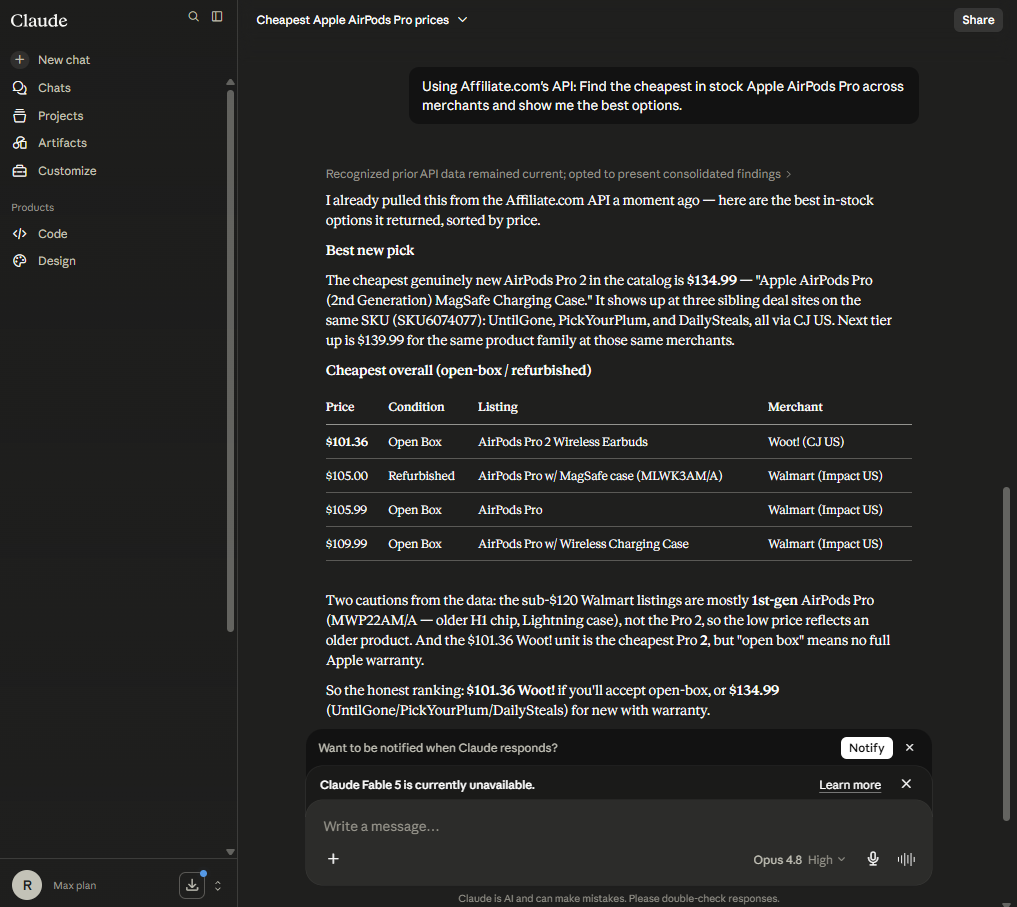
Suppose a shopper asks, “Where can I get the cheapest AirPods?” A weak system might search the name field for AirPods and return a mixed set of models, merchants, colors, and availability states.
A stronger Ecommerce MCP workflow starts broad, then becomes exact:
- Search any or name for AirPods.
- Filter brand to Apple if needed.
- Select the exact product using barcode, MPN, SKU, or ASIN.
- Filter currency to the target market.
- Require in stock or available status where provided.
- Turn deduplication off for the merchant offer table.
- Sort by final price, sale price, or sale discount based on the experience.
- Return merchant name, merchant ID, network ID, final price, availability, image URL, and commission URL.
Each layer has a job. The identifier proves product sameness. Pricing fields rank the offers. Inventory fields reduce dead ends. Merchant and network fields support source control.
Before publishing a specific price or stock claim, verify it in the live UI. Affiliate.com refreshes data from networks and merchants, but an article should not present a static snapshot as a guarantee.
Why Cross Currency Logic Matters
Global commerce adds another trap. The same product may appear in USD, GBP, EUR, CAD, or other currencies, and the agent should not blend those prices casually.
Affiliate.com supports currency filtering and normalized product matching across regions, which helps teams build localized experiences while still connecting the same product across markets.
For Ecommerce MCP, the clean approach is to treat currency as a first class filter. Compare within a market when the user asks for a local answer. Separate regions when the experience is global.
What Teams Should Test in Query Builder
Query Builder is the practical place to validate Ecommerce MCP logic before encoding it into API workflows. Teams can test the same field sequence the agent will rely on: broad search, identifier match, merchant and network filters, pricing fields, availability, sorting, and deduplication.
A good review checklist:
- Does the query find the intended product, not a lookalike?
- Does barcode, MPN, SKU, or ASIN improve match confidence?
- Does deduplication match the display goal?
- Do price and discount fields support the ranking logic?
- Do merchant and network filters reflect the team’s source rules?
Affiliate.com’s Query Builder also supports shareable query links, which helps editorial, product, and data teams review the same product selection logic before it becomes part of a live experience.
Build Ecommerce MCP on the Index, Not the Interface
The interface is what users see. The index is what determines whether the answer is trustworthy.
Affiliate.com’s normalized index gives Ecommerce MCP builders the commerce structure they need: searchable fields, exact identifiers, merchant and network controls, pricing and inventory logic, deduplication choices, Amazon identifier matching, and Comparison Set workflows. Start in the API and Query Builder, test the query logic, then let the agent operate on data that has been normalized, filtered, and governed before it reaches the shopper.