
MCP Integration for AI Shopping: Give Your Model Structured Access to Affiliate Product Data

The Model Context Protocol lets an assistant call structured tools that expose your product data through a stable interface. With MCP connected to Affiliate.com your model can search at scale, barcode match, and assemble clean merchant comparisons using the same normalized fields your operators trust.
Affiliate.com unifies product data across more than thirty networks and tens of thousands of merchant programs, covering over a billion products. Matching identical products across merchants, cross currency comparisons, and deduplication controls are built in so agents return decision ready output.
What MCP gives your assistant
MCP is an open protocol that connects assistants to external tools and data sources. When you connect the Affiliate.com MCP server, the agent gains four tool families:
- Product Search: broad discovery and precise filtering across name, description, brand, category, identifiers, price, discount, currency, availability, merchant, and network.
- Identifier Conversions: turn an ASIN or SKU or URL into a universal barcode and back again, with locale awareness for marketplaces such as Amazon.
- Merchant Lookup: browse and filter merchants, or fetch a specific merchant by id.
- Network Lookup: list networks or retrieve detailed metadata.
All tools honor limits, sort, pagination, and deduplication controls. Searchable and filterable fields include merchant id and name, network id and name, in stock and availability, stock quantity, currency, on sale, regular price and final price and discount, and core identifiers such as barcode, SKU, MPN, and ASIN, plus attributes like brand, category, color, size, material, tags, and last updated. Response payloads can also return fields such as commission url and image url for downstream linking and rendering, but those fields are not used as search criteria.
Any Like: recall first, then converge
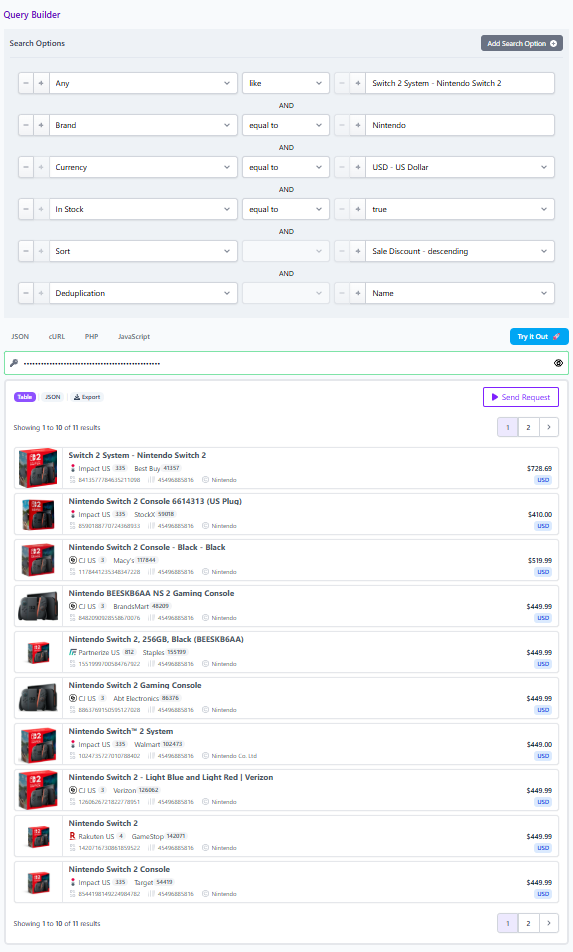
Any Like is the house pattern for AI search. Begin with the any field to capture intent across names and descriptions and attributes. Then layer precision filters such as brand, price band, currency, availability, merchant, and network. This pairing delivers strong recall without losing the ability to converge quickly to a ranked shortlist.
Example prompt to your agent
Find WH 1000XM5, use Any Like for initial recall, then filter brand equals Sony, currency equals USD, in stock equals true, sort by final price ascending, return merchant name, discount, and commission url.
Setup in practice
You can register the Affiliate.com MCP server in popular MCP clients, including the desktop app for Claude. Point the client at the Affiliate.com MCP endpoint, provide an API token, and restart the client so the tools appear in the MCP menu. For other MCP compatible clients, configure the server url and bearer token authentication.
Usage patterns that mirror production work
Product discovery to decision
- Start with Any Like on your query phrase.
- Layer brand, currency, and in stock.
- Sort by final price or by discount.
- Use duplicate_fields_to_exclude with fields like "name", "image_url", or "direct_url" to collapse identical products into a single card, or omit it for a side by side offer table showing every merchant's listing.
Identifier led exact match
- Paste an Amazon link, extract the ASIN, convert to a barcode.
- Search by barcode across all merchants with in stock equals true.
- Rank by final price and show discount and commission url.
- If you need a merchant specific sku, convert barcode to sku for a target merchant such as Walmart.
Governance aware exploration
- Add network id and merchant id filters so the agent returns only approved programs, for example scoping to Impact, CJ, etc.
Product Search details your model can rely on
Searchable fields
- Basic: name, description, brand, category
- Identifiers: sku, barcode, asin, product id
- Pricing: price, on sale, regular price, final price, discount, currency
- Availability: in stock, quantity, shipping info
- Attributes: color, size, material, gender
- Metadata: merchant, network, tags, keywords, last updated
Operators
- Equals and contains for text, comparison operators for numbers, between for ranges, is null for missing values.
- Semantic matching for discovery queries such as products comparable to premium noise cancelling headphones for travel. Use this to open the funnel, then switch to structured filters.
Facets for exploration
- Request facets for network, merchant, or final price to power filtering interfaces and quick distribution checks.
Identifier conversion limits that keep calls predictable
- ASIN conversions: up to ten asin values to barcode per request, and up to twenty barcodes to asin per request, with locale flags such as us or de or jp.
- SKU conversions: up to one hundred sku values to barcode per request, or the reverse, scoping by merchant name or domain.
- URL extraction: up to one hundred urls to barcode per request across supported merchants.
Response shape your agent can standardize on:
{
  "meta": {
    "total": 1523,
    "page": 1,
    "per_page": 10,
    "last_page": 153
  },
  "data": [
    {
      "id": "abc123",
      "name": "Product Name",
      "brand": "Brand",
      "currency": "USD",
      "regular_price": 299.99,
      "sale_price": 249.99,
      "final_price": 249.99,
      "sale_discount": 17,
      "in_stock": true,
      "availability": "in_stock",
      "merchant_id": 12345,
      "merchant_name": "Merchant Name",
      "network_id": 101,
      "network_name": "Network Name",
      "direct_url": "https://merchant.example/product/product-name",
      "commission_url": "https://tracking.example/click?offer=abc123",
      "image_url": "https://images.example/product-name.jpg",
      "last_updated": "2026-02-10T14:23:11Z"
    }
  ],
  "facets": {
    "merchant": [],
    "network": [],
    "final_price": []
  },
  "next_cursor": "opaque-token-if-present"
}
Best practices and guardrails
- Be specific. Ask for only the fields you plan to display to keep replies lean.
- Prefer identifiers. Barcode beats name for equality checks.
- Use pagination for large result sets. Summarize page by page.
- For deal hunting, set on sale true, then require a minimum discount threshold.
- Always verify before publishing. Prices and stock are at time of writing. Confirm in the live UI or the Query Builder.
- Include an affiliate disclosure when linking to merchants, We may earn a commission when you buy through links in this article.
Ship it
Connect your agent to Affiliate.com, test the Any Like pattern in your top categories, and graduate successful prompts into reusable workflows. When you are ready to productionize, mirror your favorite prompts in the Query Builder or call the programmatic APIs directly for automation.