
More Searchable Product Coverage, More Useful Results for Product Feeds

Searchable product coverage matters when your team already has access to a large catalog, but still struggles to turn that catalog into better pages, sharper comparisons, and faster merchandising decisions. In practice, the problem is rarely a lack of products. It is usually a lack of structure: inconsistent titles, duplicate listings, mixed currencies, and too many ways to describe the same item across merchants and networks.
That is where normalization matters. Normalization means bringing inconsistent product data into a common structure so you can search, filter, compare, and deduplicate with confidence. Affiliate.com already gives users access to a unified dataset spanning more than 30 networks, tens of thousands of merchant programs, and over a billion products, plus indexed fields for identifiers, pricing, inventory, merchant data, URLs, and attributes.
What more searchable coverage actually changes
Broader coverage is only useful if it improves decision quality. For existing users, the practical gain is that a wider pool of normalized listings lets you find more true matches, identify better backup merchants, and build cleaner result sets without manual feed wrangling.
A simple example makes the point. A merchant may list a coffee maker as “Premium Espresso Machine,” another may use the full model name, and a third may bury the key identifier in a description field. If you search only by name, you miss options. If you start with the Any field, then layer brand, final price, currency, and availability, you turn a messy search into a useful working set.
Three ways existing users can get more from Affiliate.com
1. Use broader coverage to replace weak discovery with identifier led discovery
When teams say they cannot find enough good options, the issue is often query design rather than supply. Start with the strongest identifier you have.
If you know the exact item, use barcode for cross merchant matching. Barcode is the most reliable way to verify that two listings refer to the same physical product, even when titles differ. If you only know the merchant specific version, use SKU or MPN. If your starting point is an Amazon listing, use ASIN or its associated barcode to find alternative merchants carrying the same product.
That shift changes outcomes quickly:
- Fewer false matches
- More complete merchant coverage for the same item
- Cleaner comparisons for editors, analysts, and product teams
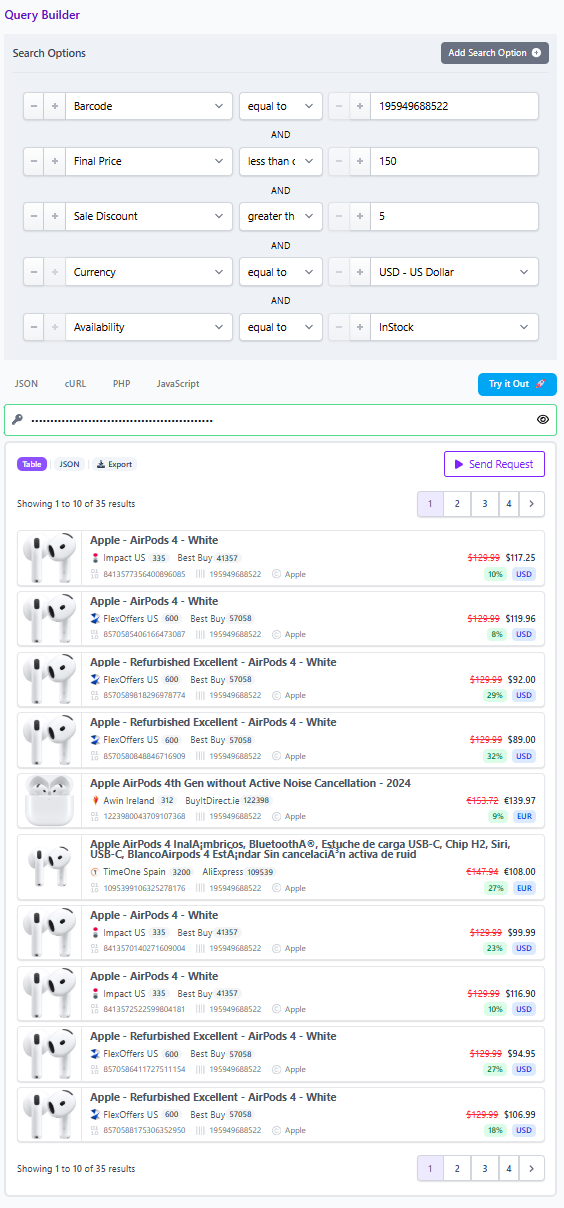
A useful workflow is simple. Search by barcode, keep deduplication off to inspect all merchant offers, then compare final price, sale discount, currency, and availability. Once you know which offers belong in the experience, decide whether to turn deduplication on for a cleaner end user view.
2. Use broader coverage to build sharper filters, not bigger result sets
More searchable coverage is not an invitation to show more clutter. It is an opportunity to be more selective.
Affiliate.com indexes practical fields that matter to merchandising decisions: merchant name and ID, network name and ID, in stock status, stock quantity, regular price, final price, sale price, discount, currency, brand, category, color, size, material, and more. That means you can start broad, then narrow deliberately until the result set matches the intent of the page or tool you are building.
Consider a seasonal refresh use case. Your editor needs “in stock kitchen products under a set budget, from trusted merchants, with meaningful discounts.” A good query pattern would be:
- Start with Any or Name for the category
- Filter currency to the target market
- Add final price bounds
- Add on sale or sale discount threshold
- Restrict to in stock items
- Limit by merchant or network if partner coverage matters
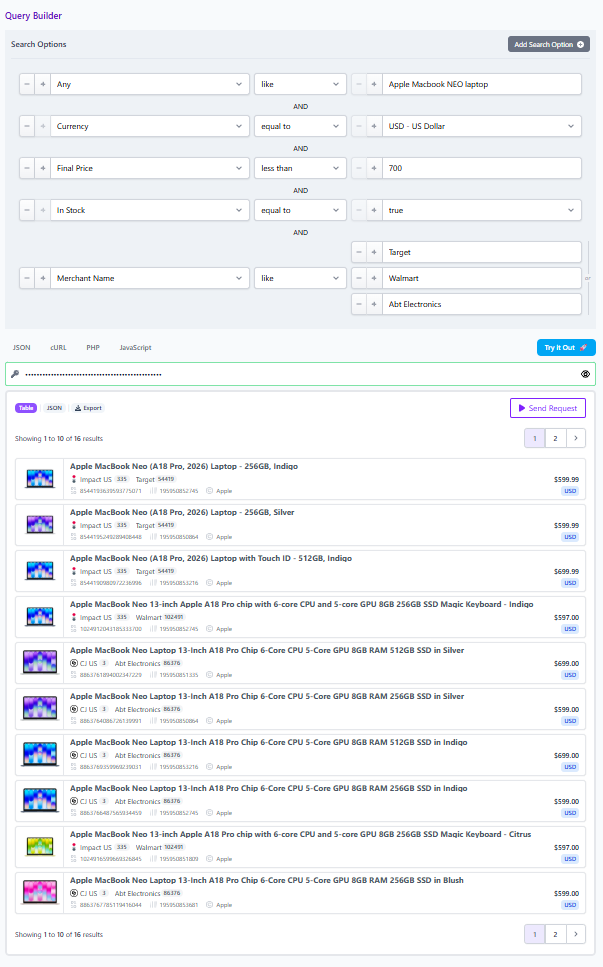
This is where searchable coverage becomes useful results. You are not browsing a giant database. You are shaping a candidate set with commercial intent built in.
3. Use broader coverage to make collaboration faster with shareable queries and Comparison Sets
The quiet advantage of broader coverage is operational. Once a good query is built, it should not live in one person’s head.
Affiliate.com’s Query Builder lets users work visually across more than 30 search fields, refine a result set, and share the query so teammates open the same logic and product selection. Comparison Sets extend that benefit by letting teams create clean, focused collections built from keywords or exact identifiers, then refine by merchant, network, brand, and price range.
This matters in real workflows. A content lead may want a short list of comparable products. A data lead may want to verify that the set contains true product matches. An operations lead may want a version filtered to approved merchants or in stock items. Shareable query links and Comparison Sets give those teams a common working object instead of scattered screenshots and manual spreadsheets.
Why normalization, identifiers, and deduplication still matter
These are not technical details. They are the difference between a trustworthy product experience and a noisy one.
Normalization makes inconsistent feeds searchable. Identifiers such as barcode, SKU, MPN, and ASIN make matching more precise. Deduplication controls let you choose whether the user should see one canonical product or every merchant offer separately, depending on the use case. Use deduplication for cleaner discovery. Turn it off when the goal is offer comparison.
What to do next
Open the Query Builder and test one existing page or workflow you already run. Start with a product or category that feels noisy today. Then rebuild it with one stronger identifier, one pricing filter, one availability filter, and one merchant or network constraint.
That small exercise usually reveals the real value of more searchable product coverage. Not more rows. Better decisions. For teams ready to go deeper, the next step is the same: move from a broad search to a structured query, then save or share that logic in the Query Builder or the Product Search API so it becomes repeatable across your team.