
Product Data API for LLMs: Turn a natural language request into layered filters for brand, MPN, price, currency, and availability

A product data API for LLMs only works if the model can translate fuzzy shopper language into precise filters, then prove that the returned items are actually what the shopper meant. In affiliate search, the failure mode is familiar: ten listings that look right, two that are the wrong variant, and three duplicates with different titles.
An LLM is great at interpreting intent, but it is not inherently great at identity. That is why normalization matters: you need structured identifiers and consistent fields so a model can ask the API for evidence instead of improvising answers. Affiliate.com is built for that style of workflow, with a unified dataset spanning more than 30 networks, about 20,000 merchant programs, and over a billion products, plus 30 plus indexed fields you can query directly.
Definitions that keep LLM workflows honest
Normalization: converting inconsistent merchant supplied product data into consistent fields so filters behave predictably across networks and merchants. This is the difference between searching titles, and searching structured facts like brand, barcode, currency, final price, and availability.
Layered filters: combining multiple constraints in one query, for example name plus currency plus in stock, then tightening with brand and price. This is the practical bridge from a natural language prompt to a reproducible query.
Why LLMs need filters, not just prompts
When teams ship an LLM shopping assistant, the model usually starts with an open ended user request. The moment you let the model answer directly, you invite hallucination: confident product details that are not grounded in your catalog.
Tool calling solves that by forcing the model to request data from your systems through a defined schema. OpenAI’s function calling and structured outputs guides are explicit about using JSON schema to connect models to external data and keep outputs machine usable.
If you want a research backed justification: retrieval augmented approaches materially reduce hallucinations in structured outputs because the model is generating from retrieved evidence rather than memory.
The translation pattern: natural language to layered filters
Here is the operator pattern that works in production:
Step 1: Start broad with Any, then immediately narrow
Natural language request: “Find a carry on bag spinner in black, under 200 dollars, in stock, ideally the newest model.”
In Affiliate.com terms, you begin with the Any field to catch variability in naming, descriptions, and categories, especially when you do not know which field a merchant used.
Then you layer constraints that reduce ambiguity fast:
• Currency = USD
• Final Price less than 200
• In Stock = true
• Color = black
• Deduplication = Barcode
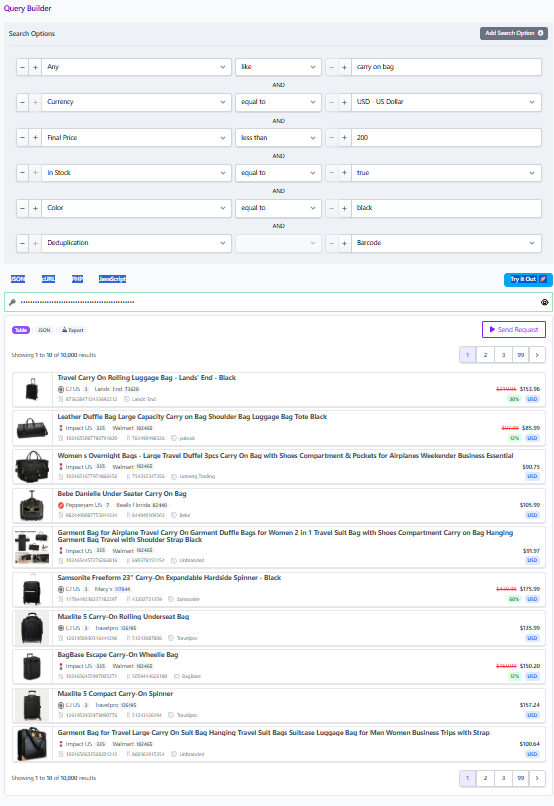
Affiliate.com’s content explicitly recommends starting broad, then layering in filters like currency and sale state to refine.
Step 2: Decide whether you are matching identity or exploring options
This is the fork that most LLM systems skip, and it is where product people earn their keep.
If the user is describing a specific product, you switch to identifiers. Barcodes, including UPC, EAN, GTIN, and ISBN, let you verify that two listings are the same physical product across networks and merchants.
If the user is exploring a category, you stay in attribute and pricing space, then use deduplication to keep the list readable.
Step 3: Use brand and MPN as precision levers
Brand is usually stable across merchants, so it is a clean narrowing filter. MPN, plus SKU when merchant specific, is your precision tool when titles are inconsistent or when you need a specific model.
In practice, your LLM can extract candidate brand and MPN tokens from the prompt, then apply them as exact match filters once it sees the first results page. That second pass is where accuracy jumps.
Step 4: Apply deduplication intentionally
Deduplication is not a default. It is a display decision.
If you are producing a clean list where variety matters, deduplicate so the shopper does not scroll through repeated versions of the same item. If you are building a comparison widget, keep deduplication off so the shopper can see multiple offers for the same product.
This distinction matters for LLMs because it changes the “best answer.” With deduplication on, the model is ranking products. With deduplication off, the model is ranking offers.
A worked example using the exact fields that matter
User prompt: “I want the Sony WH 1000XM5 in black, show me the cheapest in stock option in USD, but only from merchants we already work with.”
A robust query plan looks like this:
Pass one: confirm identity, then retrieve offers
• Any contains “WH 1000XM5”
• Brand = Sony
• Color = black
• Currency = USD
• In Stock = true
• Merchant filter set to your allowed merchant IDs
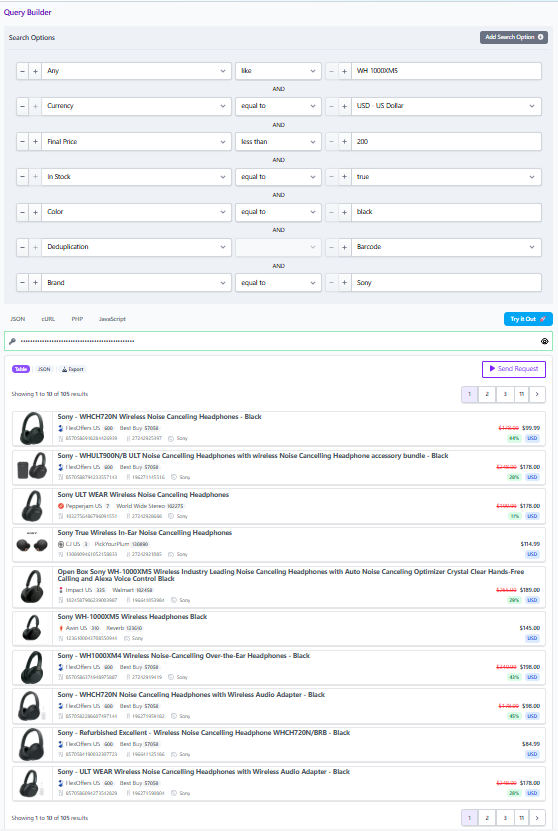
If you have a barcode for the item, use it. The blog notes that barcode is the most reliable way to know two listings refer to the same physical product.
Pass two: rank by pricing integrity
Affiliate.com distinguishes regular price, final price, and discount, and calls out why final price is what the customer pays after discounts.
So the ranking rule is simple and supportable:
• Sort by Final Price ascending
• Tie break by Availability or Stock Quantity when present
• Optional filter: Sale Discount above a threshold if the user asked for deals
That gets you to a defensible “cheapest in stock” answer without guessing.
Operational checklist for product, ops, and affiliate teams
Guardrails your LLM should enforce
• Always return structured fields with each recommendation: merchant name, currency, final price, availability, and at least one identifier such as barcode or MPN when available.
• Treat Any as a discovery entry point, not a finishing state. Start broad, then tighten with brand, merchant, currency, and price.
• Make deduplication a deliberate knob based on the UI goal.
The simplest way to operationalize this inside a team
Affiliate.com’s Query Builder is useful here because it turns the abstract idea of “filters” into a shareable artifact. Once you narrow a query to the exact selection, you can share the query link so the same result set opens for another teammate, or for a review process.
That is the practical CTA: prototype the layered filter logic in Query Builder, then lift the same filter set into the API calls that your LLM triggers. When you do that, your model stops being a storyteller and starts being a reliable interface to normalized product truth.