
Product data API for shopping chatbots: Integrate product data from your affiliate networks

Shopping chatbots need structured product data to answer precise questions, compare offers, and generate commissionable links. A product data API provides that structure across networks and merchants, so the bot can normalize, deduplicate, filter, and explain results with confidence.
In this piece, product data API means a unified interface to normalized product feeds across affiliate networks. We will use Affiliate.com as the reference model given its scale across more than 30 networks, tens of thousands of merchant programs, and over a billion products, plus its support for identifiers like barcode and ASIN, layered filters, and Comparison Sets.
Why chatbots need normalized data
Titles and descriptions vary. The same item appears under different names, currencies, and bundles. Without normalization and identifiers, your bot either misses true matches or compares lookalikes.
- Normalization aligns fields like brand, category, and price so a bot can compare consistently across networks.
- Identifiers such as barcode, GTIN, UPC, EAN, MPN, SKU, and ASIN confirm product sameness even when names differ.
- Deduplication controls decide whether to show one canonical product with multiple purchase options or every offer as a separate row.
- Cross currency handling lets you compare like for like while preserving local pricing context.
- Layered filtering narrows results by price, discount, stock, brand, merchant, and more, which keeps conversations specific and useful.
Core fields your bot should query first
Design your bot prompts and retrieval to center on fields that drive decision making:
- Merchant metadata: merchant name and ID, plus network name and ID, to respect approval lists and network constraints.
- Pricing: regular price, final price, sale price, sale discount, currency.
- Inventory: in stock, stock quantity, availability, commissionable status.
- Identifiers: barcode, SKU, MPN, ASIN for matching identical products.
- URLs: commission URL, direct URL, image URL for link rendering and previews.
- Attributes: brand, color, size, gender, material, model, category, tags.
A minimal blueprint for chatbot orchestration
1. Parse the user goal
Detect buying intent versus browsing. A message like, find the best price for the Stanley 40 ounce tumbler in navy, implies a single product with variant and merchant preferences.
2. Resolve the product
Try identifiers first. If you have an ASIN from a user paste, use ASIN to barcode matching to find the same item across merchants. If not, run an any field search with brand and model hints, then escalate to barcode once available.
3. Group or separate offers
- If the user wants one product with merchant choices, keep deduplication off during selection then present a single product row with merchant offers beneath.
- If the user wants a list of different products, enable deduplication to avoid clutter from repeated listings.
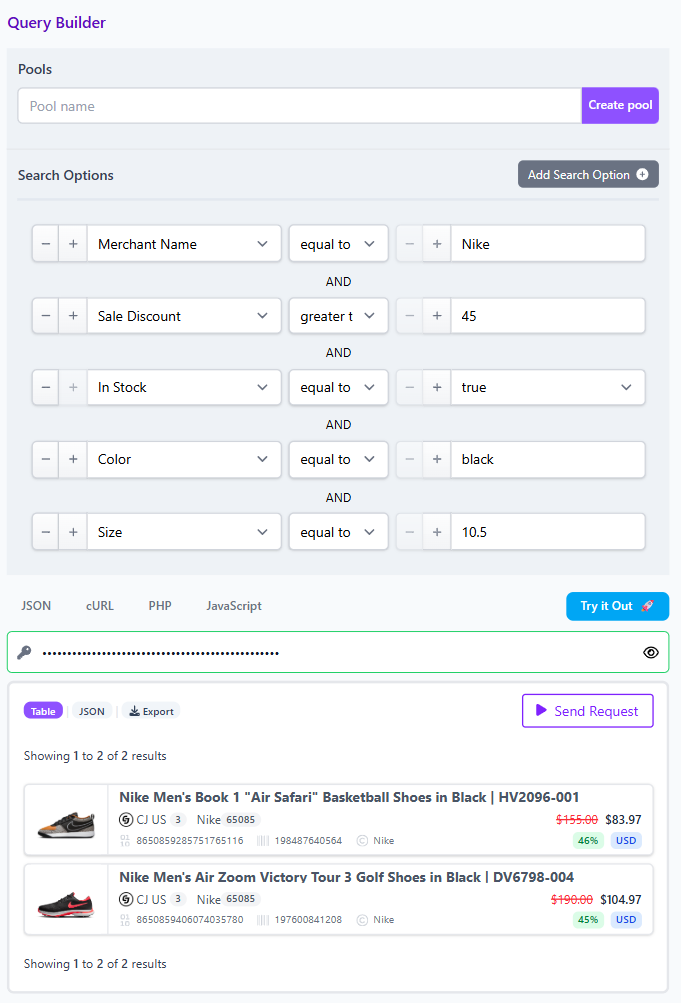
4. Apply layered filters
Layer filters in this order to reduce noise quickly:
- Brand equals the manufacturer.
- Barcode equals the confirmed identifier.
- Availability equals in stock.
- Currency equals the user locale.
- Discount greater than a set threshold, or final price within a budget.
- Merchant or network filters to stay within approved programs.
5. Present a Comparison Set
Build a Comparison Set for the resolved barcode. Sort by final price or discount, and show two to five merchant options with commission URLs. Share the set as a query link so editors or users can reload the same logic later.
Micro workflow: best offer answer in three turns
User: Find the best price on a Yeti Rambler 20 ounce in stainless.
Bot internal steps
- Any field search on name and brand to gather candidates. Extract brand equals Yeti, likely model tokens, and a barcode if present.
- Re query by barcode to collapse variants. Turn deduplication off to collect all merchant offers for that exact SKU.
- Filter availability equals in stock. Sort by final price ascending, then secondary sort by sale discount descending.
- Return a Comparison Set with merchant name, final price, discount percent, commission URL, and shipping note if provided. Include a shareable query link to the same selection.
Bot reply to user
I found one product matched across multiple merchants. The best current final price is X in your currency, followed by Y and Z. Here are the purchase options with links. Prices and stock are at time of writing. Please verify in the live UI before publishing or promoting.
Handling Amazon sourced requests
When a user shares an Amazon link with an ASIN, your bot should:
- Extract ASIN, then map to barcode where available.
- Query by barcode to find identical products at alternative merchants.
- Return a Comparison Set that shows price and availability across those merchants. This enables price comparison, merchant choice, and commission planning without manual copy paste.
Guardrails for quality answers
- Disambiguate bundles and variants by checking attributes like size and color, plus barcode equality. A matched barcode is the strongest signal of sameness.
- Respect approvals by applying network and merchant filters before link generation.
- Avoid duplicates by enabling deduplication for gallery views, and disabling it for side by side offer comparison.
- Stay local but comparable by pinning currency to the user locale while noting cross currency context when relevant.
Implementation notes for product leads
- Start broad in early sessions with the any field, then progressively constrain with exact equals filters as your dialogue surfaces identifiers.
- For deals content, use on sale equals true, then set a discount threshold, and sort descending by sale discount.
- For brand centric experiences, set brand equals target brand, then layer price caps and availability to keep answers shoppable.
Try it
Explore these flows in the Query Builder, then lift the same parameters into your bot. Share links with your team to standardize prompts and results. When you are ready to wire this into production, use the Product Search API to replicate the exact filters, deduplication setting, and sorting you validated in the Builder. Prices and stock are at time of writing, and we recommend verifying in the live UI before you publish.