
Product Data API identifier rules barcode first then MPN fallback for accurate product matches

When you aggregate product data across many affiliate networks and merchants, names and descriptions vary. Product Data API users need a clear identifier strategy that normalizes inputs, deduplicates sensibly, and returns the exact same item across merchants for reliable comparisons. This piece sets a pragmatic rule set, barcode first then MPN fallback, and shows how to operationalize it with filters that already exist in the Product Data API.
Identifiers, defined here as standardized fields used to uniquely reference products, include barcode types like UPC, EAN, GTIN, and ISBN, and merchant specific keys like SKU or MPN. Barcode matching is the most precise cross merchant method. MPN is the next best anchor when barcode is absent. We will use both inside layered filters with brand, price, discount, availability, and merchant to maximize match quality and minimize noise.
Why barcode should lead
Barcodes are universal across retailers, so a single code can surface all matching listings for the same product, even when titles differ. In practice, a barcode search gives you a canonical group of identical offers that you can sort and filter. This is the foundation for clean comparison experiences and accurate best offer logic.
When you are building a Comparison Set or price table, start with the barcode to return the exact product across multiple merchants. Use availability and price fields to refine. If barcode is missing, fall back to MPN or SKU, then layer brand to reduce ambiguity. This approach consistently yields the cleanest set for side by side evaluation.
When to fall back to MPN
MPN identifies the specific model from a specific brand and is widely present in feeds, even when barcodes are not. MPN based matching is precise within a brand and becomes more reliable when you layer a brand filter and, where helpful, a merchant or network filter to reflect your program scope. This reduces false joins from similarly named parts that cross brands.
The rule set
- Primary: barcode match across merchants to group identical listings.
- Secondary: MPN match with brand required. Add merchant or network constraints when appropriate.
- Tertiary: expand with the any field to explore candidates, then converge back to barcode or MPN.
A mini workflow in the Query Builder
Goal: clean comparison for a Stanley water bottle with on sale offers only.
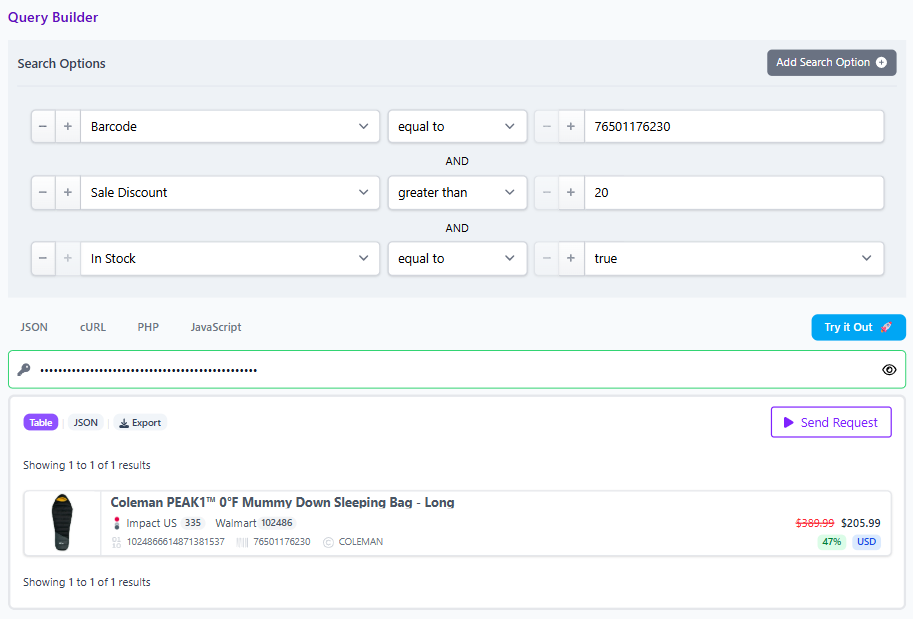
- Start with barcode: enter the product barcode to produce all identical listings.
- Layer pricing fields: filter for items where final price is lower than regular price and set a minimum discount percent, for example at greater than twenty percent off. This keeps the set focused on real deals.
- Constrain by availability: include only in stock items to avoid dead ends in your UI.
- Optional partner scope: add network ID or merchant ID filters to stay within approved programs.
- Share for review: use the Share button to copy a link that opens to these results in the app for quick collaboration.
Field checklist to deploy with the rule set
- Identifiers: barcode first, MPN fallback with brand.
- Pricing: regular price, final price, discount for deal integrity.
- Availability: in stock only when building comparison experiences.
- Partner scope: merchant ID and network ID to respect program eligibility.
- Discovery expansion: any field to explore broadly before you narrow with precise filters.
Governance tips
Create a short policy for when to prefer barcode versus MPN and document fallbacks for categories that rarely publish barcodes, such as some apparel or custom parts. Require Brand with any MPN based match. For seasonal or promotional content, default to deduplication on for list pages and off for comparison widgets so users can evaluate offers across merchants in one view.
Try it with your data
Explore the Product Data API in the visual Query Builder to test barcode first workflows, layer filters, and share results with your team. Start here.
Note: prices and stock reflect the data at the time of query. Verify important decisions in the live UI.