
Product feed data normalization for exact match workflows, barcode versus MPN with deduplication settings

Product feed data normalization is the process of standardizing fields and values across networks and merchants so that the same product can be found and compared with precision. In affiliate operations, normalization turns messy titles and uneven attributes into structured data you can trust, which is the precondition for exact match search and reliable comparisons.
This article maps a practical workflow for exact match discovery using barcode versus MPN, then explains when to enable deduplication. The goal is to help advanced affiliate teams move from approximate string matching to deterministic identifiers while keeping results clean and decision ready.
Define the identifiers that matter
Barcode. Barcodes such as UPC, EAN, GTIN, and ISBN uniquely identify a product across merchants and networks. They are the strongest key for cross merchant matching and price comparison. A barcode query will return the same product from multiple sellers, even when titles vary.
MPN and SKU. A manufacturer part number or merchant SKU is precise for a single model and often a single seller. It is excellent for confirming the exact variant from a particular merchant but is less universal than a barcode when you need offers from many sellers.
Brand. Normalized brand names make high recall filtering possible and remove label inconsistencies such as Nike Inc versus Nike. Brand is an ideal companion filter once you have a core identifier.
Why normalization is non negotiable for exact matches
Without normalized fields, two listings that are actually the same item will look different because of title choices or missing attributes. Normalization groups identical listings and standardizes key fields so you can sort and filter with confidence. That is why an identifier query such as a barcode returns a single normalized product with all available offers attached.
Normalization also powers accurate pricing work. With regular price, final price, and discount aligned, teams can sort or filter by real markdowns rather than promotions that only look like deals.
A concrete workflow: exact match from discovery to decision
Imagine editorial wants to feature a specific insulated water bottle model that readers keep asking about. The goal is to find that exact product across your partnered merchants and highlight the best current value.
Step 1: Anchor the search with a barcode
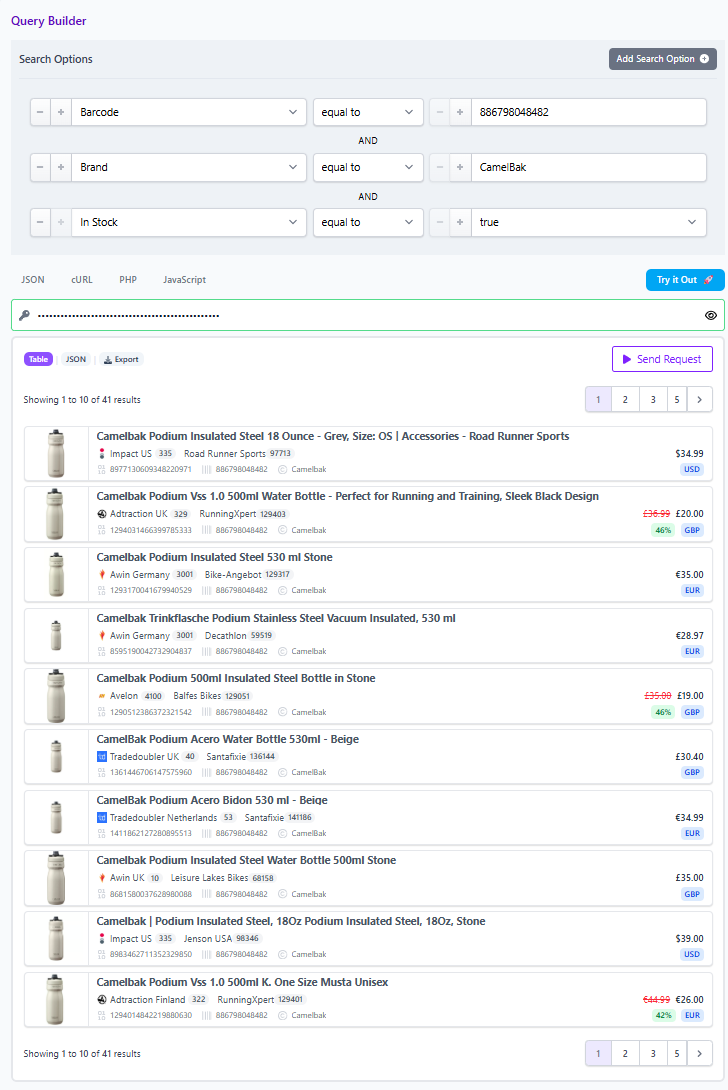
Start in the Query Builder or API with the barcode filter. For example, searching barcode 886798033341 returns the exact same bottle across multiple merchants, despite title variations.
Layer supporting filters:
- Brand equals the known manufacturer to eliminate lookalikes.
- In stock equals true to avoid dead ends for readers.
- Currency equals your audience default for apples to apples display.
- Optional, Merchant ID or Network ID to stay within approved partners.
Step 2: Decide on deduplication settings
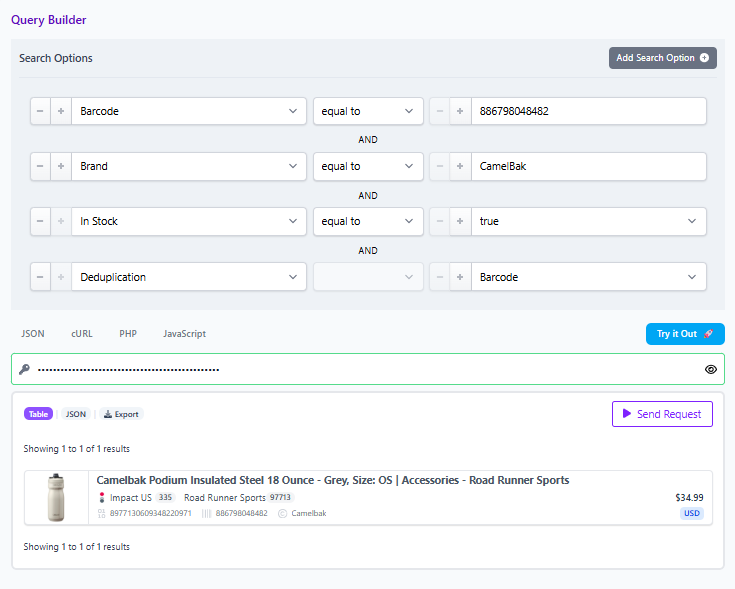
- Deduplication on if you want one clean product card that represents the group. This removes repeated listings so users do not scroll through near duplicates.
- Deduplication off if you are building a comparison widget that needs to show multiple offers for the same item, including different discounts or shipping options.
Step 3: Sort on normalized pricing fields
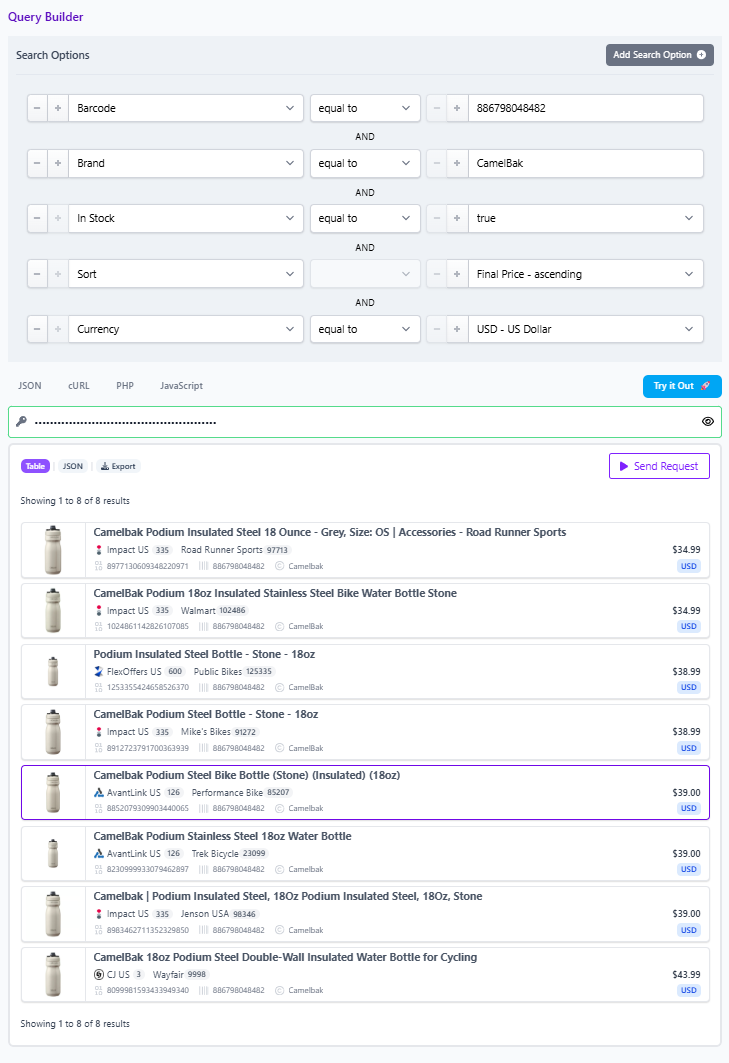
Sort by final price or by discount to surface the most compelling offer based on normalized fields, not promotional copy. This relies on standardized regular price, final price, and discount.
Step 4: Share the result and operationalize it
Use the Share control in the Query Builder to generate a link that opens directly to the exact query and product set. This makes it easy for editorial, partnerships, and engineering to collaborate, and for program managers to reuse the same selection in comparison sets.
Barcode versus MPN: when to use each
- Use barcode for cross merchant comparison. It verifies product identity across networks and sellers and is ideal when you want every available offer for the same item.
- Use MPN or SKU to pin an exact model from a specific merchant, for example confirming a particular golf club SKU from a single retailer. This is perfect when you are curating at the merchant level or validating a merchant submitted product.
In practice, many teams start with barcode to cast a wide net, then add brand and availability for cleanliness. When the editorial brief is tied to a single seller, they swap to MPN or SKU to respect that constraint.
Decision rules for deduplication
- Choose on when building clean product lists or buyer guides that benefit from one entry per product to reduce noise.
- Choose off for price comparison modules where users expect to evaluate multiple offers for the same product.
These controls are simple but powerful. They change whether you present a single normalized product with many purchase options or a list of individual offers.
Micro example: from model request to on sale comparison set
Editorial receives a reader request for a specific model.
- Search by barcode to gather all identical offers.
- Keep deduplication off to show multiple offers.
- Apply On Sale equals true and optionally set Discount percent off to at least twenty, then sort by discount.
- If the brief requires only current partners, apply Merchant ID or Network ID filters.
- Share the query link for review and reuse it in a comparison set.
Field checklist to keep queries honest
- Identifier: barcode first for cross merchant, MPN or SKU when merchant specific.
- Brand: normalized names reduce false positives.
- Availability: in stock equals true to prevent dead links.
- Pricing: final price and discount for ranking real value.
- Partner scope: Merchant ID or Network ID to keep to approved programs.
What to do next
Explore the same workflow in the Query Builder or the Product Search API. Start with a barcode, layer brand and availability, choose your deduplication setting, and sort on final price or discount. Use the Share link to circulate the exact query to stakeholders and, as always, verify offers in the live UI before publishing.