
Product Image API: How to Fetch, Normalize, and Serve Consistent Images Across Merchants

Product image API is the fastest way to make a shopping page feel trustworthy, because imagery is the first validation layer a reader uses before they believe your price and availability claims. If the image is wrong, duplicated, or mismatched to a variant, your page looks sloppy even when the offers are correct.
In affiliate commerce, the hard part is not downloading images, it is normalizing identity across merchants. One merchant’s hero image might be a lifestyle shot, another might be a pack shot, and a third might quietly swap the image when a colorway changes. The operational goal is simple: one product, one canonical image choice, with controlled fallbacks.
Affiliate.com is built for this kind of structured work, giving you a unified dataset that spans more than 30 networks, 20,000 merchant programs, and over a billion products, so you can query, filter, and curate instead of wrangling fragmented feeds.
What a product image API should return
A practical product image API is not only an image URL. It is an image URL tied to a verified product identity, plus enough context to keep you from shipping the wrong thumbnail.
At minimum, you want these fields available to filter and validate:
- Image URL, plus the merchant and network it came from
- Barcode when available, and ASIN or MPN or SKU when that is the strongest identifier
- Availability signals such as in stock and stock quantity
- Pricing context such as currency, regular price, final price, on sale, discount
Affiliate.com exposes a broad set of indexed fields so you can build that validation logic directly into your query, rather than bolting it on downstream.
The core problem: identical product, inconsistent presentation
Here is the micro scenario every deals editor has lived through. You publish a clean comparison module for a specific headphone model. Within a day, someone messages, “Why does the picture show the older version.” You check the offers and realize two merchants used nearly identical titles, but one listing is a bundle, or a prior generation, or a different color.
The fix is not “pick better images.” The fix is to anchor imagery to a strong identifier, then decide when to deduplicate and when to keep variants separate.
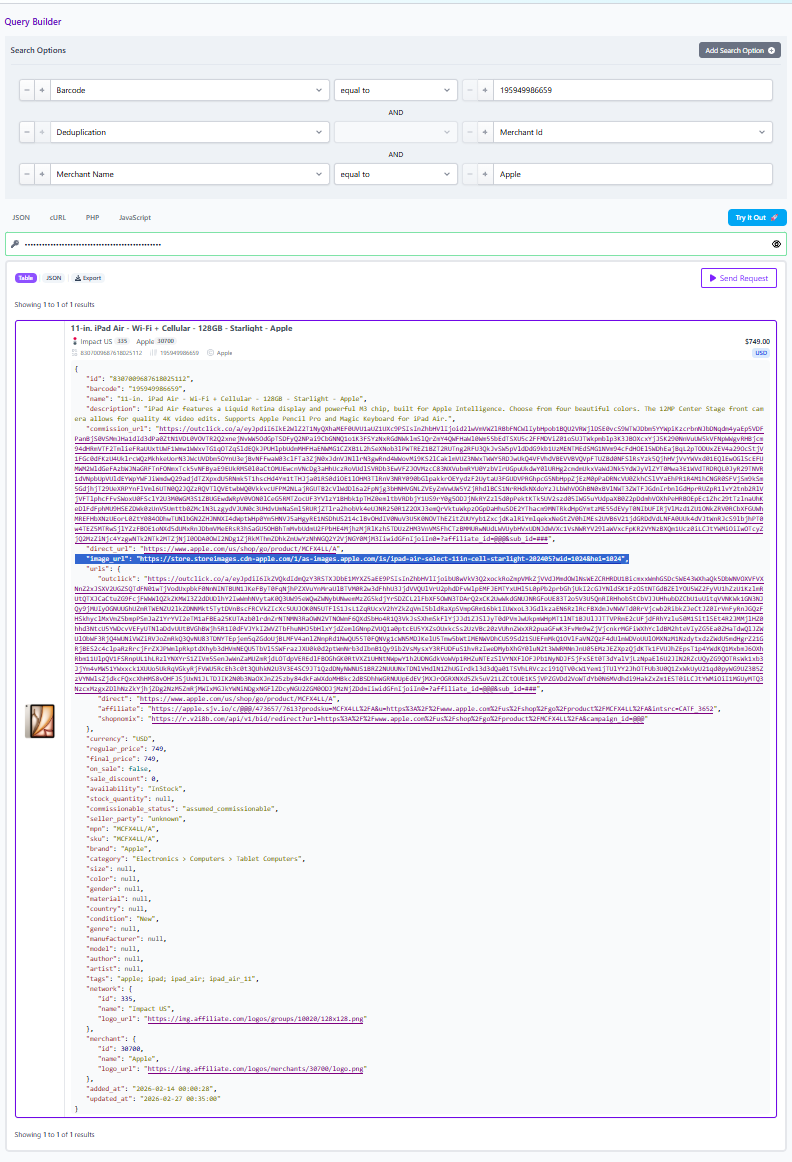
Barcodes are the most reliable way to confirm two listings refer to the same physical product across networks and merchants. When you only have a merchant specific identifier like SKU or MPN, you can still get precision, but you should treat the result as merchant scoped, not globally identical.
Workflow: barcode match first, then normalize the image choice
Use this workflow when you are building a product page, a “best offer” module, or any comparison that must not mix lookalikes.
Step 1: Identify the product with a strong key
Start with the strongest identifier you have:
- Barcode when you can get it
- ASIN when your starting point is Amazon, then map to barcode or other identifiers when available
- MPN or SKU when you are validating inside one merchant catalog
A barcode search is designed to return the same product across multiple merchants, even when titles vary.
Step 2: Decide your deduplication stance based on the page type
Deduplication is the control that determines whether you want one consolidated product record or every distinct listing and offer.
Use deduplication on when you want a clean set with variety, such as a curated roundup where repeated identical listings create visual noise.
Keep deduplication off when you are explicitly showing multiple offers for the same item, because your reader expects to compare merchants, discounts, and shipping choices side by side.
Step 3: Choose an image policy that matches your deduplication choice
A simple, durable policy looks like this:
- If deduplication is on: pick one representative image per product cluster, and keep it stable unless the identifier changes
- If deduplication is off: allow each merchant listing to keep its own image, but suppress obvious duplicates so your UI does not show five identical thumbnails in a row
This is where normalization matters. Your image policy works only if the identity model is sound, otherwise you are “normalizing” the wrong thing.
Filtering for image reliability: merchant and network constraints
Most affiliate teams have real constraints that are not visible to the reader: approval lists, preferred networks, or merchants you do not want to feature. Network level and merchant level filters let you enforce those constraints at query time, before content ever sees a staging environment.
A practical image focused query often looks like:
- Filter by network ID if you only want results from networks where you are approved
- Filter by merchant ID if the module is tied to a specific partner or a curated merchant mix
- Layer availability so you do not render images for out of stock listings in a “buy now” module
This is how you avoid the classic failure mode: a perfect image paired with an offer you cannot monetize, or an out of stock landing page.
Layered filters: keep images, offers, and intent aligned
Once identity is anchored, layered filtering is how you keep the output commercially relevant. Affiliate.com’s Query Builder and API are designed for stacking conditions so you can move from broad discovery to precise sets.
Examples that map cleanly to image use cases:
- Deal module: on sale plus minimum discount, then sort by discount to surface the most compelling offer while keeping the image stable for the product
- Buying guide grid: brand filter plus price ceiling plus in stock, so every tile is a real option, not a placeholder
- International page: currency filter plus country level merchant mix, so you are not showing a US only image and offer set to a UK audience
A quick checklist before you ship
- Do you have a strong identifier, ideally a barcode, for every product tile that must be exact match
- Is deduplication set correctly for the page goal, clean list versus offer comparison
- Are network and merchant filters enforcing your approval reality
- Are you layering availability and pricing filters so the images represent offers users can actually click through
Call to action: build it in the Query Builder, then ship it via API
If you want to operationalize a product image API workflow without guesswork, start in Affiliate.com’s visual Query Builder. It lets you explore more than 30 searchable fields, layer filters, and then share a query link that reopens with the same parameters, which is ideal for editorial review and repeatable collections.
Once the query produces the exact product set and image behavior you want, move it into your implementation via the Product API so your pages are driven by normalized identifiers, controlled deduplication, and consistent image selection, instead of brittle one off scraping.