
Build Product Price Comparison Sets from Barcode-Matched SKUs: A Repeatable API Workflow

Product price comparison sets let you show the best offer for the exact same product across multiple merchants. The most reliable way to do this is to anchor the set to a shared identifier, then layer filters that surface the clearest value and remove noise.
In this guide we use barcode matched SKUs as the backbone for comparison sets, then apply normalized fields for price, discount, currency, and availability. The result is a repeatable workflow you can run through the API or the Query Builder to build, share, and refresh high intent modules.
Why identifiers and normalization matter
Merchants rarely title products the same way. A single item can appear with different names, bundles, or model strings. Normalization connects those listings and barcode matching confirms that two offers refer to the same physical SKU. That gives you the confidence to compare like with like.
Affiliate.com aggregates structured product data from more than thirty networks and tens of thousands of merchant programs, covering more than one billion products. You can find the same SKU across many sellers, then filter on the fields that actually drive a purchase decision.
What a product price comparison set is
A comparison set is a focused group of identical products with multiple merchant offers shown beneath a single product card. It is built for clarity and decision speed. You can toggle deduplication to collapse duplicate entries or keep it off when you want to expose every qualified offer for side by side price checks.
The repeatable API workflow
1. Start from the strongest identifier.
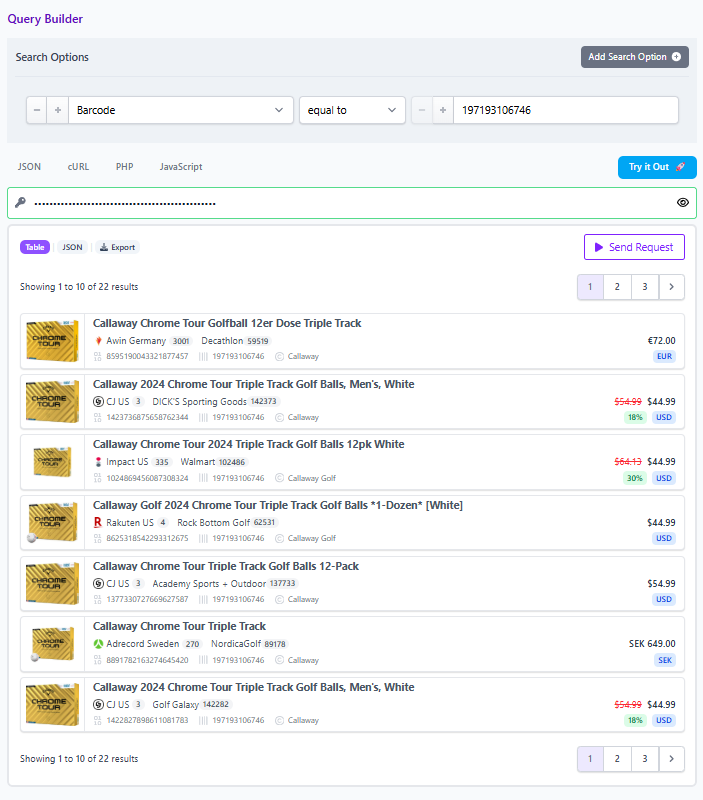
Use a barcode for precision then search for that identifier across networks to pull every merchant listing for the same SKU.
2. Retrieve all offers for the barcode.
Query by the barcode in Product Search. Keep deduplication off at first to see the full market. Capture merchant name, merchant ID, network name, and network ID so you can segment by partners you are actually approved to promote.
3. Layer filters that sharpen intent.
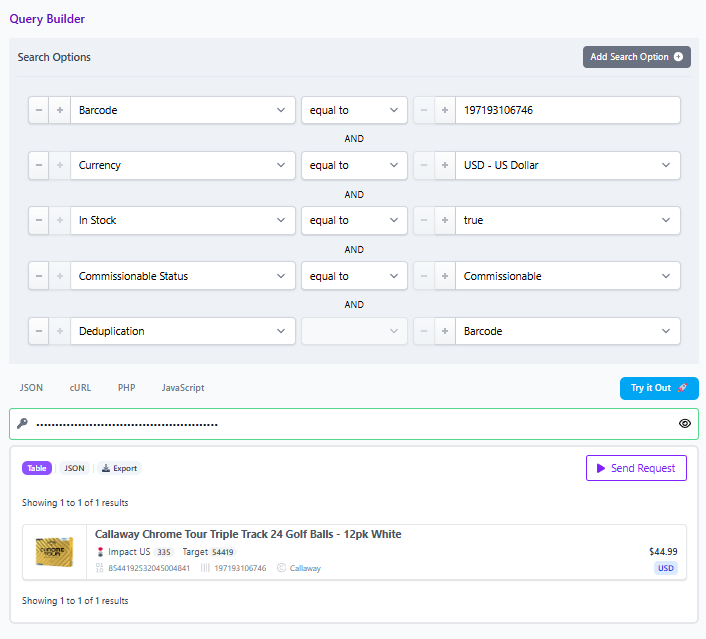
Apply currency, in stock, and commissionable status if relevant to your workflow. Add brand as a guardrail when category terms are noisy. Use the any field early for recall, then tighten with exact fields such as name, brand, and attributes as you home in.
4. Rank by value, not just price.
Use final price as the shopper paid price today. Compare it to regular price and sort by discount to highlight real savings. If you want a discount only set, filter on on sale and apply a minimum percent off.
5. Handle cross currency cleanly.
When offers span regions, keep currency explicit in your filters and present localized pricing while still tying back to the single normalized product record. The key is that the identifier keeps the match honest even when prices are in different currencies.
6. Present cleanly with deduplication and grouping.
Once ranked, enable deduplication to show one product with a list of merchant offers beneath it, or keep it off if your design favors explicit rows for each merchant. Either way, the set stays tidy because all listings resolve to the same barcode.
7. Share and operationalize.
In the Query Builder you can copy a share link for the exact query that powers the set. This makes collaboration easy across editorial and ops, and lets you reuse the same logic in multiple placements.
Field checklist for comparison sets
- IDs: Barcode, SKU, ASIN when present
- Pricing: Final price, regular price, sale discount, currency
- Inventory: In stock, availability
- Merchant and network: Merchant name and ID, network name and ID
- Attributes: Brand, color, size when variant control is needed
Decision rules you can encode
- Prefer in stock offers, then rank by lowest final price
- Break ties with higher discount, then with trusted merchant lists
- Suppress bundles that do not match the base SKU to avoid lookalikes
Implementation notes and trust
Prices and availability change. Treat comparison sets as snapshots at time of writing and recommend verifying in the live UI before publishing. Data refreshes originate from networks or merchants, so always validate the final price field and currency before promotion.
Try it now
Explore the Query Builder and Product Search API to build and share your first barcode anchored comparison set. Use the identifier search, layer price and availability filters, and copy the share link to collaborate with your team.