
Why AI Commerce Teams Use Affiliate.com as a Normalized Product Data Layer for Discovery, Filtering, and Comparison

A normalized product data layer is the system that converts inconsistent merchant product feeds into structured, searchable records. For AI commerce teams, it matters because an assistant, shopping surface, or research workflow cannot reason cleanly when the same item appears under five merchant titles, three currencies, and uneven inventory fields.
Affiliate.com gives teams a normalized product data layer across more than 30 affiliate networks, tens of thousands of merchant programs, and over a billion products. Its Product API and Query Builder support searching across dozens of fields, including name, brand, description, barcode, ASIN, MPN, SKU, price, discount, currency, availability, merchant, network, and attributes.
Why normalization is the foundation for AI commerce
AI commerce systems are only as useful as the product records they retrieve. A language model can explain a product well, but it cannot reliably compare offers when merchant titles are inconsistent or identifiers are missing from the retrieval logic.
Normalization solves the practical problem beneath the interface. Affiliate.com structures raw affiliate product data so teams can search, filter, deduplicate, and compare records without building a separate ingestion layer for every network or merchant feed.
The operator problem: identical products do not look identical
A product lead building a shopping assistant might ask for the best available merchant option for a specific water bottle. One merchant writes the full model name. Another compresses the title. A third adds promotional copy.
Title matching will wobble. Barcode matching is steadier because a barcode, UPC, EAN, GTIN, or ISBN is meant to identify the physical product, not the merchant’s wording of it. Affiliate.com’s prior product mechanics articles show barcode searches being used to connect identical listings across merchants even when titles vary.
Discovery: start broad, then layer precision
For AI teams, discovery often begins with ambiguous intent. A user asks for “lightweight carry on luggage,” not a clean SKU.
That is where the “any” field has strategic value. It lets teams cast a broad search across multiple product fields, then narrow the candidate set with filters that match the business rule.
A practical retrieval pattern
Start with a broad query:
- Any contains “carry on luggage”
- Currency equals USD
- In Stock equals true
- Final Price less than 250
- Brand equals Samsonite
- Merchant ID limited to approved merchant sources
- Sort by Final Price or Sale Discount
- Deduplication on for a clean product set
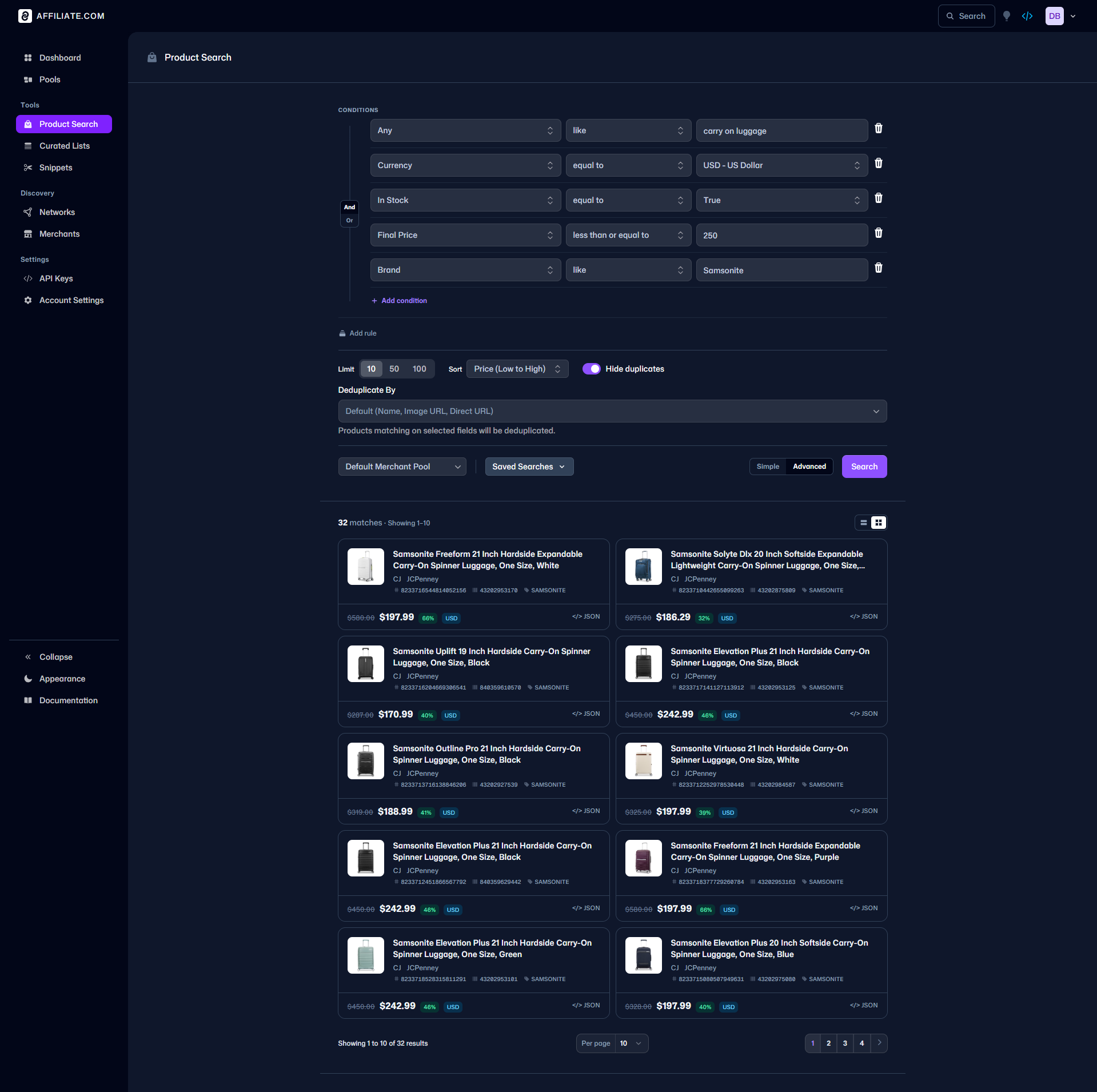
This pattern keeps the AI surface useful. The assistant is not merely generating a recommendation. It is retrieving a constrained, structured set of products that match shopper intent, market availability, price logic, and merchant strategy.
Filtering: turn business rules into query rules
Advanced affiliate teams do not need more products. They need cleaner selection logic.
Affiliate.com’s indexed fields allow product, data, and ops teams to translate rules into retrieval criteria. Brand filters support brand led pages. Merchant and network filters help teams control source inclusion. Pricing fields such as regular price, final price, sale price, and sale discount support deal logic. Inventory fields such as availability and in stock help avoid promoting items that should not be surfaced.
This matters for AI companies because retrieval is governance. A model that can access everything still needs rules about what it should show.
Decision criteria for safer product retrieval
Use these checks before powering an AI commerce experience:
- Identifier strategy: use barcode for same product matching, MPN or SKU for model specific searches, and ASIN when starting from Amazon oriented discovery.
- Merchant scope: decide whether the experience should query all available merchants, specific merchant IDs, or selected network IDs.
- Deduplication posture: turn deduplication on for clean discovery pages, and off when users need to compare multiple merchant offers for the same item.
- Price logic: choose whether final price, sale price, regular price, or discount is the correct ranking field.
- Availability rule: filter by in stock or availability when the experience should suppress unavailable options.
- Currency rule: filter by currency first when building region specific or cross currency comparison workflows.
Comparison: why identifiers beat title matching
Comparison is where weak data architecture becomes visible. If two records are merely similar, comparing them as the same product creates false confidence. If two records are identical but titled differently, failing to connect them hides better merchant options.
Affiliate.com supports matching identical products across merchants using structured identifiers such as barcode, with deduplication controls that let teams decide whether to show one representative record or expose multiple merchant offers. Prior Affiliate.com articles describe this as the difference between clean product discovery and offer level comparison.
Example: from Amazon signal to merchant alternatives
An AI commerce team may start with an Amazon ASIN because that is what a user pasted into a shopping assistant. The more useful workflow is not to stop at Amazon.
Use ASIN or barcode matching to identify the product, then search for matching offers across Affiliate.com’s dataset. Layer merchant, price, discount, currency, and availability filters to decide which offers should be shown. Affiliate.com’s API overview describes Product Search and OMNI style workflows for exploring Amazon results alongside the Affiliate.com dataset, including search by product name, barcode, or ASIN.
Where the Query Builder fits
The Query Builder is the bridge between strategy and implementation. Product managers can test retrieval logic before asking engineering to implement it. Data teams can inspect whether a filter stack is too narrow, too broad, or biased toward one merchant source.
A good Query Builder session should answer three questions:
- Does the query retrieve the intended product class?
- Do identifier matches separate identical products from lookalikes?
- Do price, discount, availability, merchant, and network filters produce a usable result set?
Affiliate.com’s API documentation describes the Query Builder as a way to create, refine, and save API queries, with support for product information fields such as name, description, pricing, discounts, image, and barcode.
The strategic case for Affiliate.com as the data layer
AI commerce teams do not win by making a model sound more confident. They win by giving the model better retrieval inputs, cleaner constraints, and product records that can be compared without guesswork.
Affiliate.com is useful because it sits at the layer where affiliate product data becomes searchable, comparable, and operational. It normalizes merchant feeds, exposes the fields teams actually need, supports identifier based matching, and gives both technical and non technical operators a path from query design to API execution.
For product leads, that means faster experiments. For affiliate operators, it means cleaner merchant and product curation. For data teams, it means fewer brittle feed transformations before the first useful product result appears.
Call to action
Use Affiliate.com’s Query Builder to prototype one high value AI commerce workflow: start with a broad “any” search, layer brand, barcode, price, discount, availability, merchant, and network filters, then test deduplication on and off.
The goal is not to retrieve more products. The goal is to retrieve the right products, with enough structure for an AI commerce experience to explain, compare, and act with discipline.