
How Price History Helps a Reader Trust a Deal
Explains how price history lets a deal page show evidence instead of a claim, using 91 days of prices for one air fryer to show how sales start, end and repeat.


A sale tag tells a reader that a price is lower than something else. It does not tell them whether the price is unusual for that product. A deal post that says "$40 off" is making a claim, and readers have learned to check claims like that. Price history lets a page show the evidence instead of just the claim.
Most deal pages already use two fields, the regular price and the final price, which work together as described in comparing regular price and final price. Those fields describe today. Price history adds time: what the price was last week, last month, and the lowest it has been.
One product, 91 days
Here is the daily price for one air fryer at one department store, from July 15 to October 13, 2026. The product is identified by its barcode, 622356631211, so the same item can be followed at other stores below. Its regular price stayed at $249.95 the whole time. What changed was the final price.
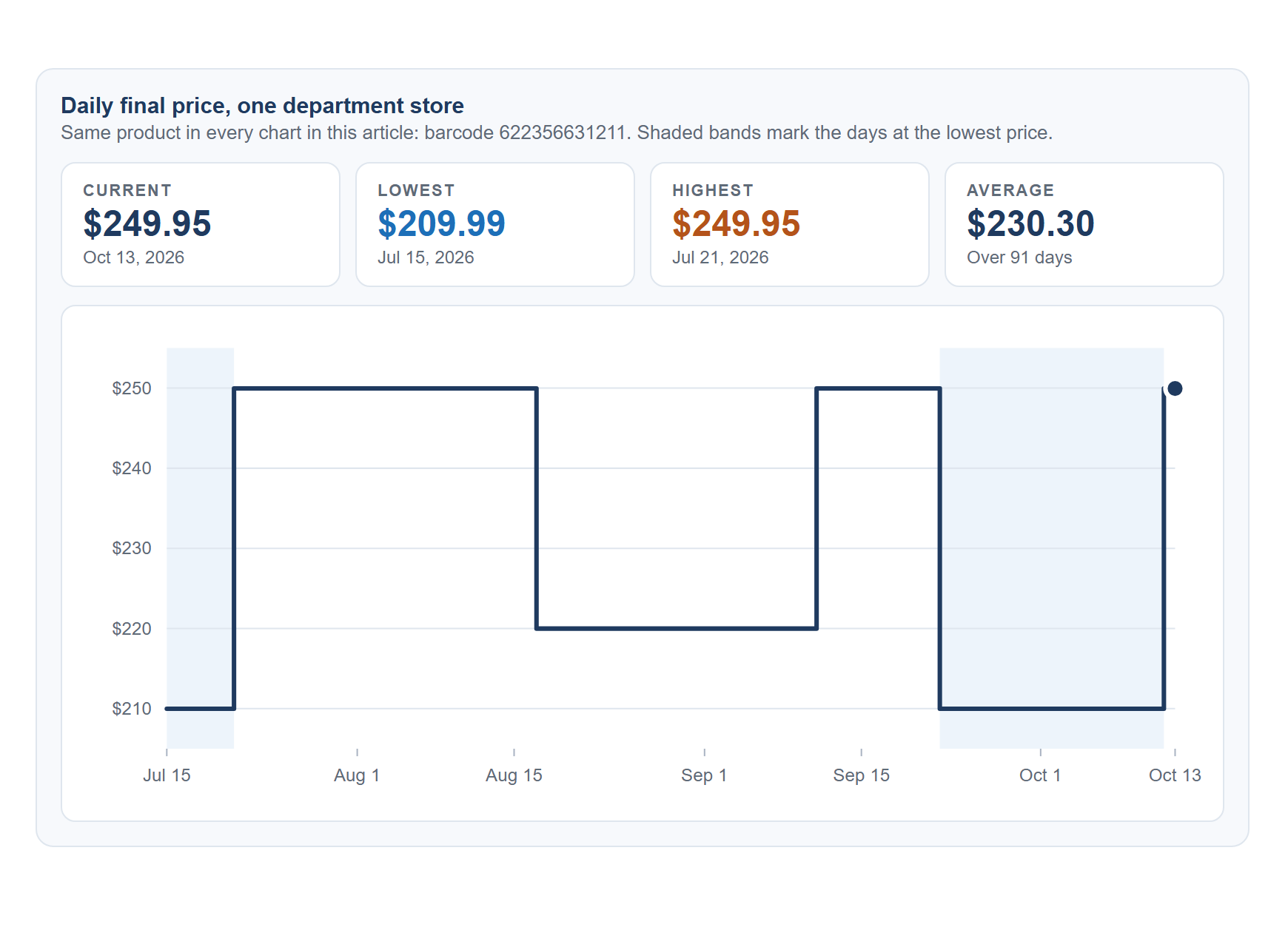
The table below lists the same history by date range.
| Dates | Final price | Days | On sale |
|---|---|---|---|
| Jul 15 to Jul 20 | $209.99 | 6 | Yes (already on sale when the history begins) |
| Jul 21 to Aug 16 | $249.95 | 27 | No |
| Aug 17 to Sep 10 | $219.99 | 25 | Yes |
| Sep 11 to Sep 21 | $249.95 | 11 | No |
| Sep 22 to Oct 11 | $209.99 | 20 | Yes |
| Oct 12 to Oct 13 | $249.95 | 2 | No |
Across the 91 days, the lowest price of $209.99 appeared on 26 days, $219.99 on 25 days, and the full $249.95 on 40 days. The most recent sale ended on October 11, so a reader arriving on October 13 sees the full price.
What a reader can learn from a history like this
- Is this a low price? $209.99 was the lowest price in the 91 days, so yes.
- Does it get this low often? In this case it did, twice, which makes the first sale look less like a one-time event.
- How long do sales last? The two longer sales ran 25 and 20 days, with gaps of 27 and 11 days between sales.
None of this predicts the next sale. It only describes what already happened, and a post should say so.
The same product at four stores
Because the barcode is the same, the history can be compared across retailers. Here are four of the stores that carry this air fryer.
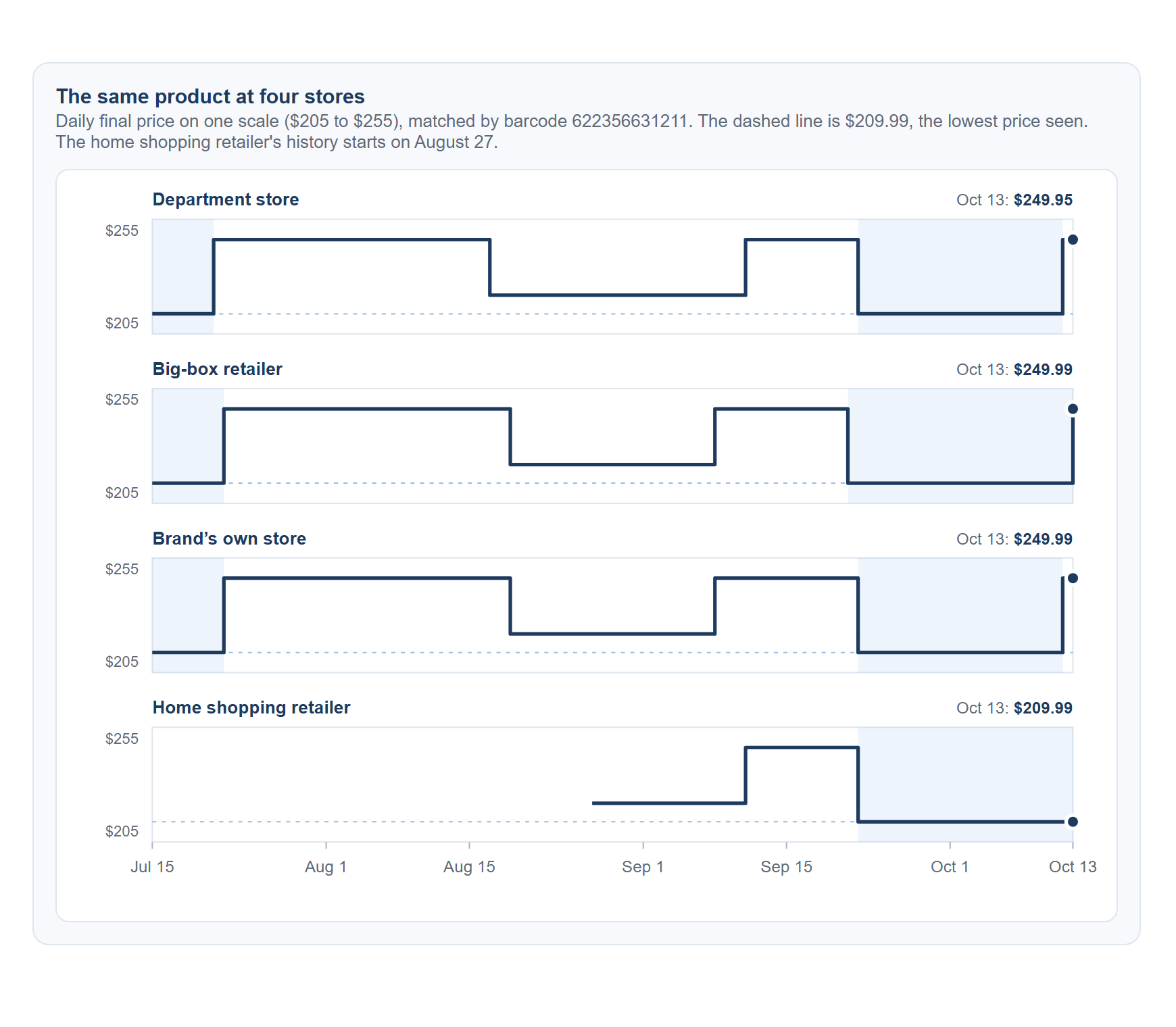
The three stores with a full 91-day history moved in step. All three began a $219.99 sale within two days of each other (August 17 to 19) and ended it within three days of each other (September 7 to 10). The $209.99 price then returned at all four stores on September 21 or 22. Three of the four were back at $249.95 or $249.99 by October 13. The home shopping retailer was still at $209.99.
A reader looking at only one of these stores sees one story. Seen side by side, the history shows a price that was low at the same moments everywhere, which is stronger evidence that $209.99 really is this product's low price.
Adding a price label to a deal post
The summary view is enough for a label. A request names one product (or one barcode) and asks for the summary only, which keeps the response small. The fields behind it are the same ones covered in structuring deal and offer logic with pricing fields.
{
  "target_type": "product",
  "target_ids": ["1178446142492677350"],
  "currency": "USD",
  "include_series": false
}
The response includes a summary of the whole window, trimmed here to the fields the label needs:
{
  "stats": {
    "points": 91,
    "current": { "date": "2026-10-13", "final_price": 249.95, "regular_price": 249.95, "on_sale": false },
    "min_final_price": { "date": "2026-07-15", "amount": 209.99 },
    "max_final_price": { "date": "2026-07-21", "amount": 249.95 },
    "avg_final_price": 230.3,
    "out_of_stock_days": 0
  }
}
A few lines of code turn that summary into a short label:
function priceLabel(stats) {
  const { current, min_final_price: low, points } = stats;
  const gap = Number((current.final_price - low.amount).toFixed(2));
  if (gap <= 0) return `Lowest price in ${points} days`;
  return `$${gap.toFixed(2)} above the ${points}-day low of $${low.amount.toFixed(2)}`;
}
For the department store listing above, the label reads "$39.96 above the 91-day low of $209.99". For a home shopping listing that is sitting at its own low, it reads "Lowest price in 47 days". Notice that the label states how many days it covers, which matters because not every listing has the same amount of history.
A few things to keep in mind
- History is a daily snapshot. The price is recorded once a day, so a short sale that starts and ends between two snapshots will not appear.
- Missing days are not zero. A day with no record means the price was not observed, not that the product was free or unavailable.
- Check stock next to price. A low price on an out-of-stock listing is not one a reader can use. Discount filters that check stock covers this for deal pages.
- Labels age. A price label is only as current as the last check, so schedule refreshes the way this guide to updating product pages suggests.
Used this way, price history turns "$40 off" into "the lowest it has been in three months," which is a statement a reader can check for themselves.