
MCP for Affiliate Commerce: Let Agents Build Safe Product Queries with Merchant and Network Guardrails

MCP (Model Context Protocol) is an open protocol for connecting LLM applications to external tools and data sources through a standardized client server pattern, so an agent can request a tool action, receive structured results, then continue reasoning with that context.
In affiliate commerce, that “tool action” is often a product query. Affiliate.com already gives you normalized product data across more than 30 networks, 20,000 merchant programs, and over a billion products, plus the filters you need to control scope. MCP is the missing glue that lets an agent draft and iterate queries safely, while your integration enforces guardrails around which networks and merchants can appear, how deduplication behaves, and what must be true before anything is eligible to publish.
Why agents need guardrails in product search
Agents are great at translating editorial intent into structured constraints. They are also excellent at being confidently wrong if you let them improvise identity and governance.
Three predictable failure modes show up fast:
Scope drift
An agent starts with a reasonable keyword, then unintentionally expands into networks or merchants you are not approved for, or would never feature. Affiliate.com explicitly supports filtering by network name or network ID, and by merchant name or merchant ID, to keep results relevant to your approvals and strategy.
Identity mistakes
Merchants name products inconsistently, so name based matches can blend identical items with lookalikes. Affiliate.com recommends starting with strong identifiers, especially barcode, because it cuts through naming differences and surfaces true matches across networks.
Output shape surprises
Deduplication is a first order control. When it is enabled, Affiliate.com clusters matching offers and selects a single representative record. When it is off, the response includes all matching variants and offers. Agents need to treat this as a page level contract, not an optional cleanup step.
The core design: a constrained “query authoring” tool over Affiliate.com
The simplest MCP pattern is to expose one tool, for example draft_product_query, that accepts a high level intent and returns a validated Affiliate.com query payload plus an explanation.
Your guardrails sit in the tool, not in the agent prompt:
- Allow list network IDs and merchant IDs
- Enforce required fields like currency
- Enforce page template defaults for deduplication and sorting
- Require a strong identifier for “exact match” workflows, barcode or SKU or MPN
- Clamp limit, disallow unbounded scans
This is how you get the speed of an agent with the predictability of a production integration.
Guardrail set 1: merchant and network allow lists
Affiliate.com’s network filter is explicitly useful when you are only approved on certain networks or want control over where product data is coming from. Its merchant filter is useful when you know which retailers you want to feature and when you are managing approval lists.
In MCP terms, this becomes a policy object your tool applies automatically:
- If the user does not specify a network, apply
network_id in approved_network_ids - If the user requests “only trusted retailers,” apply
merchant_id in preferred_merchant_ids - If the user requests a specific merchant, validate it is inside the allow list, otherwise return a safe error and suggested alternatives
That sounds basic, but it eliminates most accidental compliance issues before they reach content.
Guardrail set 2: identity requirements by workflow
Affiliate.com’s guidance is clear: SKUs or MPNs identify a specific product from a specific merchant, while barcode can verify that two listings from two different networks refer to the same product.
Use that as the agent contract:
- Comparison or best offer: require barcode
- Merchant specific landing page: allow SKU or MPN
- Exploration: allow any field plus brand, then require a second step that pins identity
Affiliate.com even describes the operational flow: start with a strong identifier, search across all networks, then compare options using fields like final price, discount, and availability.
Guardrail set 3: deduplication defaults per page template
Affiliate.com documents exactly how deduplication changes results. Enabled means one representative record per clustered product group. Disabled means all offers and variants, which is what you want for comparison widgets.
So the guardrail is not “deduplication true or false.” It is “deduplication locked by template.”
- Browse grid template: deduplication on
- Offer table template: deduplication off
- Curated list template: deduplication on, but keep a back link to an offer view
Agents can choose the template, but they should not toggle the behavior ad hoc.
Applied example: an agent drafts a safe deals query
Imagine your editorial lead asks:
“Find in stock Bluetooth speakers, show only approved networks, prioritize real discounts, keep it clean for a grid.”
The agent should not hand craft filters from memory. It should call your MCP tool.
MCP tool input
{
"intent": "bluetooth speaker deals",
"page_template": "browse_grid",
"currency": "USD",
"min_discount_percent": 20,
"require_in_stock": true,
"preferred_brands": ["JBL", "Sony", "Bose"]
}
Tool output: validated Affiliate.com query payload
{
"query": {
"any": "bluetooth speaker",
"currency": "USD"
},
"filters": {
"brand": ["JBL", "Sony", "Bose"],
"in_stock": true,
"sale_discount_min": 20,
"network_id": ["net_approved_1", "net_approved_2"]
},
"deduplication": true,
"sort": [
{ "field": "sale_discount", "direction": "desc" },
{ "field": "final_price", "direction": "asc" }
],
"limit": 24
}
Why these fields: Affiliate.com supports the any field for broad discovery across names, descriptions, brands, and more, then recommends layering in precision filters like brand, merchant, or price. It also documents discount and price fields, including regular price, final price, and discount, so you can filter and sort on true deal strength.
Make it auditable: shareable query links as your support artifact
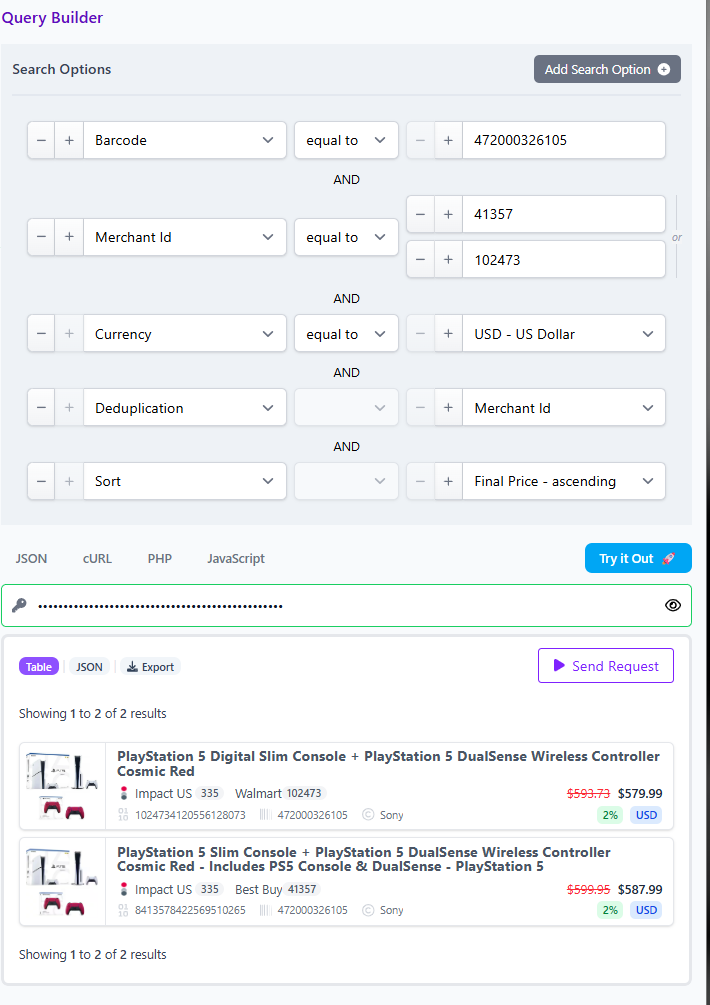
Agents add speed, but teams need reproducibility. Affiliate.com’s Query Builder lets you choose from 30 plus search fields, then share a link that reopens to the query and populates the specified products.
In an MCP workflow, treat the shared Query Builder link as the human readable receipt:
- The agent drafts the query through the MCP tool
- The tool returns the payload plus a Query Builder link
- Editorial reviews the link
- Engineering uses the payload
- Support can reproduce issues by opening the same link
This is the cleanest way to keep AI authored changes accountable.
Practical checklist: what to implement before you let agents write queries
- An MCP server that exposes a small tool surface, start with “draft query” and “validate query”
- Network and merchant allow lists enforced in the tool layer, not the prompt layer
- Identity requirements by workflow, barcode for cross merchant matching, SKU or MPN for merchant scoped precision
- Template locked deduplication behavior, and clear defaults for sort and limit
- Required currency for any price sorting or comparisons, to avoid nonsense comparisons across currencies
- Minimum publishable fields check, image URL, commission URL, availability signals, last updated, before content renders
Start with one MCP tool, then expand
If you want to test MCP quickly, do not start by letting an agent freeform call the API. Start by connecting the agent to a single constrained tool that returns Affiliate.com query payloads plus a Query Builder link. That lets new teams move fast while still honoring the fundamentals: normalized identity, controlled scope via merchant and network filters, and predictable output shape via deduplication.