
SKU Search API: How to Find Products by Stock Keeping Unit Across Multiple Merchants


A SKU Search API helps you retrieve products using a stock keeping unit, usually the merchant’s own internal identifier for a specific listing. For affiliate teams, SKU search is useful when you already know the exact item from a merchant feed, a content brief, a merchandising calendar, or a partner request, and you want to locate it fast.
The catch is that SKU is usually merchant specific. It is excellent for finding one merchant’s exact listing, but weak as a universal identifier across the wider market. That is why advanced product discovery depends on three things working together: normalization, identifier strategy, and deduplication. Affiliate.com is built around that reality, with normalized search across more than 30 networks, tens of thousands of merchant programs, and over a billion products.
Why SKU search matters, and where it breaks
SKU search is often the cleanest way to answer a very practical question: Can I find this exact merchant listing right now? A content operator may get a spreadsheet from a brand manager, with merchant names and SKUs but no barcodes. A commerce editor may need to refresh a holiday gift guide without re reviewing every product manually. In both cases, SKU is the fastest starting point.
But SKU alone does not solve cross merchant comparison. Merchant A’s SKU for a coffee maker will not match Merchant B’s SKU for the same physical item. That is why SKU search is best treated as a precise entry point, not the whole strategy.
SKU versus barcode versus MPN
A useful mental model is simple.
Use SKU when you want the exact merchant listing
SKU is ideal when you know the source merchant and want that exact offer. It is especially useful for:
- content refreshes tied to a specific merchant
- replacing broken links with the same merchant listing
- validating whether a promoted item is still in stock
- checking sale price, final price, or availability for a known partner listing
Use barcode when you want the same product across merchants
Barcode fields such as GTIN, UPC, or ISBN are the stronger cross merchant key because they identify the product itself, not just one retailer’s listing. Affiliate.com uses normalized identifiers to connect identical products across merchants, even when titles differ materially.
Use MPN when barcode is missing
MPN, or manufacturer part number, is often the next best identifier when barcodes are absent or incomplete. It can help narrow to a model family with much more precision than title search alone.
The workflow that actually works
Advanced teams do not rely on one field. They layer fields in sequence.
Step 1: Start with SKU to anchor the known listing
Search the SKU field with deduplication off. That gives you the raw merchant level result, which is exactly what you want at the start. Then confirm the surrounding fields:
- merchant name or merchant ID
- brand
- final price and regular price
- availability or in stock status
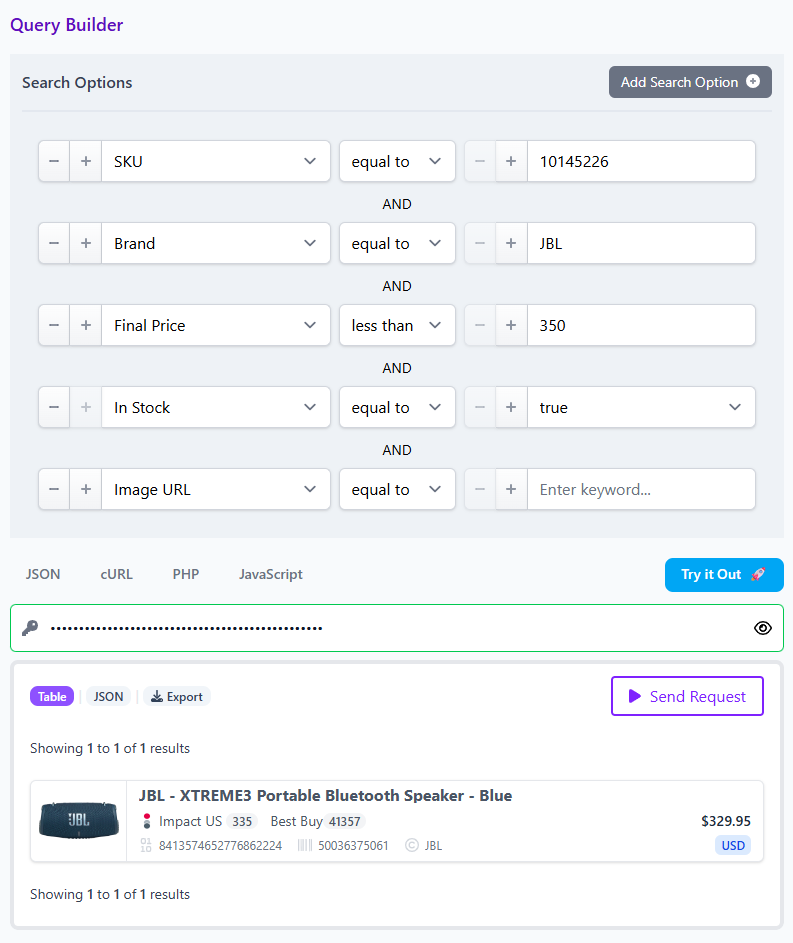
This is the moment where many teams avoid a silent mistake. A SKU can be recycled, mistyped, or mapped to a child variant you did not expect. Looking at price, brand, and stock prevents a bad comparison from entering production.
Step 2: Promote the search from listing level to product level
Once you have the anchored merchant listing, look for a product wide identifier such as barcode or MPN. This is where normalization earns its keep. Instead of trusting titles, you move to a stable product key and search the wider dataset for the same item across merchants. Affiliate.com supports barcode matching across merchants and networks, which is what turns a single known listing into a real market view.
Step 3: Layer commercial filters
Now the search becomes strategic. Filter by:
- in stock or availability
- currency
- final price
- sale discount
- merchant or network
- commissionable status, when relevant to execution
This turns a simple product lookup into an operational decision tool. You are no longer asking, “Where is this product?” You are asking, “Which approved merchant has the best presentable offer for this audience, in this market, right now?”
A concrete example
Say your team has a merchant Barcode for a bestselling espresso machine from one retailer. You search by Barcode and confirm the listing is live, in stock, and priced below $399 in USD. Good start.
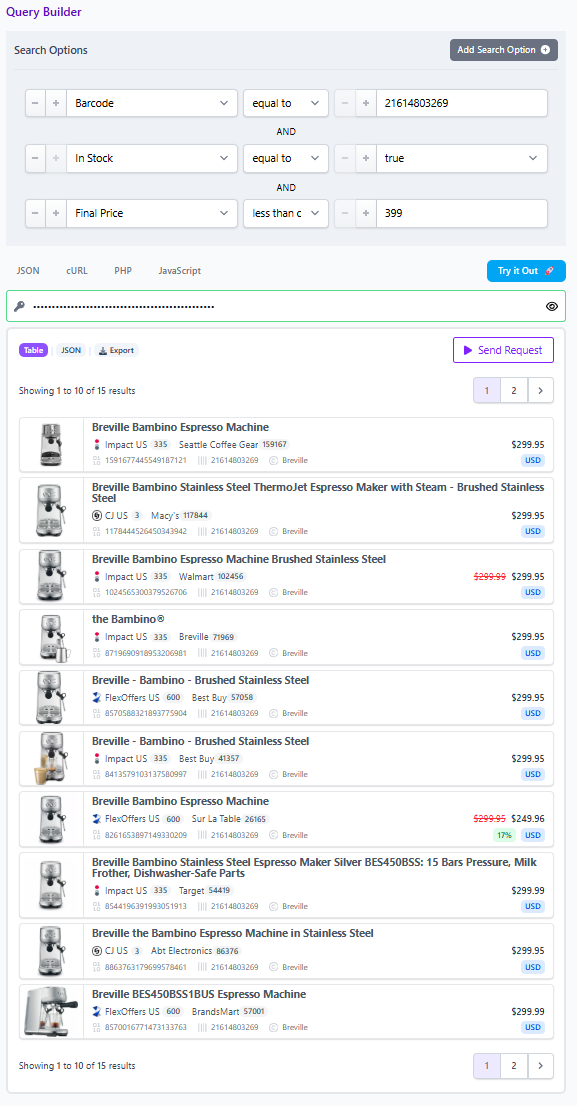
Next, you extract the barcode from that result and run a second search across the broader catalog. Now you find the same machine sold by several merchants, one at $299.95, another at $249.96 with a deeper sale discount, and another in EUR for a regional page. Because the product data is normalized, you are comparing the same item rather than a close cousin with a slightly different title. Because deduplication can be turned on or off, you can either show one clean product entry or expose every merchant offer for a comparison experience.
That distinction matters. Without normalization and deduplication control, “best offer” pages drift into noise. With them, they become credible.
What advanced affiliate teams should check before publishing
Use SKU for control, not for certainty across merchants
SKU is a precise merchant key. Treat it as a reliable pointer to one listing, not as proof that two merchants sell the same thing.
Validate with multiple fields
For product matching and offer selection, combine identifiers with:
- brand
- barcode or MPN
- final price and discount
- availability
- merchant filters
- currency filters for regional integrity
Choose deduplication based on the page type
Turn deduplication on for clean discovery pages. Turn it off for comparison modules, merchant choice blocks, and offer level analysis. Affiliate.com supports both modes, which is critical when one team is serving editorial discovery and another is building commerce tooling.
Where to go next
If your workflow starts with merchant supplied SKUs, the fastest move is to test the sequence in Affiliate.com’s Query Builder first, then operationalize it in the API. Start with SKU. Confirm the merchant listing. Promote to barcode or MPN for cross merchant matching. Then layer price, discount, stock, and merchant filters until the result set reflects the decision you actually need to make.
That is the practical advantage of a real SKU Search API inside a normalized product system: not just finding a listing, but turning one identifier into a cleaner comparison, a better merchant mix, and a more trustworthy shopping experience.