
Same Product, Different Merchants: A Price Comparison Workflow for API Users


Price comparison sounds simple until the same product appears under five merchant titles, three discount structures, and two stock statuses. For API users, the challenge is not finding products. It is proving that each offer belongs to the same underlying item before ranking price, discount, availability, and merchant fit.
Affiliate.com helps solve that problem by normalizing product data across more than 30 networks, tens of thousands of merchant programs, and over a billion products. The practical goal is clean offer comparison: use identifiers to match the same product across merchants, then layer pricing, inventory, merchant, and network fields to decide which offers belong in a product card, widget, buying guide, or Comparison Set.
Why Product Titles Are Not Enough for Price Comparison
Merchant titles are written for merchandising, search, and feed conventions. They are not reliable identity records.
One retailer may use the full brand and model. Another may shorten the product name. A third may append color, bundle, size, or promotional language. If your API workflow compares by title alone, it can miss valid offers or compare a core product against a bundle.
That is why normalized product identity matters. Affiliate.com uses structured identifiers such as barcode, GTIN, UPC, MPN, SKU, and ASIN to help connect listings that refer to the same product, even when names and descriptions vary.
Start With the Strongest Product Identifier
For price comparison, the first decision is the starting key. A broad query can help with discovery, but a known product should move quickly toward an identifier based workflow.
Use this order of confidence:
- Barcode, GTIN, UPC, EAN, or ISBN for the same physical item across merchants
- MPN when model specificity matters
- SKU when you are working inside a merchant specific context
- ASIN when starting from an Amazon product and looking for alternative merchant matches
- Name or any field when you are still exploring or do not yet have a clean identifier
The cleaner the identifier, the cleaner the comparison. Barcode matching is especially useful because it cuts through inconsistent merchant naming and helps distinguish the same product from a lookalike.
A Price Comparison Workflow for API Users
Imagine an API user has a product that already performs well in an editorial article. The question is not “What products are similar?” The question is sharper: “Who else sells this exact item, and which offer should we show?”
Step 1: Resolve the Product
Start with the most specific product data available. That may be a barcode from your catalog, an MPN from a product detail page, or an ASIN from an Amazon listing.
If you only have a product name, use a broader discovery pass first, then inspect the returned identifiers before moving into comparison logic.
Step 2: Find Matching Merchant Offers
Search across merchants and networks using the identifier. The goal is to retrieve listings that represent the same product, even if their merchant supplied titles differ.
This is where normalization changes the workflow. You are not asking the API to guess whether “close enough” titles match. You are using structured product data to connect offers that belong together.
Step 3: Layer Commercial Filters
Once matching offers are returned, layer the fields that determine whether an offer is useful to your experience.
Key fields include:
- Final price
- Regular price
- Sale price
- Sale discount
- Currency
- Ship price
- In stock
- Availability
- Merchant ID
- Network ID
For a domestic comparison widget, you may filter currency to USD, require in stock availability, and sort by final price. For a deal focused page, you may require on sale status and rank by sale discount. Affiliate.com supports pricing fields such as regular price, final price, and discount so API users can filter, compare, and prioritize offers with more precision.
Step 4: Apply Merchant and Network Controls
Price is not the only decision variable. Source control matters.
Merchant ID, merchant name, network ID, and network name let teams narrow results to the sources they want in a given experience. A publisher may want to show only approved merchants, isolate one network for testing, or compare offers inside a defined merchant set.
This is where API discipline beats manual curation. The workflow can encode the operating rule instead of relying on a person to remember it each time.
Step 5: Decide How to Deduplicate
Deduplication should be a display decision, not an afterthought. If the user is browsing a category page, showing one clean product card may be best. If the user is comparing offers for one exact item, keeping multiple merchant listings visible is the point.
Affiliate.com supports deduplication controls, so API users can choose whether to consolidate repeated listings or show separate merchant offers. For a product grid, deduplicate. For an offer table, keep deduplication off so price, discount, and availability differences remain visible.
Applied Example: Where Can I Get the Cheapest AirPods?
Suppose a shopper asks, “Where can I get the cheapest AirPods?” The page should not return a loose list of wireless earbuds. It should identify the AirPods product, find matching merchant offers, then rank the available options by price.
In Query Builder, the workflow would start broad, then tighten quickly:
- Search the any or name field for AirPods
- Use brand to narrow results to Apple when needed
- Use barcode, GTIN, UPC, MPN, or ASIN once the exact product is identified
- Filter currency to the target market, such as USD
- Filter availability or in stock so unavailable offers do not lead the module
- Turn deduplication off for the merchant offer list so Amazon, Target, Walmart, and Adorama can each appear separately
- Sort by final price, or sale price when the experience is focused on discounts
- Return merchant name, final price, availability, commission URL, image URL, and product URL
The API call should mirror that same logic. Start with a product discovery query, confirm the identifier for the exact AirPods model, then make the comparison query around that identifier. The comparison query should include pricing fields such as final price, regular price, sale price, sale discount, currency, and ship price, plus merchant and network fields for source control.
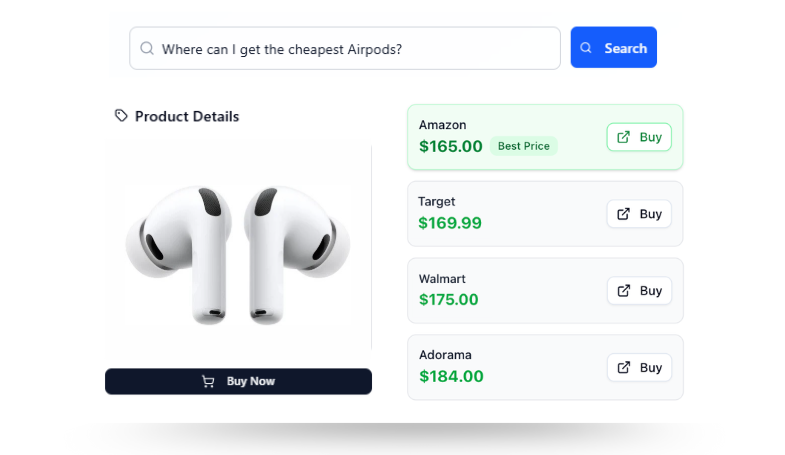
That is how the example reaches a clean “best price” state. Identifier fields establish that each merchant is selling the same product. Pricing fields determine the order. Availability fields prevent weak offers from leading. Merchant fields make the result usable for an affiliate product card, offer table, or shopping widget.
How to Think About Cross Currency Comparisons
Cross currency comparison adds another layer of caution. The same product may appear in USD, GBP, EUR, CAD, or other currencies depending on merchant region.
Affiliate.com supports currency as a searchable field, which helps API users isolate regional experiences or compare offers within a defined currency. For global pages, use currency deliberately rather than mixing regions in a single price table without context.
The editorial rule is simple: make the comparison understandable. If prices or availability are cited in copy, verify them in the live UI before publishing and avoid presenting a static snapshot as a guarantee.
Where Query Builder Fits
Query Builder is the fastest way to test price comparison logic before pushing it into an API workflow. Existing users can validate whether a barcode returns the expected merchant offers, whether deduplication changes the display set, and whether filters such as brand, merchant, price, discount, currency, and stock behave as intended.
It also helps teams collaborate. Affiliate.com’s Query Builder lets users share narrowed product results, so editorial, product, and data teams can review the same selection logic before it becomes part of a live experience.
A Decision Checklist for Price Comparison
Before shipping a price comparison experience, ask five questions.
- Are we comparing the same product, or merely similar products?
- Which identifier proves the match best: barcode, MPN, SKU, or ASIN?
- Should deduplication be on for cleaner browsing or off for offer comparison?
- Which price field drives the ranking: final price, sale price, sale discount, or regular price?
- Which merchant and network filters reflect our source rules?
If the answer to the first question is unclear, pause the workflow. Price comparison without product identity is just sorted noise.
Build Price Comparison Around Product Identity
The strongest price comparison workflows start with a simple discipline: match first, rank second.
Affiliate.com gives API users the product data structure to do that at scale. Use identifiers to barcode match the same item across merchants, layer price and availability filters, control merchant and network scope, and choose deduplication based on the user experience.
Start in Query Builder, confirm the product set, then carry the same logic into the API. That is how price comparison moves from manual review to repeatable operating system.