
Commerce MCP API Coverage: What Builders Can Query Across Affiliate.com Product Data

Commerce MCP is the commerce use case for Model Context Protocol, a structured way for AI systems to request product data, compare options, and return usable shopping answers. For affiliate teams, the hard part is not the agent layer. It is the product data layer beneath it.
A Commerce MCP experience is only as useful as the fields it can query and trust. Affiliate.com gives builders access to normalized product data across more than 30 networks, tens of thousands of merchant programs, and over a billion products, with indexed fields spanning product identity, pricing, inventory, merchant context, network context, attributes, and URLs.
Why Commerce MCP Needs Normalized Product Data
Most merchant feeds were not designed for AI agents. They were designed to describe products, and each merchant describes the same item differently.
One merchant might list a water bottle with the full brand name, another might shorten the model, and a third might pack the title with promotional language. Normalization turns those inconsistent records into a queryable product graph, so a Commerce MCP can compare like with like instead of guessing from titles.
That matters because AI shopping workflows tend to collapse three jobs into one response:
- Identify the product
- Compare merchant offers
- Explain why a result should be shown
Without normalized identifiers, deduplication, and field level filtering, the agent risks returning a polished answer built on messy inputs.
What Builders Can Query in Affiliate.com Product Data
Affiliate.com’s API coverage is useful because the query surface maps closely to how affiliate operators already think. You are not limited to a product name search. You can query and refine across commercial, operational, and product identity fields.
Merchant and Network Fields for Source Control
Commerce MCP builders can filter by merchant name, merchant ID, network name, and network ID. This is useful when the agent should only surface products from approved sources, known partners, or a specific network scope.
For example, a product lead building a gift finder might start with a broad query for “espresso machine,” then restrict results to selected merchants and networks. That keeps the answer aligned with business rules rather than letting the agent roam across every possible offer.
Identifier Fields for Exact Product Matching
Identifiers are the backbone of serious commerce search. Affiliate.com supports fields such as barcode, SKU, MPN, ASIN, and related product IDs, which help distinguish an identical product from a lookalike.
A barcode match is especially important when titles diverge. If two merchants sell the same physical product under different names, the barcode can help connect those listings and support a clean comparison across merchants.
A practical Commerce MCP workflow might look like this:
- Start with an ASIN or product name from an Amazon result
- Resolve the associated barcode when available
- Search Affiliate.com for matching merchant listings
- Layer merchant, price, availability, and currency filters
- Return a concise set of eligible alternatives
That is not AI guesswork. It is structured retrieval with commercial constraints.
Pricing and Availability Fields for Offer Logic
Commerce MCP responses often need to answer a deceptively simple question: which option should be shown first?
Affiliate.com supports pricing fields such as regular price, final price, sale price, sale discount, currency, ship price, and on sale status. It also supports inventory fields such as in stock, stock quantity, availability, and commissionable status where provided.
For a deal module, the agent could query “running shoes,” filter to USD, require in stock availability, include only products on sale, then sort by sale discount or final price. The result is a more disciplined answer than a generic product recommendation.
Prices and availability should still be verified in the live UI before publishing sensitive claims. Affiliate.com refreshes data from networks and merchants, but no serious commerce team should treat a static article snapshot as a price guarantee.
The Role of the Any Field in Commerce MCP Discovery
Not every Commerce MCP query starts with a clean product field. In the example above, the shopper asks for “best marathon nike shoes size 11 for men,” which blends intent, brand, product category, size, gender, and performance context into one natural language request.
The any field is useful at the first pass because it lets the agent search broadly across product names, descriptions, brands, and related metadata instead of forcing the query into a single field too early. From there, the Commerce MCP can convert the shopper’s phrase into structured filters.
For this example, a practical query pattern would be:
- Start with any for “marathon running shoes”
- Filter brand to Nike
- Filter gender to men
- Filter size to 11 when size data is available
- Layer availability so results favor in stock products
- Use final price, sale price, or discount to help rank offers
- Use merchant and network filters when the builder wants source control
- Use deduplication based on whether the experience should show one product card or multiple merchant offers
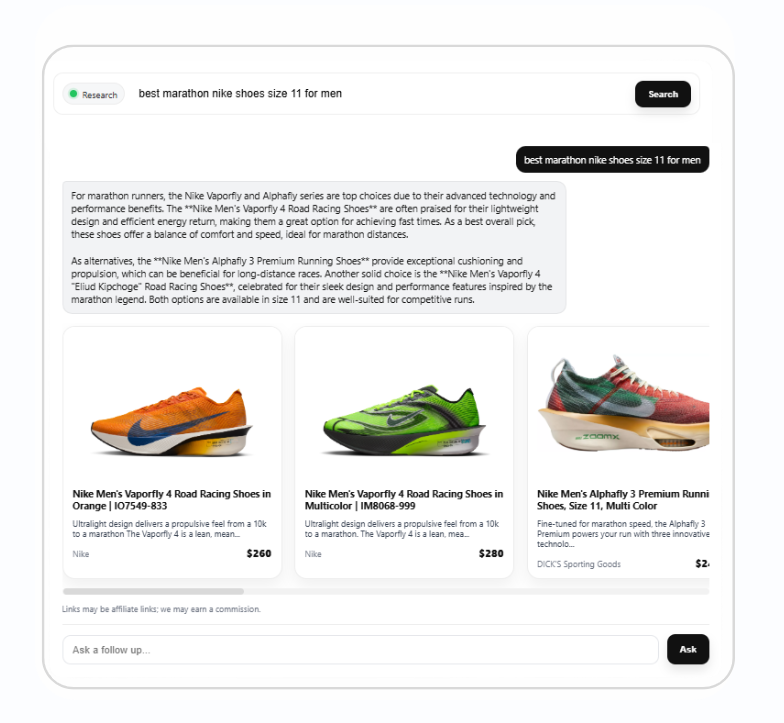
This is the value of Commerce MCP in an affiliate context. The shopper can ask naturally, while the system translates that intent into fielded product discovery that is easier to compare, govern, and explain.
Deduplication Decisions for Agent Output
Deduplication is not a cleanup preference. It is an experience design decision.
When deduplication is on, identical products can be consolidated so users do not see repeated versions of the same item. When deduplication is off, builders can expose multiple merchant offers for the same product, which is useful for comparison tables or offer selection.
A Commerce MCP should make that choice based on the job:
- Use deduplication for browsing pages, gift guides, and category discovery
- Turn deduplication off for exact product comparison, merchant choice, and price sorting
- Pair deduplication logic with barcode or MPN checks when accuracy matters
The best agent output is not always the shortest result. It is the result with the right level of product grouping for the decision being made.
Applied Example: Building a Commerce MCP Query for a Deal Page
Imagine an editorial commerce team preparing a seasonal kitchen appliance page. The brief is simple: show credible offers, avoid duplicates, and keep results limited to merchants the team wants to feature.
A strong query sequence would be:
- Search any for “air fryer”
- Filter currency to USD
- Filter availability to in stock
- Set on sale to true
- Add a minimum sale discount threshold
- Filter to selected merchant IDs or network IDs
- Sort by final price or sale discount
- Use deduplication for the main product grid
- Turn deduplication off inside a comparison view for a specific barcode
This workflow uses the fields that matter to operators: product intent, commercial terms, merchant eligibility, offer quality, and product identity. It also gives the AI layer a cleaner basis for explanation.
Where Comparison Sets and Shareable Queries Fit
Commerce MCP builders should not think only in one off responses. Repeatable query patterns are operational assets.
Affiliate.com’s Query Builder lets teams create product searches across indexed fields and share the resulting query, which helps product, editorial, and data teams work from the same selection logic.
Comparison Sets extend that logic into presentation. A team can start with a keyword, brand, merchant, barcode, MPN, or SKU, then refine by brand, merchant ID, network ID, price range, and deduplication setting.
For Commerce MCP, that means the agent does not need to invent merchandising logic from scratch. It can rely on structured query patterns that humans have reviewed.
A Practical Field Checklist for Commerce MCP Builders
Before connecting an AI agent to commerce data, define which fields govern each decision.
Product Identity
Use barcode, GTIN, UPC, MPN, SKU, ASIN, brand, name, and model to decide whether two listings are the same item or merely similar.
Offer Quality
Use final price, regular price, sale price, sale discount, currency, ship price, on sale status, and availability to determine how an offer should be ranked or explained.
Source Eligibility
Use merchant ID, merchant name, network ID, network name, commissionable status, and URL fields to control where results come from and how they are linked.
User Fit
Use category, color, size, gender, condition, material, manufacturer, tags, country, and other attributes to make results feel curated rather than generic.
Build Commerce MCP on Queryable Commerce Data
Commerce MCP will reward teams that treat product data as structured infrastructure, not as a pile of merchant feed rows. The winning pattern is clear: normalize the catalog, use identifiers to barcode match exact products, layer commercial filters, deduplicate intentionally, and preserve merchant and network controls.
Affiliate.com is built for that operating model. Use the API and Query Builder to test how your Commerce MCP should query, filter, compare, and present product data before you put an agent in front of shoppers.