
Validate Identifiers, Offers, Stock, and Merchant Scope

An Affiliate Product QA Checklist is a pre publish review system for making sure a product set is accurate before it reaches a buying guide, comparison module, or shopping experience. In affiliate commerce, QA means checking whether products are truly the same item, whether merchant offers are usable, and whether price, discount, currency, and availability signals support the editorial claim.
This matters because merchant feeds are not written in one shared language. Titles vary, attributes arrive unevenly, and the same product can appear across networks with different merchant names, prices, stock states, and descriptions. Affiliate.com helps teams work from normalized product data across more than 30 networks, tens of thousands of merchant programs, and over a billion products, with searchable fields for identifiers, merchants, networks, price, inventory, URLs, and product attributes.
Why Product QA Belongs Between Search and Publishing
Search finds candidates. QA decides what deserves to be shown.
A commerce editor might search broadly for “espresso grinder” and find hundreds of usable looking results. The QA step asks sharper questions: is this the same model, a different size, a bundle, an out of stock offer, or a merchant outside the intended scope?
That distinction protects user trust. A comparison page that mixes lookalikes with identical products may still look polished, but its recommendation logic is weak.
Identifier QA: Validate Product Identity Before Ranking Offers
Product identity is the first gate. Use names for discovery, then use structured fields to confirm what the listing actually represents.
Check barcode first when exact matching matters
Barcode fields such as UPC, EAN, GTIN, and ISBN are the strongest starting point when the goal is to match identical products across merchants. Affiliate.com supports barcode based matching so teams can connect listings even when merchant titles differ.
Use barcode QA when building:
- Where to buy modules
- Single product comparison sets
- Alternative merchant recommendations
- Price comparison blocks
Check MPN, SKU, ASIN, and brand for context
MPN and SKU help narrow a model or merchant specific listing. ASIN is useful when a workflow begins with an Amazon product and needs to find matching products or alternatives through barcode or other available identifiers.
Brand is not proof by itself, but it is a useful guardrail. If the barcode matches but the brand field looks wrong, review the listing before it goes live.
Offer QA: Price, Discount, and Currency Need Separate Checks
A good product match can still produce a bad recommendation if the offer layer is not reviewed.
Check these fields before publishing:
- Currency: Does the product set match the audience region or comparison logic?
- Regular Price: Is there a baseline price available?
- Final Price: Is this the price you intend to display or sort by?
- Sale Price: Does it support the sale claim?
- Sale Discount: Is the discount meaningful enough for the page angle?
- Ship Price: Does shipping change the practical offer?
Do not treat a discount as useful simply because it exists. A product at 5 percent off may not belong in a “best deals” module, while a 35 percent discount may be compelling if the product is in stock, relevant, and from an approved merchant.
Stock QA: Do Not Let Dead Offers Lead the Experience
Availability is a quality signal, not an afterthought. A beautiful product card that points users to an unavailable offer creates friction and weakens confidence in the page.
At minimum, review:
- In Stock
- Stock Quantity
- Availability
- Commissionable Status
- Last Updated
For evergreen content, stock QA is especially important. A product can be a strong editorial fit but a poor lead offer if its availability is unstable or unclear. Verify in the live UI before making final publishing decisions, especially for price or stock sensitive pages.
Merchant Scope QA: Decide Who Belongs in the Set
Merchant scope is where commercial strategy enters the checklist. A product set should not blindly include every possible merchant if the page has a defined audience, region, or partnership strategy.
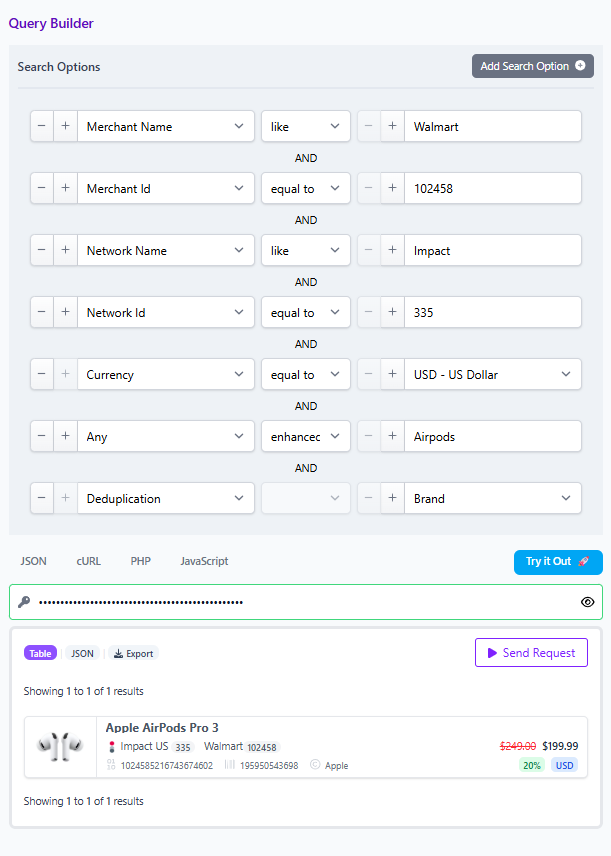
Use merchant and network filters to define scope:
- Merchant Name
- Merchant ID
- Network Name
- Network ID
- Currency
For example, a US focused outdoor gear page might start with the any field for “Airpods,” then layer brand, USD currency, in stock status, sale discount, and a merchant list that matches the team’s publishing strategy. That is not just filtering. It is editorial control.
Deduplication QA: Choose the Right Display Logic
Deduplication is a publishing decision. It controls whether identical products are grouped into a cleaner result or whether each merchant offer remains visible.
Use deduplication for browsing pages
Turn deduplication on when the user wants product variety. A category page for “best trail running shoes” should not show the same shoe repeatedly because several merchants carry it.
Keep offers visible for comparison pages
Turn deduplication off when the user needs merchant choice. A single product page can show multiple offers for the same barcode matched product, then sort or evaluate by final price, discount, availability, currency, or merchant preference.
The rule is simple: deduplicate for clean discovery, preserve offers for buying decisions.
A Practical QA Workflow for a Product Set
Here is a compact workflow for an affiliate team preparing a product set for publication.
Step 1: Start broad
Use any or name to gather candidates. This is useful when merchant feeds place useful details in different fields such as name, description, category, tags, or attributes.
Step 2: Layer relevance filters
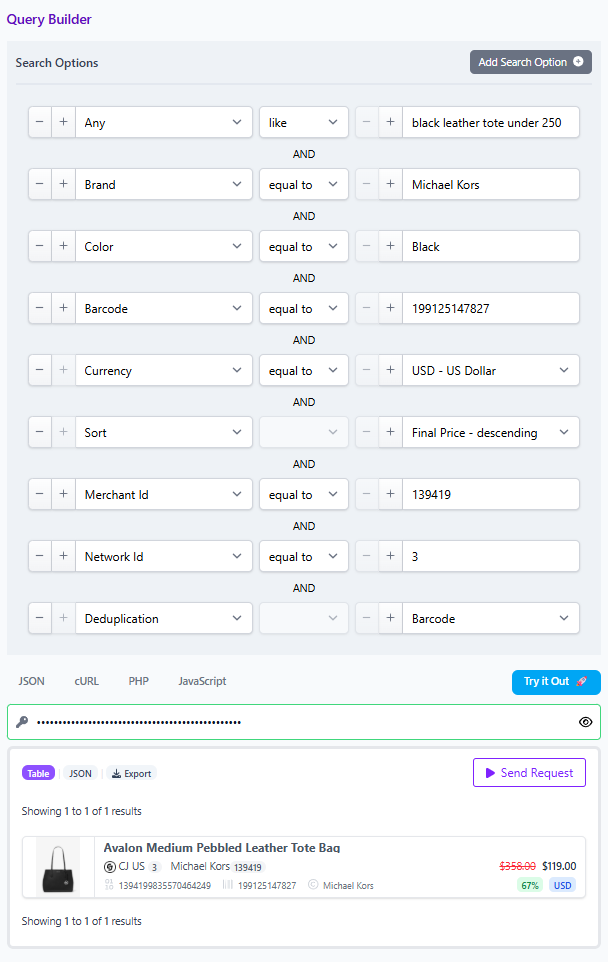
Add brand, category, color, size, gender, material, condition, or other attributes that reflect the page promise. A “black leather tote under 250” page should enforce those constraints before offer ranking begins.
Step 3: Confirm identity
Use barcode first when exact product matching is required. Review MPN, SKU, ASIN, model, and brand where available.
Step 4: Review offer quality
Check currency, final price, regular price, sale price, sale discount, ship price, and on sale status. Then verify availability and commissionable status.
Step 5: Set merchant boundaries
Apply merchant and network filters. Confirm that the set reflects the intended region, partner scope, and editorial strategy.
Step 6: Choose deduplication behavior
Turn deduplication on for a cleaner catalog view. Turn it off when the page is designed to compare merchant offers for the same item.
Step 7: Share the result
Use a shareable Query Builder link or Comparison Set so another operator can review the same logic. This turns QA from a private judgment call into a repeatable process.
The Operator Takeaway
Affiliate product QA is not busywork. It is the control layer between a large searchable product universe and a page your audience can trust.
Use Affiliate.com’s API or Query Builder to search broadly, validate identifiers, layer merchant and offer filters, check stock, choose deduplication settings, and share the final query for review. Clean product experiences come from disciplined checks, not guesswork.