
Building Wishlists and Collections With Affiliate.com product data

Wishlists and Collections are saved product experiences built around intent. A wishlist usually captures products a shopper may buy later, while a collection groups products around a theme, use case, editorial angle, or shopping moment.
For Affiliate.com API users, the opportunity is to build these experiences from normalized product data rather than static merchant feed rows. Affiliate.com aggregates product data across more than 30 networks, tens of thousands of merchant programs, and over a billion products, giving teams a broad search surface for saved product sets.
Why Saved Product Experiences Need Better Product Data
A wishlist is only useful if the saved item remains recognizable after merchant data changes. Product titles shift, promotions expire, products go out of stock, and the same item may appear across several merchants with different naming conventions.
That is why identifiers matter. Barcode, GTIN, UPC, MPN, SKU, and ASIN fields help teams distinguish the same product from a lookalike, which is essential when a saved item needs to be refreshed, compared, or replaced with another merchant offer.
Collections have a different risk. They can become noisy if every search result is saved just because it loosely matches a keyword. Strong collection logic starts broad, then narrows with brand, category, merchant, price, discount, stock, and attribute filters.
Start With the Collection Intent
Before building the API query, define what the saved set is supposed to do. A holiday gift collection, a running gear wishlist, and a price watch list for a specific product should not use the same search logic.
A practical framework:
- Wishlist: save exact products a user may revisit
- Editorial collection: curate products around a theme
- Comparison collection: group merchant offers for the same item
- Deal collection: show products that meet discount or final price rules
- Replacement collection: find the same product when a merchant offer is unavailable
The intent decides which fields matter most. A wishlist leans on product identity. A deal collection leans on pricing and availability. A comparison collection needs deduplication choices and merchant level visibility.
Build the First Search Pass
Most collections start with discovery. The any field is useful when the starting phrase is messy or broad, such as “linen dresses for summer travel” or “wireless headphones under 150.”
The first pass should gather candidates, not finalize the collection. Use any, name, description, brand, category, and relevant attributes to find products that fit the shopping idea.
Then tighten the query with fields such as:
- Brand
- Category
- Color
- Size
- Gender
- Material
- Condition
- Country
- Merchant name or merchant ID
- Network name or network ID
This pattern keeps the experience flexible without making it vague. The broad query finds the market. The filters shape it into a product set.
Use Identifiers to Keep Saved Items Stable
Once a product belongs in a wishlist or collection, save more than the name. Names are useful for display, but identifiers are better for future matching.
For exact products, prioritize barcode, GTIN, UPC, MPN, SKU, ASIN, and product ID where available. These fields make it easier to revisit the same product later, find alternative merchant offers, or compare price changes across listings.
For example, a user saves a specific espresso machine from one merchant. Later, that merchant offer is unavailable. Instead of searching by title again, the API workflow can use the saved barcode or MPN to find the same machine across other merchants, then compare final price, sale price, availability, and merchant fields.
That is the difference between a saved link and a resilient product object.
Decide When to Deduplicate
Deduplication should match the user experience.
For a clean collection page, turn deduplication on so the same product does not appear five times because five merchants carry it. This is better for browsing, gifting, and editorial curation.
For a comparison view, turn deduplication off so each merchant offer can appear separately. That lets users compare merchant name, final price, sale price, ship price, availability, and commission URL for the same product.
A simple rule works well:
- Deduplicate for product discovery
- Do not deduplicate for merchant offer comparison
- Recheck identifier fields when the product match must be exact
Applied Example: Building a Running Gear Collection
Suppose an editorial team wants to build a “Marathon Prep Items” collection. The goal is not to show every running product. The goal is to create a focused set that can support content, shopping widgets, and saved user lists.
Start in Query Builder with a broad search:
- Use any for “marathon training”
- Filter category toward shoes, apparel, hydration, recovery, or accessories
- Layer brand filters if the collection has preferred brands
- Filter currency to the target market
- Require in stock or available products
- Use final price and sale discount to surface useful offers
- Apply merchant or network filters when source control matters
- Turn deduplication on for the collection grid
For a specific product inside the collection, such as a known running watch or shoe, shift to identifier logic. Search by barcode, MPN, SKU, or ASIN, then turn deduplication off if the page should show multiple merchant offers for that exact item.
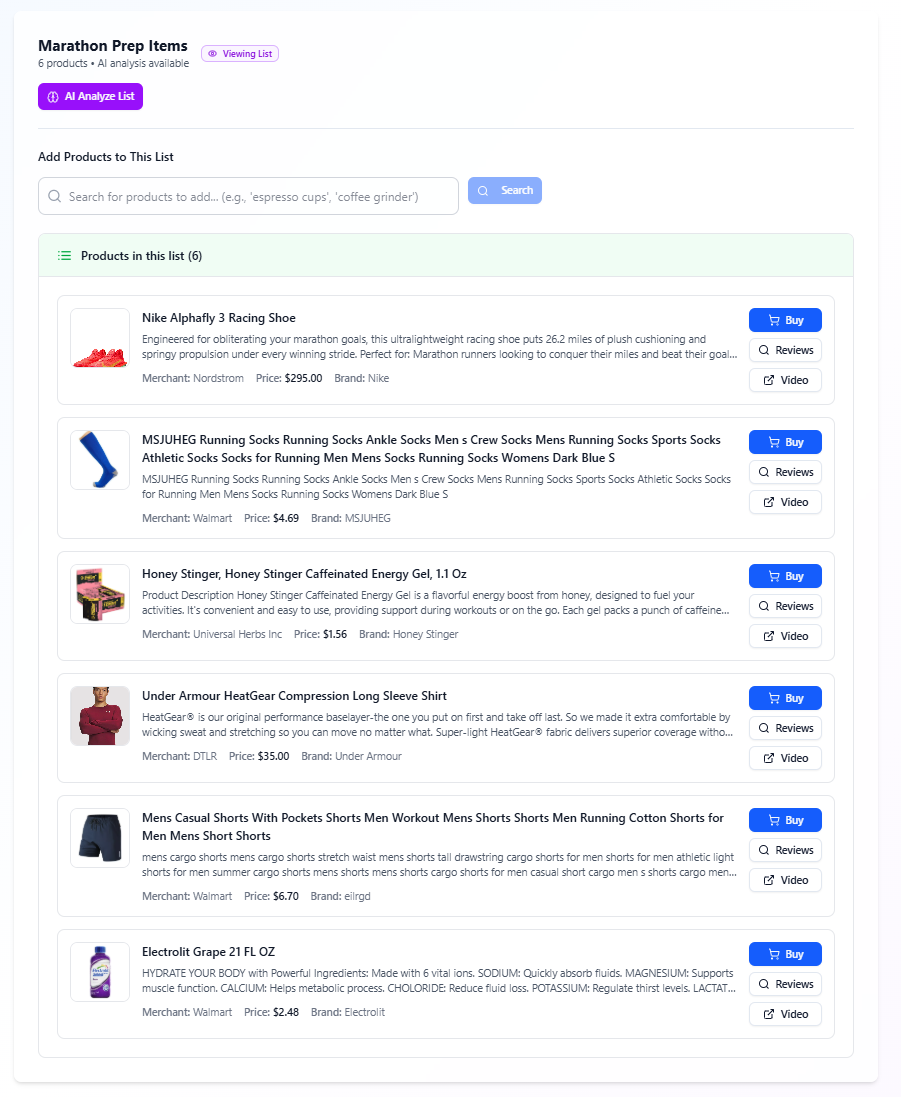
The collection becomes more than a themed list. It becomes a structured product set with clear rules for discovery, identity, availability, and price comparison.
Price and Availability Rules for Saved Sets
Wishlists and Collections should not rely on a single price snapshot. Product feeds refresh from networks and merchants, and prices or stock can change after a product is saved.
Use pricing and inventory fields to create better display logic:
- Show final price as the current offer field when available
- Use regular price and sale price to explain discounts
- Use sale discount for deal based sorting
- Use currency to keep regional collections coherent
- Use in stock, stock quantity, and availability to avoid weak recommendations
When writing editorial copy, avoid fixed price promises unless verified in the live UI at time of publishing. A saved collection should help users evaluate offers, not imply a permanent guarantee.
What to Store for Each Saved Product
A strong wishlist or collection record should preserve the fields needed for future refresh and display.
At minimum, store:
- Product name
- Brand
- Image URL
- Product URL or direct URL
- Commission URL
- Barcode, MPN, SKU, ASIN, or product ID
- Merchant name and merchant ID
- Network name and network ID
- Final price, regular price, sale price, and currency
- Availability and in stock status
- Last updated where available
This gives product, editorial, and data teams enough context to rebuild the set, audit it, or refresh merchant offers later.
Build Saved Commerce Experiences From Query Logic
The best Wishlists and Collections are not manually assembled once and forgotten. They are built from repeatable search logic, clear product identifiers, and deliberate display rules.
Use Affiliate.com Query Builder to test the collection logic first. Confirm the search fields, layer filters, review deduplication behavior, and validate merchant offers before carrying the same structure into the API.
That workflow turns saved product experiences into durable commerce assets: searchable, comparable, refreshable, and easier for teams to govern.