
Affiliate Product Feed Aggregator: How to Consolidate Multiple Network Feeds into One API


An affiliate product feed aggregator consolidates product data from multiple affiliate networks, merchants, and formats into one structured access layer. For advanced affiliate teams, the point is not simply collecting more feeds. The point is turning fragmented merchant data into a searchable product system that can normalize, deduplicate, barcode match, filter, and compare offers with commercial discipline.
Affiliate.com aggregates normalized product data across more than 30 networks, tens of thousands of merchant programs, and over a billion products, with searchable fields for merchant, brand, barcode, SKU, MPN, ASIN, price, discount, availability, currency, attributes, URLs, and network metadata. That structure lets teams move from static feed management to API driven discovery, comparison, and curation.
Why consolidating affiliate feeds is harder than combining files
A merchant feed is not a universal product catalog. It is a merchant supplied view of inventory, often shaped by that merchant’s ecommerce system, network requirements, taxonomy habits, and promotional priorities.
The same product may appear as three different titles across three merchants. One feed may include a GTIN. Another may include only an MPN. A third may include a rich title but weak attributes. Without normalization, the data team inherits the mess and the editorial team sees the symptom: duplicate products, incomplete comparisons, and brittle deal pages.
A consolidated API should solve four practical problems:
- Product discovery across networks
- Product identity across merchants
- Offer comparison across prices, currencies, discounts, and stock states
- Operational control through filters, sorting, deduplication, and shareable result sets
That is the difference between warehousing feeds and operating a product intelligence layer.
Normalize first, then search
Normalization means standardizing inconsistent product data so different feeds can be searched, compared, and organized through common fields. In affiliate product data, normalization touches brand names, product titles, identifiers, categories, pricing fields, availability states, and merchant metadata.
Affiliate.com’s approach is useful because the API exposes searchable fields across the commercial stack. A product lead can search by name or description, narrow by brand, filter by merchant or network, validate identity with barcode or MPN, and then rank by final price, sale discount, in stock status, or currency.
That sequence matters. Search finds candidates. Identifiers prove sameness. Filters decide what deserves placement.
Use identifiers to connect products across merchants
The most important consolidation question is deceptively simple: are these listings the same product?
Titles are rarely enough. A merchant might call a product “Sony Noise Canceling Headphones,” while another uses the full model name and a third adds color, bundle, and promotion language. In a raw feed stack, those may look unrelated.
Structured identifiers cut through that noise. Barcode fields such as UPC, EAN, GTIN, and ISBN can connect identical products across merchants. MPN and SKU can help with model level specificity, though SKU may be more merchant specific. ASIN can support workflows that begin with Amazon and then look for matching products at alternative merchants.
For a comparison use case, the identifier is the spine. Once the product is matched, the team can compare merchant name, final price, regular price, sale discount, currency, availability, commissionable URL, image URL, and network source without guessing whether the rows describe the same item.
Decide when to deduplicate
Deduplication is the control that determines whether matching listings collapse into one product result or remain visible as separate merchant offers. It is not a cleanliness preference. It is a user experience decision.
Turn deduplication on when the page is meant to show variety. A buying guide for cordless drills should not show the same model five times because five merchants list it differently.
Turn deduplication off when the page is meant to show offer depth. A price comparison module should preserve multiple merchant offers so the user can weigh final price, sale discount, availability, currency, and preferred retailer.
The rule is simple: deduplicate for product selection, do not deduplicate for merchant comparison.
Layer filters for commercial precision
A single network feed can be browsed. A consolidated product API must be governed.
Affiliate.com supports layered filtering across fields such as merchant, network, brand, category, price, discount, stock, currency, attributes, and identifiers. That lets operators shape results around intent rather than accepting whatever a merchant feed happens to provide.
Practical filter sequence
A data ops lead building a “discounted running shoes” module might use this workflow:
- Start with the any field for broad discovery around running shoes
- Add brand filters for the manufacturers the editorial team wants to feature
- Filter currency to match the audience geography
- Require in stock availability
- Add on sale status and a minimum sale discount
- Use merchant ID or network ID to stay inside approved partner lists
- Sort by final price, discount, or another page specific priority
- Toggle deduplication based on whether the module shows products or offers
This is the operational advantage of one API. The team is not stitching together network exports by hand. It is expressing commercial logic through a consistent query model.
Handle cross currency comparison with discipline
Multi region feeds introduce another consolidation challenge: currency. A product sold in USD, GBP, EUR, and CAD is not automatically comparable just because it shares a product identifier.
A sound aggregator preserves currency as a searchable and filterable field. That allows teams to build localized product modules, compare offers within a currency, or separate market views before deciding what to publish. Affiliate.com’s product data supports currency fields alongside regular price, final price, sale price, sale discount, and shipping price, which gives teams the raw material for cleaner regional experiences.
The trust rule is important: do not imply a guaranteed best price across all markets. Verify price and availability in the live UI before publishing, because product data refreshes from networks and merchants over time.
Mini workflow: consolidate feeds into one API driven process
Imagine an affiliate team managing home appliance content across several networks. The legacy process is familiar: download feeds, reconcile columns, remove duplicates, clean merchant names, and send a spreadsheet to editorial.
A better process starts in the API.
Step 1: Define the product universe
Use any or name for the broad category, such as air fryer or espresso machine. Add category, brand, manufacturer, material, size, or model when the page needs tighter relevance.
Step 2: Control the source set
Use merchant name, merchant ID, network name, or network ID to include strategic partners, approved programs, or specific regions.
Step 3: Validate product identity
For exact product comparisons, search or group by barcode, GTIN, UPC, MPN, SKU, or ASIN where available. This prevents lookalike products from being treated as identical.
Step 4: Apply commercial filters
Layer final price, regular price, sale discount, on sale status, stock quantity, availability, currency, and commissionable status. A deal page should not rely on title language that says “sale” when structured discount fields are available.
Step 5: Package the output
Use Query Builder links or Comparison Sets to share the exact result logic with editorial, partnerships, and product teams. That creates a reviewable source of truth rather than another private spreadsheet.
What to evaluate in an affiliate product feed aggregator
Advanced teams should judge an aggregator by whether it improves decisions, not whether it merely increases coverage.
Look for the ability to:
- Search across normalized product fields
- Match identical products across merchants despite title variation
- Filter by merchant, network, brand, price, discount, stock, currency, and attributes
- Preserve key identifiers such as barcode, SKU, MPN, and ASIN
- Control deduplication based on the page experience
- Compare offers without collapsing meaningful merchant differences
- Share queries or product sets across teams
- Move from visual exploration to API based scale
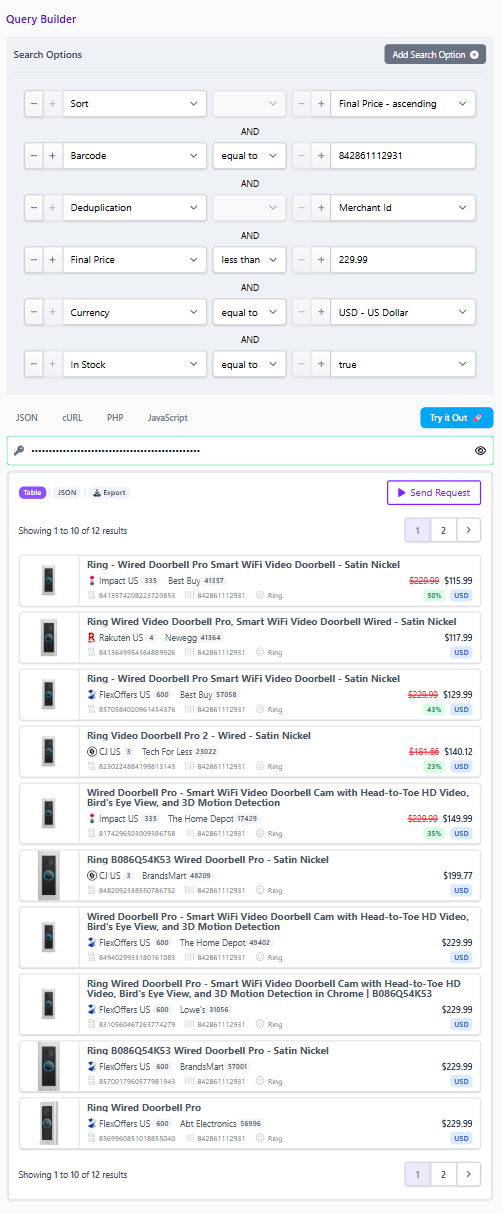
Coverage matters, but coverage without normalization creates a larger cleanup problem. The better test is whether a non technical operator can start broad, narrow intelligently, validate identity, and hand a clean product set to a publishing or product workflow.
From feed consolidation to product operations
Consolidating multiple network feeds into one API is not just a data architecture decision. It changes how affiliate teams work.
Editorial teams can build cleaner buying guides. Product teams can power searchable experiences. Data teams can reduce manual reconciliation. Partnerships teams can spot alternative merchants for the same product and evaluate coverage gaps with more confidence.
Start in Affiliate.com’s Query Builder when you want to explore fields, filters, deduplication, and shareable results visually. Move into the Product Search API when the workflow needs to scale across pages, tools, templates, and internal systems. The operational goal is clear: one normalized access layer for discovery, identity, comparison, and curation across the affiliate product universe.