
Deduplicate and Normalize Product Names: API Solutions for Clean Product Catalogs

Deduplicate and normalize product names is not a cosmetic data task. It is the difference between comparing the same product across merchants and accidentally comparing lookalikes that only share a title, brand, or image.
Normalization means turning inconsistent merchant feed data into structured, searchable product information. Deduplication means deciding when identical product listings should collapse into one clean record, and when every merchant offer should remain visible for comparison. Affiliate.com supports that workflow across more than 30 networks, tens of thousands of merchant programs, and over a billion products, with indexed fields for brand, barcode, MPN, ASIN, merchant, network, price, discount, availability, attributes, and more.
Why Product Names Break Catalog Quality
Product names are written for merchants, not for your catalog. One merchant may list “Sony WH 1000XM5 Wireless Noise Canceling Headphones,” another may write “Sony noise cancelling bluetooth headphones black,” and a third may add promotional copy to the title.
A human can infer the match. A product grid cannot. Without normalized fields, the same item appears three times, price comparisons become noisy, and editorial teams waste time cleaning rows instead of building useful shopping experiences.
Barcode Versus MPN Versus Name
Names are useful for discovery. Identifiers are better for truth.
A barcode, including GTIN, UPC, EAN, or ISBN, is designed to identify a trade item; GS1 describes GTINs as identifiers companies use to uniquely identify products or services that are priced, ordered, or invoiced. Google also treats GTINs, MPNs, and brand names as common unique product identifiers for commerce listings.
For affiliate operators, the decision hierarchy is simple:
- Use barcode when you need exact product matching across merchants.
- Use MPN plus brand when barcode coverage is missing but manufacturer identity is clear.
- Use ASIN when starting from Amazon, then convert or map to barcode where available.
- Use name or any when you are exploring broadly, not validating identity.
The practical rule: title search opens the funnel, identifier search closes it.
How Deduplication Should Change by Use Case
Deduplication is not always “on” or “off.” It is a merchandising choice.
Turn Deduplication On for Clean Discovery
Use deduplication when the user needs product variety. A “best espresso machines under 500” page should not show the same Breville model eight times because eight merchants carry it.
With deduplication on, identical product offers can be grouped into a cleaner product result. This improves scannability, protects editorial quality, and keeps category pages from feeling mechanically generated.
Turn Deduplication Off for Offer Comparison
Keep deduplication off when merchant choice is the point. A price comparison module, shopping assistant, or “where to buy” block should show each merchant offer so users can compare final price, sale discount, currency, stock, and merchant preference.
This is where normalized data pays for itself. You are no longer comparing titles. You are comparing offers attached to the same product identity.
Applied Workflow: From Messy Product Names to a Clean Catalog
Imagine a commerce editor building a comparison set for a popular running shoe. The feed contains inconsistent names, several currencies, mixed stock states, and merchants from multiple networks.
Step 1: Start Broad With Any or Name
Begin with a broad query such as:
Any like contains running shoe
The any field is useful when you do not know whether a merchant placed the important term in the name, description, brand, category, or tags. Affiliate.com’s Query Builder lets teams explore API queries visually before moving them into implementation.
Step 2: Layer Brand and Merchant Logic
Narrow the candidate pool:
Brand equals target brand
Merchant ID in approved merchant list
Network ID in target networks
This keeps the search commercially usable. A perfect product match is less valuable if it comes from a merchant your team does not want to feature.
Step 3: Add Price, Discount, Currency, and Availability
Now make the catalog operational:
Currency equals USD
In Stock equals true
Final Price less than budget ceiling
Sale Discount greater than target threshold
These fields turn normalized product data into a merchandising decision. A product may match perfectly, but if it is out of stock, outside budget, or not commissionable, it should not lead the experience.
Step 5: Choose the Display Mode
For a clean category grid, set deduplication on and show one normalized product card. For a merchant comparison block, keep deduplication off and rank offers by final price, discount, availability, or preferred merchant set.
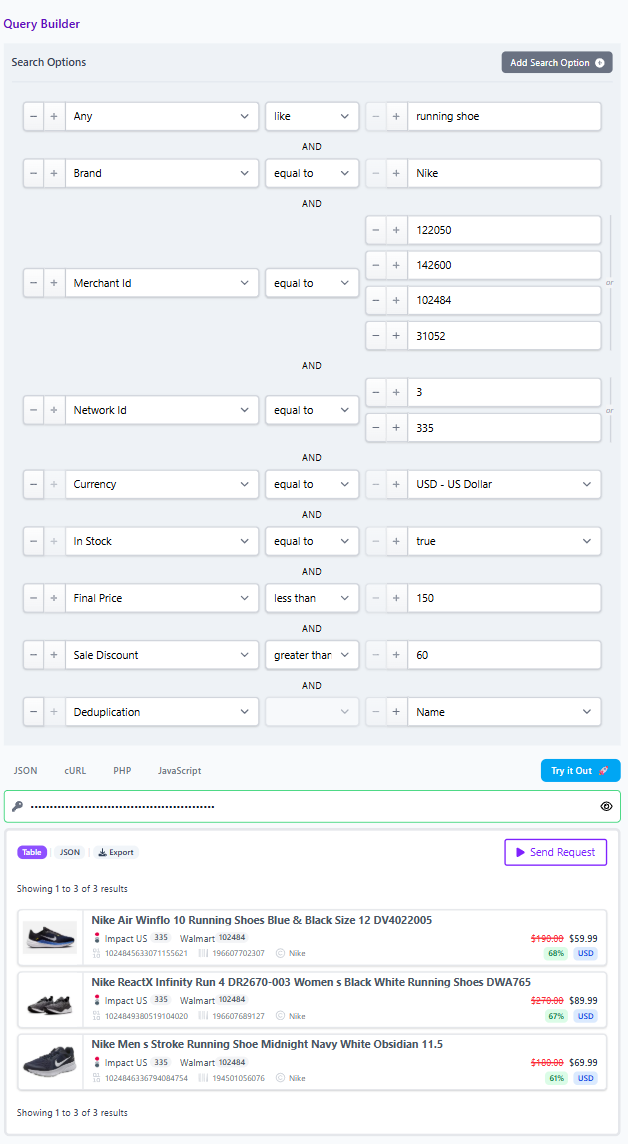
Then save the result as a Comparison Set or share the query link with the team for review.
Catalog Governance Checklist
Before publishing a product collection, ask five questions:
- Is the page using product names for discovery and identifiers for confirmation?
- Are barcode, MPN, ASIN, brand, and merchant fields visible in the review workflow?
- Is deduplication aligned to the page type, not applied by habit?
- Are final price, sale discount, currency, and availability checked before selection?
- Can another operator reproduce the result through the API or Query Builder link?
This checklist prevents the quiet failure mode of affiliate catalogs: attractive pages built on weak matching logic.
The Operator Takeaway
Clean product catalogs do not come from prettier names. They come from disciplined identity resolution, layered filtering, and explicit deduplication choices.
Affiliate.com gives teams the working surface for that discipline: normalized product data, searchable fields, merchant and network filters, barcode and ASIN matching, price and discount logic, stock signals, shareable Query Builder links, and Comparison Sets. Start in the Query Builder, validate the match with identifiers, then move the winning query into your API workflow or saved comparison experience.