
Finding the Right Merchant Partnerships for Your Niche

An affiliate program network directory is only as useful as the data model behind it. Most directories list merchants, categories, and headline commission rates, but they rarely help you answer the operational question that actually matters: which merchant should I promote for this exact product, right now, given price, availability, and commission structure.
The gap comes from fragmentation. Merchants list identical products differently, networks structure data inconsistently, and commission logic sits outside the product context. Without normalization and identifier level matching, you are comparing programs in the abstract instead of evaluating real offers in market conditions.
Why Commission Structure Alone Is an Incomplete Signal
Commission rate is a percentage applied to a transaction, not a guarantee of earnings. A 10 percent commission on a higher priced or out of stock product can underperform a 5 percent commission on an aggressively discounted, in stock listing.
To make decisions that hold up in production, you need to evaluate:
- Final price, not just regular price
- Discount depth and sale status
- Inventory availability and commissionable status
- Merchant coverage across networks
This is where normalized product data changes the equation. Instead of comparing merchants as isolated programs, you compare them as competing offers for the same SKU.
The Role of Normalization and Identifiers in Merchant Comparison
Normalization standardizes inconsistent product data across more than 30 affiliate networks, tens of thousands of merchant programs, and over a billion products. It ensures that a product listed with three different titles across three merchants resolves to one canonical entity.
Identifiers are the backbone:
- Barcode, the most reliable cross merchant match
- MPN or SKU for merchant specific precision
- ASIN to bridge Amazon listings into broader comparisons
Without these, directories rely on text matching, which introduces false positives and misses true matches. With them, you can confidently group identical products and evaluate merchant partnerships on a like for like basis.
A simple but critical shift: you are no longer asking which program pays more. You are asking which merchant offers the best combined outcome of price, availability, and commission for a verified product match.
Building a Merchant Comparison Workflow That Actually Works
Start with a product level anchor, not a merchant list.
Step 1, Identify the Product Precisely
Use a strong identifier such as a barcode or ASIN. This ensures you are working with exact matches rather than lookalikes.
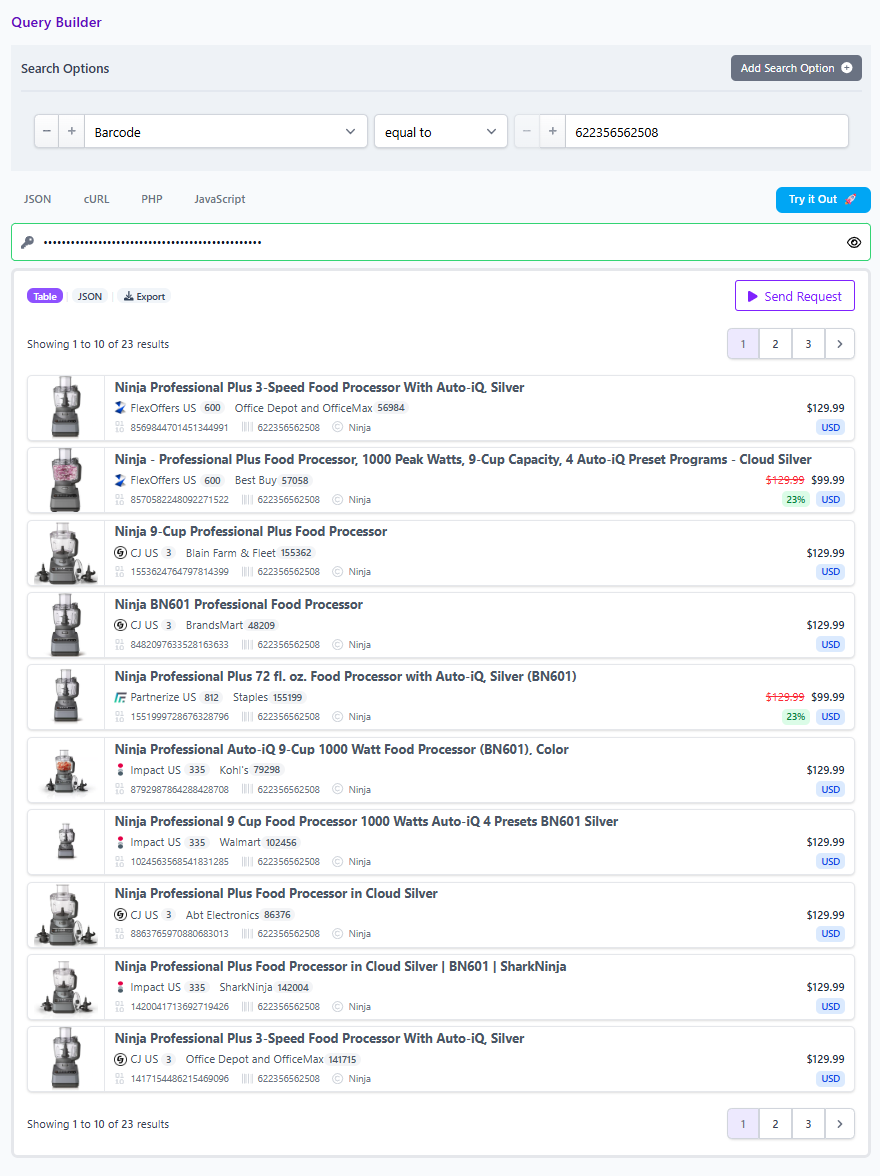
Example:
You have a high intent page around a specific model of noise cancelling headphones. Instead of searching by name, query by barcode to retrieve every merchant listing tied to that product.
Step 2, Expand Across Networks
Run the identifier across all available networks. A normalized dataset aggregates results from more than 30 networks, allowing you to see the full merchant landscape without switching platforms.
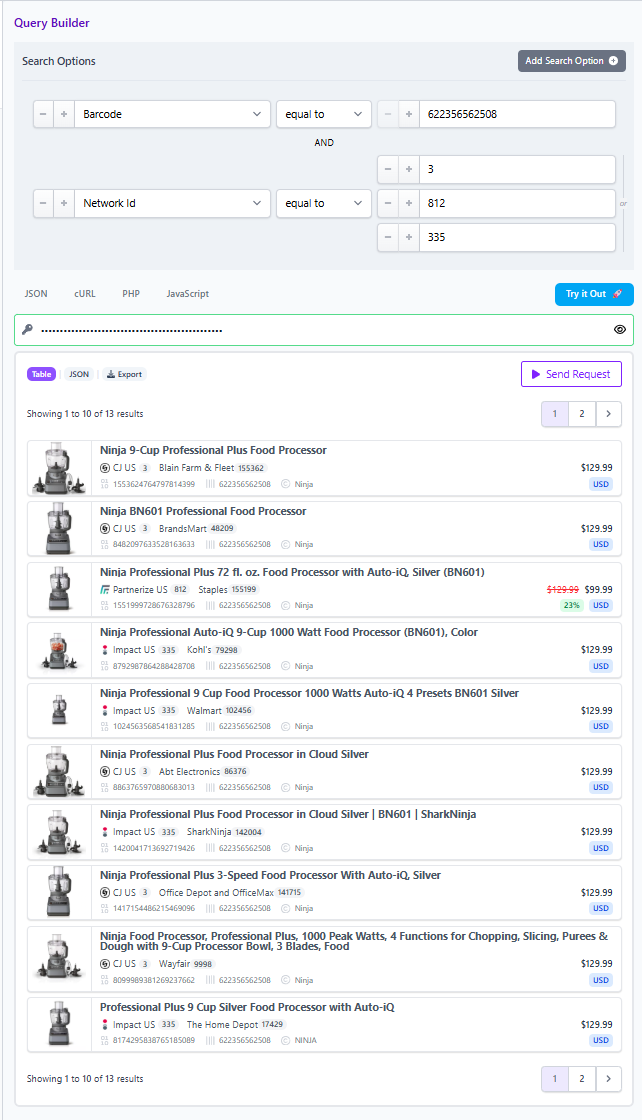
This is where directories typically fail. They show who exists, not who actually carries the product.
Step 3, Compare Core Fields That Drive Conversion
Now layer filters and sorting:
- Final price to identify the true checkout cost
- Sale discount to surface promotional intensity
- Availability to avoid dead links
- Merchant or network filters to align with your approvals
At this stage, commission rate enters as a secondary filter, not the starting point.
Step 4, Control Deduplication Based on Use Case
Deduplication determines how you view results:
- On, for clean product level views with one entry per item
- Off, for full merchant level comparisons showing all offers
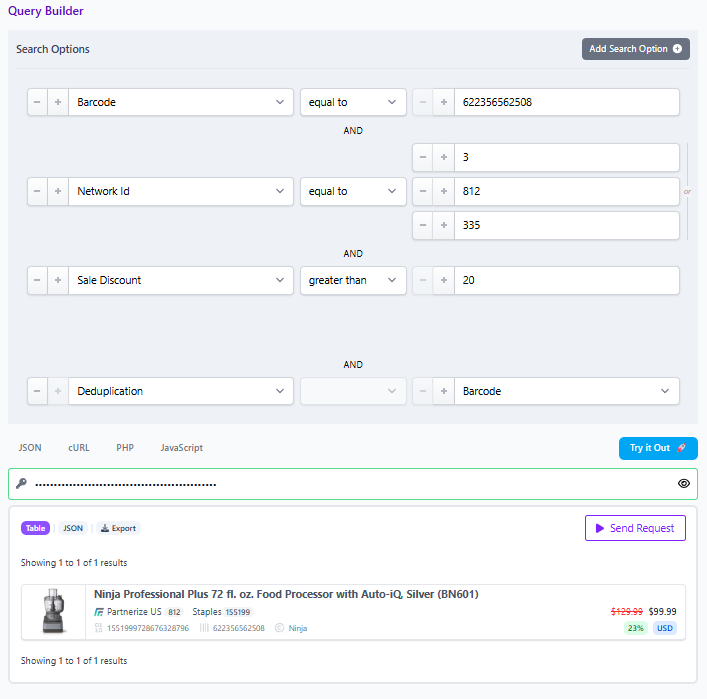
If you are building a directory style comparison table, keep deduplication off. If you are curating a product list, turn it on to reduce noise.
Step 5, Package as a Comparison Set
Once refined, save or share the query as a reusable Comparison Set. This creates a living asset that updates as pricing and availability shift, rather than a static snapshot.
Layered Filtering, Turning Directories Into Decision Engines
Traditional directories are static. Layered filtering turns them into dynamic decision tools.
Start broad using the any field to capture all relevant listings across names, descriptions, and attributes. Then progressively narrow:
- Brand to anchor to a manufacturer
- Price range to align with audience expectations
- On sale and discount thresholds to emphasize deals
- In stock to ensure monetizable inventory
This progression mirrors how real operators work. You explore first, then refine with intent.
A practical example:
You are evaluating merchants for a fitness equipment page.
- Any field search for adjustable dumbbells
- Filter brand to Bowflex and NordicTrack
- Add final price less than 500 USD
- Filter in stock equals true
- Sort by highest discount
Now you have a shortlist of merchant offers that are both competitive and actionable. Only then does it make sense to compare commission structures.
Cross Currency Comparisons, The Hidden Constraint
Global affiliate strategies introduce currency fragmentation. The same product can appear in USD, EUR, and GBP with different pricing dynamics.
Normalization connects these listings under a single product identity while preserving local pricing. This allows you to:
- Compare offers across regions without manual conversion
- Identify arbitrage opportunities where one market is materially cheaper
- Build localized experiences from a unified dataset
Critically, you maintain consistency. You are still comparing the same product, not approximations.
Merchant Mix Strategy, Beyond Top Paying Programs
High performing directories balance merchant mix, not just commission rates.
Large merchants provide trust and conversion stability. Smaller or niche merchants often introduce:
- More aggressive discounts
- Unique inventory availability
- Less competitive exposure
A normalized dataset reveals both ends of the spectrum in one query. This allows you to diversify partnerships based on actual product level performance rather than brand recognition alone.
Decision Framework, Choosing the Right Merchant
When evaluating merchant partnerships for a given product, apply a simple hierarchy:
- Product match confidence, verified via barcode or equivalent
- Availability and commissionable status
- Final price and discount competitiveness
- Merchant reliability and existing approvals
- Commission rate as a tie breaker
This ordering reflects how revenue is actually generated. Conversion precedes commission optimization.
From Directory to Execution, Using the Query Builder
The real advantage is not access to data, but the ability to operationalize it.
Using a Query Builder or API:
- Start with an identifier or broad any field query
- Layer filters for price, discount, stock, and merchant
- Toggle deduplication based on output needs
- Save and share the query as a Comparison Set
This transforms a directory into a repeatable workflow. Instead of manually evaluating merchants, you create a system that continuously surfaces the best partnerships for each product.
Closing Perspective
Affiliate program network directories are evolving from static lists into dynamic, query driven systems. The shift is subtle but decisive. You move from comparing programs in isolation to evaluating merchants within the context of real, matched products.
Normalization, identifiers, and layered filtering are not technical details. They are the difference between theoretical optimization and actual revenue impact.
To move beyond surface level comparisons, build your workflows around product truth, not program summaries. Then use the Query Builder or API to turn those workflows into scalable assets.