
Using Merchant Data Signals to Improve Brand and Product Name Consistency


Brand and product name normalization is the process of turning messy merchant supplied labels into consistent, searchable, comparable product records. For affiliate teams, the practical goal is not cosmetic cleanliness. It is knowing whether “Nike Air Zoom Pegasus,” “Pegasus Road Running Shoe,” and a retailer stuffed title with size, gender, and promo language describe the same product, adjacent products, or completely different inventory.
Mixed merchant data lists create this problem at scale. Affiliate.com works across more than 30 networks, tens of thousands of merchant programs, and over a billion products, with indexed fields for brand, name, barcode, MPN, ASIN, price, discount, stock, merchant, network, and attributes that help teams search and compare with discipline.
Why product name normalization matters
A merchant title is often written for onsite search, not cross merchant comparison. One retailer may lead with brand. Another may lead with model. A third may add “sale,” color, gender, bundle language, or category terms.
That means title matching alone creates two risks.
- False duplicates, where different products are collapsed because their names look similar
- False separation, where identical products stay apart because their titles differ
Both errors damage affiliate experiences. Comparison tables get noisy, deal pages show repeated products, and editorial teams lose confidence in whether they are recommending the best available offer or merely the best labeled one.
Start by separating merchant, brand, and product name
The first normalization mistake is treating merchant, brand, and product name as one blob. They are different commercial objects.
A merchant is the seller. A brand is the manufacturer or owner of the product. The product name is the listing label supplied for discovery and conversion. Affiliate.com exposes merchant name, merchant ID, brand, manufacturer, name, description, category, model, MPN, SKU, barcode, ASIN, and other attributes as searchable fields, which lets teams avoid forcing every decision through a single title string.
A clean workflow looks like this:
- Use merchant or network filters to control the source set
- Use brand to anchor the manufacturer or product owner
- Use name and description for discovery language
- Use barcode, GTIN, UPC, ISBN, MPN, SKU, or ASIN for product identity
- Use price, discount, currency, and availability to decide which offer to show
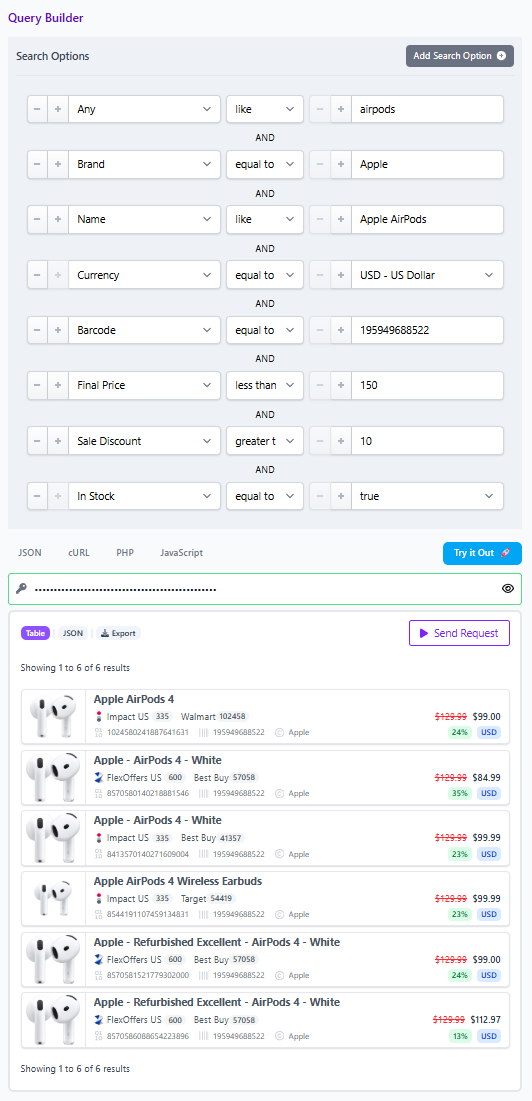
This structure keeps the data model honest. Brand normalization helps you find the right family of products. Identifier matching helps you prove sameness.
Use identifiers before trusting titles
The strongest normalization signal is usually a structured identifier. Barcodes such as UPC, EAN, GTIN, and ISBN can connect identical products across merchants even when titles and descriptions diverge. MPN and SKU can help identify exact models, though SKU may be merchant specific.
A practical example: your team finds a high converting countertop appliance at one merchant. The title includes brand, wattage, color, and a promotional phrase. Instead of searching the full title across every network, search by barcode first. Then layer brand, merchant, final price, discount, currency, and in stock status to understand the real market for that exact product.
This matters because the best affiliate decision is often downstream of identity. You cannot compare final price or availability until you know the offers are attached to the same product.
Normalize brand names without overfitting
Brand normalization should reduce harmless variation without erasing meaningful distinctions. “Nike Inc.” and “Nike” should resolve to the same brand intent. But “The North Face” and “North Face inspired” should not be treated as equivalent simply because the tokens overlap.
For non technical teams, a useful rule is: normalize brand for recall, then validate product identity with identifiers and attributes.
Brand normalization checklist
- Remove corporate suffixes when they do not affect shopper meaning
- Standardize casing and punctuation
- Preserve legally or commercially meaningful brand terms
- Check manufacturer, brand, and merchant fields when the seller is also the brand
- Pair brand with category, model, color, size, or gender when variants matter
This gives editors broader discovery without inviting loose matching.
Normalize product names for discovery, not proof
Product names are excellent for exploration. They are weak evidence for exact matching.
Use the “any” field when you do not know where a merchant placed relevant language. It can search across multiple fields, making it useful for early discovery. Then narrow with brand, category, merchant, price, discount, stock, and attributes until the result set reflects the editorial intent.
For example, a commerce editor building a “best carry on luggage deals” module might start with "any like carry on luggage", then filter by currency, in stock status, on sale status, sale discount, and merchant approval list. If the module shifts from discovery to exact comparison, the editor should move to barcode or MPN matching.
Deduplicate according to the user experience
Deduplication is not always good or bad. It is a presentation choice.
Turn deduplication on when the page should show product variety. A buying guide does not need five visually identical versions of the same headphones scattered through the list.
Turn deduplication off when the page should show offer variety. A price comparison widget should preserve multiple merchant listings so the user can evaluate final price, discount, stock, currency, and merchant preference.
The best operators decide this before building the query. Product variety and offer variety are different jobs.
Mini workflow: from messy list to usable comparison set
Imagine a data ops lead receives a mixed list of running shoes from several merchants. Titles vary, brand fields are inconsistent, and some rows contain discount language in the name.
Step 1: Start broad
Search with the any field for the core product phrase. Include brand when known, but avoid relying on brand alone.
Step 2: Layer commercial filters
Filter by currency, in stock status, final price range, and sale discount if the page is deal oriented. Add merchant ID or network ID if the team only wants approved or strategic partners.
Step 3: Validate identity
For exact comparisons, use barcode, GTIN, UPC, MPN, SKU, or ASIN where available. Affiliate.com can also support Amazon ASIN and barcode based matching workflows for finding the same product at alternative merchants.
Step 4: Choose deduplication
Use deduplication for clean product discovery. Disable it when the output should show multiple merchants selling the same item.
Step 5: Share the result
Use the Query Builder to create a shareable query link or Comparison Set so editorial, partnerships, and data teams can review the same normalized product universe.
Decision criteria for advanced teams
Use brand normalization when the question is, “Which products from this maker should we consider?”
Use product name normalization when the question is, “What should we discover around this shopper intent?”
Use identifier matching when the question is, “Is this the same product?”
Use layered filters when the question is, “Which offers deserve placement?”
That hierarchy prevents a common affiliate mistake: asking titles to do the work of identifiers. Titles help humans browse. Identifiers help systems compare. Filters help teams make commercial decisions.
Build cleaner affiliate operations around normalized data
The reward for normalizing brand and product names is not merely cleaner spreadsheets. It is sharper product discovery, fewer duplicate recommendations, better merchant coverage, and more credible comparison experiences.
Start in the Affiliate.com Query Builder when you need a visual workflow. Move to the Product Search API when the process needs to scale across templates, deal modules, product pages, or internal tools. In both cases, verify price and availability in the live experience before publishing because product data refreshes from networks and merchants over time.